
Teachable Vs Thinkific LMS Platform Comparison: Ultimate Guide
Teachable Vs Thinkific Lms Platform Comparison
Online learning has changed education for good. Today, anyone can create a course, share their skills, and earn money. But picking the right LMS platform is not easy. Two names stand out: Teachable and Thinkific. Both are popular, powerful, and used by thousands of creators worldwide. Still, their features, pricing, and user experience are not the same. If you want to build and sell courses online, this comparison will help you make a confident choice.
I’ve spent years advising creators and businesses about LMS platforms. In this article, I’ll break down Teachable vs Thinkific—using data, real-life examples, and practical insights. You’ll learn what makes each platform special, where they fall short, and which one fits your goals best.
Whether you’re a solo teacher or a business with big plans, you’ll find clear answers here.
Platform Overview: What Are Teachable And Thinkific?
Teachable and Thinkific are both cloud-based LMS platforms. They let you build online courses, host content, enroll students, and manage payments. Each platform handles the technical parts, so you can focus on teaching.
Teachable launched in 2014 and quickly became a favorite for course creators. It’s known for a user-friendly interface and strong marketing tools.
Thinkific started in 2012, focusing on flexibility and customization. It appeals to educators who want more control over their course design and student experience.
Both platforms support:
- Video, audio, and text lessons
- Quizzes and assignments
- Certificates for students
- Payment processing
- Student analytics
But each has unique strengths and weaknesses. Let’s look deeper.
Pricing Models: Cost, Value, And Hidden Fees
Choosing an LMS is not just about features. Price matters, especially for beginners. Here’s how Teachable and Thinkific compare on costs.
| Plan | Teachable | Thinkific |
|---|---|---|
| Free | Yes (limited features, 1 course) | Yes (limited features, 1 course) |
| Basic | $39/month + 5% transaction fee | $49/month, no transaction fee |
| Pro | $119/month, no transaction fee | $99/month, no transaction fee |
| Premium | $499/month, advanced features | $499/month, advanced features |
Key insights:
- Teachable’s Basic plan is cheaper, but charges a transaction fee (5% per sale).
- Thinkific’s Basic plan costs more, but you keep all your earnings—no transaction fees.
- Both platforms offer a free plan for testing. However, features are limited and branding from the platform stays visible.
Non-obvious tip: If you plan to sell high-priced courses or expect many sales, Thinkific’s no-fee model can save you thousands per year. Teachable’s transaction fees add up fast.
Both platforms offer annual billing discounts—usually two months free. But be careful: upgrading or downgrading plans mid-year can get tricky.
Course Creation & Content Management
Building courses should be simple, but also flexible. Here’s how each platform handles the process.
Teachable: Ease And Speed
Teachable’s course builder is designed for beginners. You can:
- Drag and drop videos, PDFs, and quizzes
- Organize lessons into sections
- Set drip schedules (release content over time)
- Add course completion certificates
Uploading content is fast. The editor is clean and guides you step-by-step. You can preview your course as a student.
But customization is limited. You can change colors and logo, but deeper design changes need coding (HTML/CSS). This can be hard for non-tech users.
Practical insight: If you want to launch a course quickly, Teachable is excellent. But if you want a unique look or advanced lesson structures, you may feel restricted.
Thinkific: Flexibility And Control
Thinkific gives you more control. Features include:
- Drag-and-drop builder
- Customizable course templates
- Support for surveys and assignments
- Multiple instructor support
You can adjust lesson layouts, add downloadable files, and embed third-party tools (like Google Docs). Branding can be changed more easily—logos, colors, even custom domains.
Advanced users can tweak themes or use their own CSS. But the builder is still easy for beginners.
Non-obvious insight: Thinkific’s multi-instructor support is a hidden gem. If you want to run a school with several teachers, Thinkific is more flexible.
Student Experience: Learning, Engagement, And Support
Your students’ experience will affect reviews, sales, and repeat business. Let’s compare student dashboards, engagement tools, and support.
Dashboard And Navigation
Both platforms offer a clean, mobile-friendly student area. Students can:
- See their progress
- Resume where they left off
- Download materials
Teachable’s dashboard is simple, but some users say the navigation feels basic. Thinkific’s dashboard offers more customization—schools can add banners, links, or extra resources.
Engagement Tools
Both platforms include quizzes, completion certificates, and course communities. But there are differences:
- Teachable has simple quizzes (multiple choice only), no discussion forums.
- Thinkific offers richer quizzes (multiple choice, short answer, surveys) and discussion forums inside courses.
You can set up course communities with Thinkific, encouraging student-to-student interaction.
Example: An English teacher using Thinkific can ask students to submit essays, join forum discussions, and take quizzes—all inside the platform.
Student Support
Teachable handles student support through email and a help center. Thinkific offers email support, live chat (for paid plans), and more in-depth guides.
Non-obvious tip: Thinkific’s live chat is useful for urgent issues. Teachable’s response times can be slower, especially for free users.
Sales, Marketing, And Payment Options
Selling courses online means you need strong marketing tools and payment solutions. Here’s how Teachable and Thinkific compare.
Payment Processing
Both platforms support Stripe and PayPal for payments. You can sell in multiple currencies.
Teachable manages payouts automatically (US-based creators get daily payouts). International creators may face delays (up to 30 days). Thinkific lets you connect directly to your Stripe or PayPal account, so you control payouts.
Important difference: Teachable collects EU VAT automatically. Thinkific requires manual setup for VAT, which can be tricky for European sellers.
Marketing Features
Teachable offers:
- Built-in sales pages
- One-click upsells
- Affiliate marketing tools
- Coupon codes
Thinkific includes:
- Custom sales pages
- Bundled courses
- Affiliate marketing tools (paid plans)
- Free trials and first-lesson previews
Both platforms integrate with email tools like MailChimp, ConvertKit, and ActiveCampaign.
Hidden insight: Teachable’s one-click upsell feature is powerful for boosting sales. If you want to offer extra courses or coaching after a purchase, this can increase revenue.
Analytics And Tracking
Teachable has simple analytics—sales, student progress, revenue. Thinkific offers deeper reporting, including:
- Course completion rates
- Quiz scores
- Student engagement
Thinkific also lets you export data to Excel/CSV for custom analysis.
Example: A school manager can track which lessons students struggle with and adjust content.
Design And Customization
Course creators want their platform to reflect their brand. Let’s see how Teachable and Thinkific handle design.
Teachable: Basic Customization
Teachable lets you:
- Change logo, colors, and fonts
- Add custom domain
- Edit sales pages
But most course pages look similar. Advanced design needs coding.
Limitation: If you want a unique website or highly branded pages, Teachable is not as flexible.
Thinkific: Advanced Customization
Thinkific offers:
- Custom themes
- Theme editor (change layout, colors, fonts)
- Custom domains
- Full access to HTML/CSS for paid plans
You can build a unique site that matches your brand. Many users create full schools with blogs, landing pages, and resource sections.
Non-obvious tip: Thinkific’s theme editor allows for easy changes without coding. If you want to refresh your site every year, this is a big advantage.

Credit: swarmify.com
Integrations And Add-ons
No LMS platform does everything alone. Integrations help you connect with other tools—email, marketing, analytics, and more.
| Integration Type | Teachable | Thinkific |
|---|---|---|
| Email Marketing | MailChimp, ConvertKit, ActiveCampaign | MailChimp, ConvertKit, ActiveCampaign |
| Zapier (Automations) | Yes | Yes |
| Webinars | Zoom (via Zapier) | Zoom, WebinarJam (direct) |
| Analytics | Google Analytics, Facebook Pixel | Google Analytics, Facebook Pixel, Mixpanel |
| Membership Tools | Limited | More robust |
Both platforms support Zapier, letting you automate tasks like adding students to mailing lists.
Thinkific has more direct integrations, especially for webinars and membership sites.
Practical tip: If you plan to host live classes or run a membership site, Thinkific’s integrations make setup easier.
Customer Support And Community
When you run an online course, you’ll need help sometimes. Good support makes a big difference.
Teachable Support
- Email support for all users
- Live chat for Pro/Premium users
- Help center with guides and tutorials
Response times vary. Free users may wait longer. Teachable has a user community, but it’s less active than Thinkific.
Thinkific Support
- Email support for all users
- Live chat (weekday business hours)
- Extensive knowledge base
- Active Facebook community
Thinkific’s community is helpful for troubleshooting and sharing best practices.
Hidden insight: Thinkific’s Facebook group is a goldmine for tips and networking. Many course creators find solutions faster there than through official support.
Security, Reliability, And Compliance
Security and reliability are essential, especially if you handle payments and student data.
Both platforms offer:
- SSL encryption
- GDPR compliance
- Regular backups
- 99%+ uptime
Teachable manages all payments on their servers, reducing your risk. Thinkific lets you control payment accounts, so you’re responsible for security.
Non-obvious tip: If you need HIPAA compliance (for health courses), neither platform offers this out of the box. You’ll need extra steps or third-party solutions.
Who Should Use Teachable?
Teachable is best for:
- Solo course creators
- Beginners who want a fast, easy setup
- Teachers who focus on video courses
- Creators who want built-in marketing tools
It’s also ideal for those who prefer not to handle technical settings. If you want to launch quickly and don’t need deep customization, Teachable is a strong choice.
Who Should Use Thinkific?
Thinkific is best for:
- Schools or businesses with multiple instructors
- Creators who want custom branding
- Teachers who use quizzes, assignments, and forums
- Businesses building membership sites
If you want flexibility, more integrations, and control over payments, Thinkific is a better fit. It’s also good for those who plan to scale up or run several courses.
Real-life Examples And Case Studies
Let’s look at real-world examples to see how each platform performs.
Teachable Success Story
Sarah, a yoga instructor, used Teachable to launch her online course. She created video lessons, set up a sales page, and started selling within a week. Teachable’s simple builder and upsell tools helped her earn $10,000 in the first month.
Sarah didn’t need custom branding or advanced quizzes. She focused on video content and used Teachable’s marketing features.
Thinkific Success Story
John, a language school manager, wanted to host courses with multiple teachers. He built a branded site on Thinkific, added discussion forums, and tracked student progress. Thinkific’s multi-instructor support and rich analytics helped him grow to 500 students in six months.
John also integrated Zoom for live classes. His team managed payments directly, avoiding transaction fees.
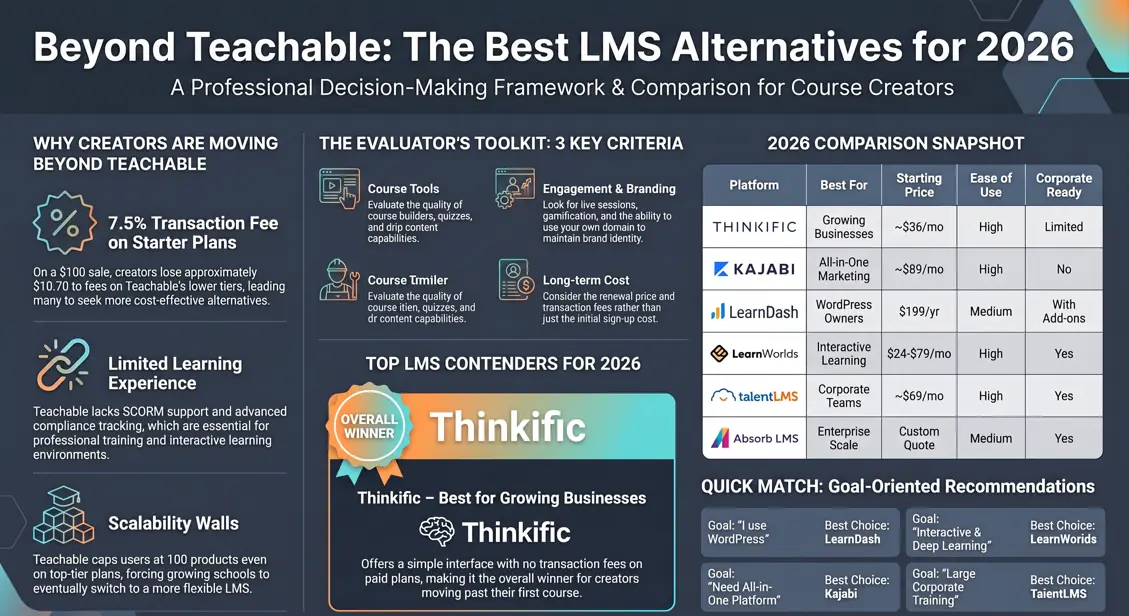
Non-obvious insight: Many creators start with Teachable, then switch to Thinkific as their needs grow. Migrating content is possible, but can be time-consuming.
Credit: theeduassist.com
Feature Comparison Table
Here’s a summary of key features:
| Feature | Teachable | Thinkific |
|---|---|---|
| Ease of Use | Very easy | Easy, more flexible |
| Customization | Basic | Advanced |
| Multi-instructor | Limited | Full support |
| Quizzes/Assignments | Simple quizzes | Advanced quizzes, assignments |
| Community Features | None | Discussion forums |
| Payment Processing | Managed by platform | Direct to creator |
| Transaction Fees | 5% (Basic plan) | None |
| Integrations | Limited | Extensive |
| Student Analytics | Basic | Advanced |
| Support | Email, chat (higher plans) | Email, chat, active community |
Common Mistakes When Choosing An Lms Platform
Many beginners make costly mistakes when picking their LMS. Here are some to avoid:
- Ignoring transaction fees: Small fees add up over time. Calculate your expected sales before choosing a plan.
- Overlooking branding needs: If you want a unique look, don’t settle for basic customization.
- Missing community features: Student interaction can boost engagement and completion rates.
- Not considering payment delays: Teachable’s payout delays can affect cash flow, especially for international creators.
- Skipping analytics: Tracking student progress helps improve your courses. Choose a platform with detailed analytics.

Credit: www.vdocipher.com
Which Platform Is Best For You?
There is no single “best” platform. Your choice depends on your goals, budget, and technical skills.
- For fast setup and built-in marketing, Teachable is ideal.
- For flexibility, advanced features, and growth, Thinkific stands out.
If you’re unsure, try both free plans. Build a test course, check the interface, and see which feels right.
Remember, switching platforms later is possible, but can be hard. Making the right choice now saves time and money.
Frequently Asked Questions
Is There A Limit To How Many Courses I Can Create?
Both Teachable and Thinkific allow unlimited courses on paid plans. Free plans limit you to one course. If you plan to grow your business, start with a paid plan.
Can I Migrate My Courses From Teachable To Thinkific Or Vice Versa?
Yes, migration is possible. You’ll need to export your content (videos, files, quizzes) and rebuild courses on the new platform. Some third-party services can help, but migration takes time.
Do Both Platforms Support Languages Other Than English?
Teachable supports multiple languages for course content, but the admin dashboard is English-only. Thinkific offers more language support, including French, Spanish, and German for both courses and dashboard.
How Do Refunds And Chargebacks Work?
Teachable manages refunds for you. You can set refund policies and process requests inside the platform. Thinkific lets you handle refunds directly through Stripe or PayPal. Chargebacks follow payment processor rules.
Which Platform Is Better For Live Classes?
Thinkific integrates directly with Zoom and other webinar tools. Teachable supports Zoom via Zapier, but setup is more complex. For live teaching, Thinkific is easier and more reliable.
For more details and industry comparisons, you can check the PCMag LMS Guide.
Choosing the right LMS platform is a big decision. Take your time, test features, and pick what fits your teaching style and business goals. Both Teachable and Thinkific offer powerful tools—your success depends on how you use them.

About author









Add comment