
Decktopus Ai Presentation Tool Comparison: Best Features Reviewed
Creating a powerful presentation today is much different than it was just a few years ago. The rise of AI-powered presentation tools has changed the way people design, structure, and deliver their slides. Among these tools, Decktopus AI stands out for its promise to make presentations fast, beautiful, and easy—even for those with little design experience. But how does Decktopus really compare to other popular AI presentation platforms? If you’re searching for the best way to create professional slides without wasting hours, this in-depth comparison will guide you through the strengths and weaknesses of Decktopus AI and its main competitors.
Here, you’ll find everything you need to make an informed choice: side-by-side comparisons, real user insights, practical tips, and a clear look at what makes each AI presentation tool unique. If you’re a student, business professional, teacher, or startup founder, this guide is designed to help you select the right tool for your needs.
What Is Decktopus Ai?
Decktopus AI is an online tool that uses artificial intelligence to help users build presentations quickly. You type your topic, and Decktopus generates slides, images, and even suggested talking points. The platform aims to make creating presentations as simple as possible—no design skills needed.
Decktopus’s core features include:
- AI-powered slide creation: Enter a topic, and the tool suggests layout, text, and images.
- Template library: Dozens of modern, professional templates.
- Automatic formatting: The AI arranges elements for visual balance.
- Image suggestions: Built-in royalty-free image search and AI-generated visuals.
- Collaboration tools: Share and edit presentations with your team.
- Export options: Download as PDF, PPTX, or share online.
Decktopus AI targets people who need to create professional presentations quickly, without hiring a designer or learning advanced software.
How Do Ai Presentation Tools Work?
AI presentation tools use machine learning and natural language processing to turn ideas or basic outlines into full presentations. Most tools follow a similar flow:
- You enter a topic or outline.
- The AI suggests a slide structure, main points, and sometimes even speaker notes.
- The system picks images or recommends visual elements.
- You review and customize the slides as needed.
This process cuts down the time needed to make a presentation from hours to minutes. Some advanced platforms, like Decktopus, go further by offering audience engagement features, automatic branding, and real-time collaboration.
Why Compare Decktopus Ai To Other Tools?
Choosing a presentation platform matters. The right tool can save time, boost your confidence, and help you impress your audience. But each AI tool has strengths and weaknesses. For example, some offer more design freedom, while others focus on speed or team features.
A direct comparison helps you see where Decktopus shines and where it may fall short. By understanding these differences, you’ll avoid common mistakes—such as choosing a tool with limited export options or one that doesn’t support your company’s branding.
Main Competitors: Who’s Competing With Decktopus Ai?
Decktopus AI’s biggest rivals include:
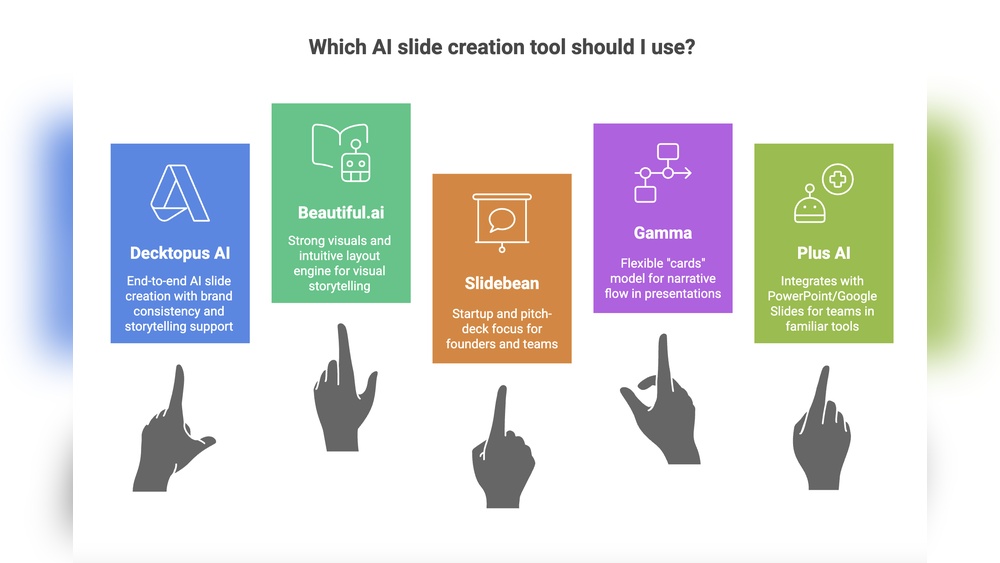
- Beautiful.ai
- Tome
- Gamma
- Canva Presentations (with AI magic)
- Visme
- Slidesgo
- Pitch
- Zoho Show
Each of these tools offers AI-driven features, but their approaches and strengths differ. In the following sections, you’ll see how Decktopus compares across key factors like speed, design, customization, and pricing.
Decktopus Ai Vs. Other Tools: Key Features Compared
To make things clear, here’s a head-to-head look at how Decktopus stacks up against its main rivals.
| Feature | Decktopus AI | Beautiful.ai | Tome | Canva Presentations | Gamma |
|---|---|---|---|---|---|
| AI Content Generation | Yes (topic to slides) | Yes (AI designer) | Yes (text-to-slide) | Yes (Magic Write) | Yes (AI outline & visuals) |
| Template Library | Modern, limited | Large, varied | Minimal | Extensive | Modern, limited |
| Image Suggestions | Built-in & AI | Stock images | Stock images | Stock & AI | Some stock |
| Export Options | PDF, PPTX, online | PDF, PPTX | Web, PDF | PPTX, PDF, web | PDF, web |
| Team Collaboration | Yes | Yes | Yes | Yes | Yes |
| Branding Tools | Basic | Advanced | Minimal | Strong | Basic |
Creating A Presentation: Step-by-step Comparison
Let’s see how the process of making a presentation differs across platforms.
Decktopus Ai
- Type your topic (e.g., “Benefits of Remote Work”).
- The AI generates a presentation outline and fills slides with content.
- You review the slides, edit text, and swap images if needed.
- Pick a template. The design adjusts automatically.
- Add speaker notes, embed multimedia, or invite others to edit.
- Export or share the final deck.
Tip: Decktopus’s biggest advantage is speed. You can have a 10-slide deck in under 5 minutes.
Beautiful.ai
- Choose a template or start from scratch.
- The AI design assistant suggests layouts as you add content.
- Add charts, timelines, or infographics with smart formatting.
- Refine the design. The tool keeps slides consistent.
- Export or present online.
Insight: Beautiful.ai offers more control over design details, which is good for advanced users but can slow down the process.
Tome
- Enter your topic or paste an outline.
- AI generates slides with text and images.
- Customize slides with blocks (text, images, video).
- Present directly from the web or export as PDF.
Note: Tome shines for storytelling and web-native presentations but has fewer templates.
Canva Presentations
- Pick a template (thousands available).
- Use Magic Write (AI text generator) to fill slides.
- Drag and drop images, charts, and elements.
- Collaborate in real time.
- Download or present online.
Secret: Canva’s real strength is design freedom. If you want to match a specific brand or visual style, Canva is hard to beat.
Gamma
- Input a topic.
- AI creates an outline and slide content.
- Edit slides, rearrange sections, and add visuals.
- Share a live web link or export as PDF.
Unique Point: Gamma is focused on quick, web-based presentations and interactive features.
Customization And Design Flexibility
How much can you customize your slides? This is where major differences appear.
- Decktopus AI: Offers a good selection of templates and some color/font tweaks. However, design choices are more limited to keep the process simple. This means your slides look clean and consistent, but you can’t move elements freely like in PowerPoint or Canva.
- Beautiful.ai: Allows more detailed customization. You can adjust layouts, colors, and animations. The AI keeps slides “on brand” and visually harmonious.
- Canva: Maximum flexibility. You can change almost every visual element, add animations, upload fonts, and build custom layouts.
- Tome and Gamma: Both focus on speed and simplicity. Customization is limited but enough for most business and educational needs.
Non-obvious Insight: If you need unique layouts or want to match strict brand guidelines, Canva or Beautiful.ai is better. If you value speed and ease, Decktopus or Gamma wins.
Templates And Visuals: How Do They Compare?
A strong template library helps you start fast and look professional.
- Decktopus AI: Offers dozens of clean, modern templates. Most are business-focused: pitches, reports, and educational decks.
- Beautiful.ai: Hundreds of templates, including timelines, charts, and infographics.
- Canva: Thousands of templates for every use case—business, education, marketing, and more.
- Tome & Gamma: Fewer templates, but they focus on clarity and storytelling.
Decktopus also includes AI-generated images and a built-in search for royalty-free visuals. This is valuable if you need to avoid copyright issues.
Content Generation: Quality And Usefulness
AI-generated content is the heart of these tools. But how good is the output?
Decktopus AI produces clear, relevant slide content. Its suggestions are usually short, to the point, and easy to understand. You’ll still need to review and personalize the material, but it’s a strong starting point.
Beautiful.ai and Tome also offer smart content generation, but sometimes the slides are more generic. Canva’s Magic Write can help brainstorm ideas, but you’ll need to guide it more.
Practical Example: When you enter “The Future of E-learning” into Decktopus, it creates an outline, fills in main points, and even suggests images. You can go from idea to basic deck in minutes.
Collaboration And Sharing
Working with others is now expected, even for presentations.
- Decktopus AI: Supports team editing. You can invite others, add comments, and manage versions. Present online or export.
- Beautiful.ai: Advanced collaboration with roles and permissions.
- Canva: Real-time team editing, comments, and workflow management.
- Tome & Gamma: Web-based sharing and simple team access.
Non-obvious Insight: Decktopus’s online sharing links are especially useful for remote teams or when presenting to clients. You don’t need to send large files—just share a link.

Credit: max-productive.ai
Pricing: What Does It Cost?
Price is a big factor—especially for students, startups, and small businesses. Here’s a quick comparison of the most popular plans as of early 2026:
| Tool | Free Plan | Paid Plans (per month) | Export Options |
|---|---|---|---|
| Decktopus AI | Yes (limited) | $9–$36 | PDF, PPTX, online |
| Beautiful.ai | Yes (watermarked) | $12–$50 | PDF, PPTX |
| Tome | Yes | $10–$20 | Web, PDF |
| Canva | Yes | $13–$30 | PPTX, PDF, web |
| Gamma | Yes | $10–$25 | PDF, web |
Note: Prices may change and often depend on team size and features.
Real-world Use Cases: Who Should Choose Decktopus Ai?
Decktopus AI is ideal for:
- Business Professionals: Need to pitch ideas, report to management, or share project updates—fast.
- Educators: Create lessons or training decks quickly, with clear visuals.
- Startups: Prepare investor presentations or market research decks.
- Students: Make class presentations with minimal effort.
Decktopus is less suited for users who want deep design control or need complex animations. If branding and unique layouts are essential, Canva or Beautiful. ai may be a better fit.
Pros And Cons: Decktopus Ai At A Glance
Pros:
- Extremely fast—presentation in minutes.
- Simple, modern designs.
- AI-generated content and visuals.
- Easy sharing and team collaboration.
- Affordable pricing tiers.
Cons:
- Limited advanced design options.
- Fewer templates compared to Canva.
- Customization is basic.
- Some features (like advanced branding) require higher-tier plans.
Common Mistakes When Choosing An Ai Presentation Tool
Many users pick a tool based only on price or popularity. Here are mistakes to avoid:
- Not checking export options: Some tools only let you share online or as PDF, not PowerPoint.
- Overlooking branding needs: If you need to match company colors or fonts, check customization features first.
- Ignoring collaboration tools: Team editing is vital for business and education.
- Assuming all AI content is accurate: Always review and adjust auto-generated text.
- Choosing based on the template count alone: More templates are not always better. Focus on quality and relevance.
Pro Tip: Try the free version of several tools before committing. Each platform feels different, and the “best” one depends on your workflow.
User Experience And Learning Curve
Most AI presentation tools are built for speed and simplicity, but their interfaces vary.
- Decktopus AI: The interface is clean, with tooltips and a guided process. Even first-time users can make a deck in minutes.
- Beautiful.ai: More features, so the interface is busier. Takes longer to master, but rewards advanced users.
- Canva: Flexible, but the huge feature set can overwhelm beginners.
- Tome & Gamma: Minimalist design, focused on fast results.
Non-obvious Insight: Decktopus’s simplicity means you may sometimes wish for more control. But for most users, less choice means less time wasted.
Ai Presentation Tools For Teams
If you’re creating presentations with a group, team features matter:
- Decktopus AI: Good for small teams; easy sharing, basic permissions.
- Beautiful.ai: Advanced team tools; brand kit, analytics, user roles.
- Canva: Comprehensive team workspace; template locking, approval workflows.
- Tome & Gamma: Best for fast, informal collaboration.
Larger organizations should consider platforms with robust branding and admin controls.
Credit: max-productive.ai
Security, Privacy, And Support
Before uploading sensitive data, check the platform’s privacy policy and support options.
- Decktopus AI: Uses secure cloud hosting. Privacy and GDPR compliance are outlined on their site. Email and live chat support.
- Other tools: Most major platforms offer similar security, but always check for SOC 2 compliance if handling confidential data.
Insider Tip: For high-security presentations (e.g., confidential business data), export slides as PDF and share offline when possible.
How Decktopus Ai Handles Multimedia
Presentations are more engaging with video, audio, and interactive elements.
- Decktopus AI: Supports embedding YouTube videos, GIFs, and clickable links.
- Canva: Allows video uploads, audio tracks, and animated elements.
- Beautiful.ai: Limited multimedia; focused on static slides.
- Tome & Gamma: Strong support for web-native media.
If you need advanced multimedia, Canva or Tome is stronger—but Decktopus is fine for basic video and web embeds.
Customer Support And Community
Getting help when you’re stuck is important.
- Decktopus AI: Offers tutorials, a help center, and responsive email support.
- Canva: Massive help library, live chat, and a large user forum.
- Beautiful.ai: Help center and priority support for premium users.
- Tome & Gamma: Smaller communities, but direct support channels.
Real-World Example: Decktopus’s onboarding emails walk you through your first project, making it easier for beginners to get started.
Decktopus Ai: Unique Features That Stand Out
While many features overlap across tools, Decktopus offers a few unique strengths:
- AI-generated speaker notes: Get suggested talking points for each slide.
- Automatic Q&A slide: The AI can add a “Questions?” slide at the end, so you never forget.
- Linked forms: Add feedback forms or surveys right inside your presentation.
- Voice recording: Record and embed narration directly.
These details make Decktopus more than just a slide generator—it’s a complete presentation toolkit.
Future Trends: Where Is Ai Presentation Tech Heading?
AI presentation tools are evolving fast. Here’s what’s coming next:
- Deeper integration with video and live streaming.
- Automatic translation and localization for global teams.
- Voice-to-slide creation: Speak your outline, get a deck.
- Personalized design suggestions based on audience or context.
Decktopus and its rivals are already testing these features. Staying updated will help you leverage new tools as they appear.
When Should You Not Use Decktopus Ai?
Decktopus is not right for everyone. It’s not ideal if:
- You need to build highly customized designs from scratch.
- You require advanced animation or transitions.
- Your company enforces very strict branding rules.
- You need to present offline with complex embedded media.
In these cases, traditional tools like PowerPoint, Keynote, or advanced Canva features may be better.
How To Decide: Simple Selection Guide
Here’s a quick guide to help you choose:
- Speed is your top priority: Decktopus AI or Gamma.
- Need full design freedom: Canva or Beautiful.ai.
- Storytelling and web-native decks: Tome.
- Large teams and brand control: Beautiful.ai or Canva.
- Students and educators: Decktopus (easy and affordable).
Final Insight: No tool is perfect for every use case. Focus on your most important needs—speed, design, branding, or team work.
Frequently Asked Questions
What Makes Decktopus Ai Different From Other Ai Presentation Tools?
Decktopus AI stands out for its speed and simplicity. It generates a complete presentation from just a topic or outline, making it ideal for users who want a quick, polished result. Features like AI-generated speaker notes and built-in forms add extra value.
Can I Use Decktopus Ai For Free?
Yes, Decktopus offers a free plan with limited features. You can create and share presentations, but some templates and export options are reserved for paid plans. This is similar to most competitors, though the free tier is quite generous for basic needs.
Is Decktopus Ai Suitable For Large Companies?
Decktopus works well for small teams and startups. However, for large organizations needing advanced branding, user roles, or analytics, tools like Beautiful.ai or Canva may offer more enterprise-focused features.
How Accurate Is The Ai-generated Content In Decktopus?
The AI does a good job generating clear, simple slide content and structure. But always review and edit—AI can miss context or make generic statements. Personalizing your slides ensures they fit your unique message and audience.
Where Can I Learn More About Ai Presentation Tools?
For further reading on AI in presentations, check out this Wikipedia overview of presentation software. It covers the history, types, and modern trends in this fast-changing field.
Choosing the right AI presentation tool can transform the way you communicate ideas. Whether you pick Decktopus AI for speed or another platform for deeper design, this new generation of tools makes creating stunning presentations easier than ever. Take the time to try a few options, and you’ll find the perfect match for your style and workflow.

Credit: www.decktopus.com


About author









Add comment