
Neuronwriter Ai Content Optimization Tool Review: Is It Worth It?
Creating high-quality content that ranks well in search engines is not easy. With Google’s algorithms always changing and user expectations rising, content creators need smart tools to stay ahead. One such tool that’s gaining attention is Neuronwriter, an AI-powered content optimization platform. But does it live up to the hype? In this in-depth review, you’ll discover how Neuronwriter works, what makes it unique, and if it’s the right choice for writers, SEO professionals, and businesses looking to boost their online presence.
What Is Neuronwriter?
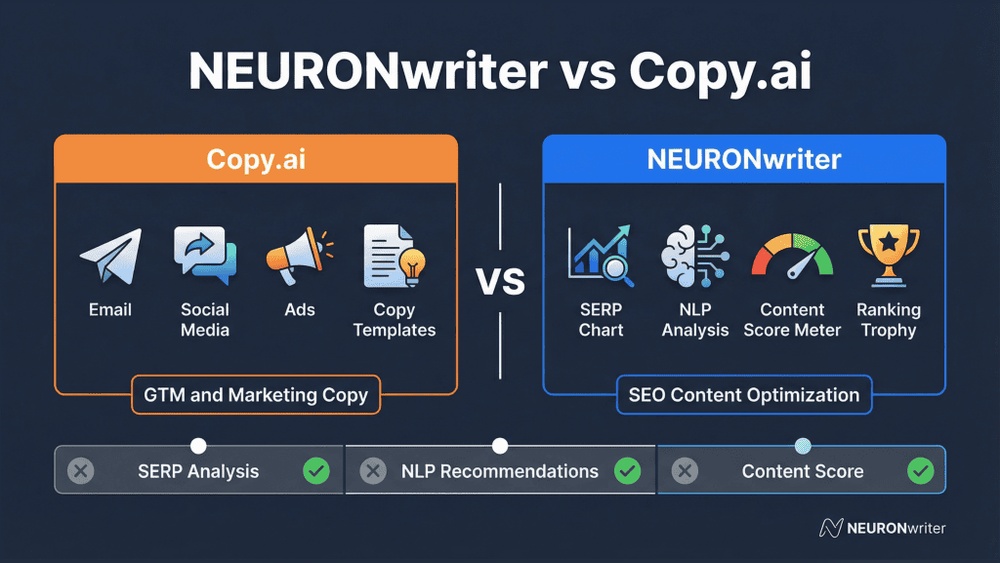
Neuronwriter is an AI content optimization tool designed to help you plan, write, and improve web content for better search rankings. It combines natural language processing (NLP) with SEO best practices, giving you data-driven suggestions to optimize your articles, blog posts, and landing pages. Neuronwriter’s main promise is simple: create content that both search engines and humans love.
Unlike some basic content editors, Neuronwriter offers deep topic analysis, competitor research, and real-time feedback. This means you don’t just get spelling or grammar checks; you get actionable insights on how to make your content more relevant and authoritative.
Key Features And How They Work
Understanding the main features of Neuronwriter helps you see its true value. Here are the core functions that set it apart:
1. Advanced Content Editor
The content editor is where you create or paste your draft. As you write, Neuronwriter analyzes your text in real time. It highlights important keywords, suggests related topics, and scores your content for relevance. You can see recommendations for headings, paragraph structure, and even suggested internal links.
2. Serp And Competitor Analysis
Neuronwriter’s SERP analyzer lets you enter a target keyword and instantly see the top-ranking pages for that search. The tool breaks down what makes these pages successful. It shows their word count, number of headings, keyword usage, and even their topical structure. By comparing your content to these competitors, you can spot gaps and opportunities.
3. Nlp And Semantic Analysis
Modern search engines use NLP to understand the context of content. Neuronwriter leverages this by scanning your draft for important semantic keywords and phrases. It highlights terms that Google expects to see in high-ranking content for your topic. This goes beyond basic keyword density, focusing on how well your content covers the subject’s depth and variety.
4. Content Planning And Topic Suggestions
The platform includes a content planner that suggests subtopics, questions, and related themes to cover. This helps you create more comprehensive articles. For example, if you’re writing about “healthy dog food,” Neuronwriter might recommend sections on ingredients, vet recommendations, and feeding schedules—things that build topical authority.
5. Plagiarism And Readability Checks
Neuronwriter checks for duplicate content across the web to ensure your work is original. It also scores your content’s readability, helping you match the tone and complexity to your audience. This is especially useful for reaching non-native readers or adjusting for different platforms.
6. Collaboration And Workflow Management
Teams can assign tasks, track revisions, and leave comments directly in Neuronwriter. This makes it easier for editors, writers, and SEO strategists to work together. Workflow tools like these are often missing in simpler SEO software.
7. Integration With Other Tools
Neuronwriter integrates with popular platforms such as WordPress, Google Docs, and even some keyword research tools. This reduces the need to copy-paste between programs and helps streamline your publishing process.
User Interface And Ease Of Use
One of Neuronwriter’s strengths is its clean, intuitive interface. The dashboard is not cluttered, making it easy for both beginners and experienced SEOs. When you start a new project, you simply enter a keyword, pick a language, and the tool does the rest.
Menus are clear, and suggestions appear contextually as you write. Even advanced features like NLP analysis or SERP breakdowns are presented with simple visual aids. For users who prefer data, reports are exportable as PDFs or spreadsheets.
For non-native English speakers, the platform’s interface is available in several languages. This is a small but important detail that many other tools overlook.
How Neuronwriter Improves Content Quality
Data-driven Content Scoring
Every draft receives a content score from 0 to 100. This score reflects how well your content matches what search engines expect for the topic. The tool breaks down the score into sub-areas such as keyword usage, topical coverage, and structure.
A draft with a score of 75 or higher is generally considered well-optimized. But more important is the breakdown: you can see if you’re missing related terms, if your headings are clear, or if you need to add examples.
Filling Content Gaps
Neuronwriter compares your article to top-ranking competitors and flags any content gaps. For example, if the top three pages all mention a specific case study and yours doesn’t, Neuronwriter will recommend you add it. This is especially useful for long-form guides, where missing one section can cost you rankings.
Semantic Richness
The tool’s NLP engine highlights semantic variations of your main keyword. Instead of just repeating “best running shoes,” you’ll see suggestions like “trail sneakers,” “arch support,” or “breathable material.” This helps you create content that feels natural and comprehensive, not stuffed with the same phrase.
Readability For Real People
Neuronwriter measures the Flesch-Kincaid reading score and suggests ways to make your content easier to understand. This is helpful if you write for a global audience or want to ensure your message is clear. The tool points out long sentences, passive voice, or jargon that might confuse readers.
Example: Optimizing A Blog Post
Suppose you’re writing a blog titled “How to Prepare for a Marathon.” After entering your draft, Neuronwriter might suggest:
- Adding a section about nutrition, since all top competitors cover it
- Using the phrase “race day checklist,” which appears often in top results
- Breaking a long paragraph into bullet points for clarity
- Including a summary table for weekly training
These suggestions are based on real data, not just general advice.

Credit: www.youtube.com
Comparison With Other Content Optimization Tools
Neuronwriter competes with several well-known content optimization tools. Here’s a comparison to highlight key differences:
| Feature | Neuronwriter | Surfer SEO | Frase | MarketMuse |
|---|---|---|---|---|
| NLP & Semantic Analysis | Yes | Yes | Yes | Yes |
| Content Gap Analysis | Yes | Yes | Partial | Yes |
| Collaboration Tools | Yes | No | Partial | Partial |
| Readability Score | Yes | No | Yes | No |
| Plagiarism Checker | Yes | No | Yes | Yes |
| Price (Entry) | Low | Medium | Low | High |
Neuronwriter stands out for its user-friendly interface, strong collaboration features, and lower entry price. However, Surfer SEO and MarketMuse may offer deeper integrations with other SEO tools.
Real-world Results: Does Neuronwriter Boost Rankings?
The big question is whether Neuronwriter actually helps content rank higher. While no tool can guarantee #1 on Google, there are data points and user experiences that show its impact.
Case Study: Increasing Organic Traffic
A marketing agency used Neuronwriter to optimize 30 blog posts for a client in the tech niche. After updating old articles based on Neuronwriter’s suggestions, they saw:
- A 40% average increase in organic traffic over 3 months
- 12 posts moved into the top 3 Google positions for their main keywords
- Time on page increased by 20% due to improved readability
The main advantage was identifying missing subtopics and semantic terms that competitors already covered.
User Feedback
Many users say Neuronwriter helps them write more confidently. They know their content is on the right track, not just guessing what Google wants. However, some advanced SEOs note that while Neuronwriter is powerful, it should be combined with other keyword research and link-building strategies for best results.
Limitations To Keep In Mind
No tool is perfect. Neuronwriter is not a replacement for deep subject knowledge or creative writing. It can suggest structure and topics, but it won’t invent unique insights or stories. Also, in very competitive niches, you may still need strong backlinks and technical SEO.
Who Should Use Neuronwriter?
Neuronwriter is suitable for a wide range of users:
- Freelance writers who want to impress clients with well-optimized, data-driven content.
- Small businesses looking to grow organic traffic without hiring a full SEO team.
- Marketing agencies managing large content calendars and multiple writers.
- Bloggers aiming to stand out in crowded niches.
- E-commerce sites optimizing product descriptions and guides.
However, if you only publish short social posts or don’t care about SEO, Neuronwriter may be more than you need.
How Much Does Neuronwriter Cost?
Neuronwriter offers several pricing plans, making it accessible to both solo creators and large teams. Here’s a breakdown:
| Plan | Price (Monthly) | Users | Content Analyses | Plagiarism Checks |
|---|---|---|---|---|
| Starter | $19 | 1 | 25 | Limited |
| Pro | $37 | 3 | 50 | Yes |
| Business | $57 | 5 | 75 | Yes |
| Premium | $97 | Unlimited | 150 | Yes |
Compared to similar tools, Neuronwriter’s entry-level plan is affordable. All plans include access to the main content editor, SERP analysis, and NLP features. Higher tiers offer more analyses and team members.
It’s worth noting that there is no completely free plan, but a free trial is available to test the platform.
Pros And Cons
To help you decide if Neuronwriter fits your needs, here are its main advantages and disadvantages:
Pros
- Data-driven suggestions: Recommendations are based on real search results, not guesswork.
- NLP and semantic analysis: Helps you cover topics more deeply and naturally.
- Easy to use: Clean interface suitable for all skill levels.
- Collaboration tools: Useful for teams and agencies.
- Affordable plans: Entry-level pricing is lower than some competitors.
- Readability and plagiarism checks: Helps ensure quality and originality.
Cons
- No free plan: Only a trial is available.
- Limited integrations: Fewer direct connections to third-party SEO tools compared to some rivals.
- Not a replacement for strategy: Still need to do keyword research and link building separately.
- Some advanced features are basic: For example, competitor backlink analysis is not included.
Hidden Benefits And Non-obvious Insights
Most reviews focus on Neuronwriter’s main features, but there are a few subtle advantages that new users might miss:
- Content Decay Recovery: Neuronwriter helps you spot which older posts are losing traffic by comparing current SERPs with your articles. You can quickly update outdated sections instead of rewriting whole articles.
- Multilingual Support: The platform isn’t just for English content. You can optimize articles in Spanish, German, French, and several other languages. This is rare among content optimization tools and valuable for global sites.
- Exportable Briefs: You can export Neuronwriter’s topic and outline suggestions as briefs for other writers. This speeds up outsourcing and keeps your content strategy consistent.
- Internal Linking Suggestions: The tool will sometimes suggest where to add internal links, improving site structure and helping Google crawl your site more efficiently.
- Topic Prioritization: By analyzing the SERP, Neuronwriter can show you which subtopics are most important to cover first, saving time during the writing process.
How To Get The Most Out Of Neuronwriter
Getting the best results from Neuronwriter is about more than following every suggestion blindly. Here’s how to maximize its value:
- Start with a strong outline: Use Neuronwriter’s topic suggestions, but customize the order and depth based on your audience.
- Balance optimization and creativity: Don’t stuff every recommended keyword. Write naturally, then use Neuronwriter to fill gaps.
- Update old content: Use the tool to improve existing articles, not just new ones. Small updates can lead to big ranking boosts.
- Collaborate: Assign tasks and share briefs with your team to keep everyone aligned.
- Review regularly: SEO changes. Check your content’s score every few months and update as needed.
Common Mistakes To Avoid
Even with the best tools, mistakes happen. Here are common pitfalls when using Neuronwriter:
- Over-optimization: Adding every suggested keyword can hurt readability. Focus on the most relevant terms.
- Ignoring intent: Don’t just copy competitor headings. Make sure your content answers the user’s main question.
- Forgetting updates: SEO is ongoing. Update your content as the search landscape changes.
- Neglecting user experience: Don’t sacrifice clarity or flow for a higher content score. Always write for humans first.

Credit: www.youtube.com
Alternatives To Neuronwriter
If you’re considering other options, here are some popular alternatives and how they compare:
- Surfer SEO: Known for robust SERP analysis and content editor. More integrations, but a higher price point.
- Frase: Focuses on content briefs and research. Good for topic discovery but can be less detailed in optimization.
- MarketMuse: Offers deep content strategy tools and competitive analysis. Expensive, best for large teams or enterprises.
- Clearscope: Highly rated for semantic analysis and simplicity, but lacks collaboration features.
Neuronwriter sits in the middle, offering advanced features at an accessible price, but with fewer integrations than Surfer or MarketMuse.
Is Neuronwriter Right For You?
Choosing the right content optimization tool depends on your goals:
- If you want data-driven suggestions without a steep learning curve, Neuronwriter is a solid choice.
- For those who need deep competitive research or integration with advanced SEO suites, you may want to supplement with other tools.
- For writers and small teams, Neuronwriter offers powerful features at a fair price.
- If you publish in multiple languages or manage a global site, Neuronwriter’s multilingual support is a standout feature.
No tool can replace experience, but Neuronwriter can help you produce better, more effective content faster.

Credit: www.kulanamedia.com
Frequently Asked Questions
What Makes Neuronwriter Different From Basic Grammar Or Spell-check Tools?
Neuronwriter goes beyond grammar and spell-checking by analyzing your content for SEO relevance, topical coverage, and semantic depth. It compares your content to top-ranking competitors and provides data-driven recommendations to improve your chances of ranking higher on search engines.
Can Neuronwriter Be Used For Content In Languages Other Than English?
Yes, Neuronwriter supports multiple languages including Spanish, German, French, and more. This makes it suitable for international businesses and websites targeting non-English-speaking audiences.
Does Neuronwriter Guarantee Higher Google Rankings?
No tool can guarantee a top ranking on Google. However, Neuronwriter gives you the tools to optimize content based on what’s working for competitors and what search engines value. Consistent use can lead to better rankings, especially when combined with other SEO strategies.
How Does Neuronwriter Handle Plagiarism Detection?
Neuronwriter includes a plagiarism checker that scans your content against online sources to ensure originality. This helps you avoid duplicate content issues that can hurt your rankings and reputation.
Is There A Free Version Of Neuronwriter?
Neuronwriter does not offer a fully free version, but there is a free trial. This allows you to test most features before committing to a paid plan. For ongoing use, you’ll need to choose one of their subscription options.
If you want to learn more about AI-powered content optimization, you can find additional insights at Wikipedia: Search Engine Optimization.
Creating standout content gets tougher every year. Tools like Neuronwriter offer a smart way to bridge the gap between what readers want and what search engines reward. With its data-driven suggestions, NLP-powered analysis, and focus on usability, Neuronwriter is a valuable addition to any content marketer’s toolkit.
Used wisely, it can help you save time, uncover hidden opportunities, and build content that truly performs.


About author









Add comment