
How to Clean Bulk Email Lists With Reoon Email Verifier Effectively
Keeping your email marketing lists clean is no longer optional—it’s essential for real business results. If you send emails to invalid addresses, you risk more than just wasted effort. Your sender reputation, deliverability, and even your ability to reach real customers can suffer. This is why smart marketers and business owners invest time and tools into email list cleaning. One tool that stands out for bulk verification is Reoon Email Verifier. But how do you actually clean a large email list with it, and why does it matter so much? Let’s break down every step, common pitfalls, and how to get the most out of your efforts.
Why Email List Cleaning Matters
Sending emails to bad addresses is like shouting into the void. But the real problems go deeper:
- High bounce rates: If too many emails bounce (fail to deliver), email providers may block you or send your emails to spam.
- Damage to sender reputation: ISPs track your sending habits. Too many invalid emails can label you as a spammer.
- Wasted resources: Every email you send costs money or time. Dead addresses bring zero return.
- Compliance and privacy: Regulations like GDPR and CAN-SPAM require list hygiene.
- Better engagement: A clean list means more real people see your message.
According to Statista, the average global email bounce rate in 2026 was around 0.7% for regular senders, but can be over 5% for neglected lists. Just a few percent higher can greatly impact your results.
What Is Reoon Email Verifier?
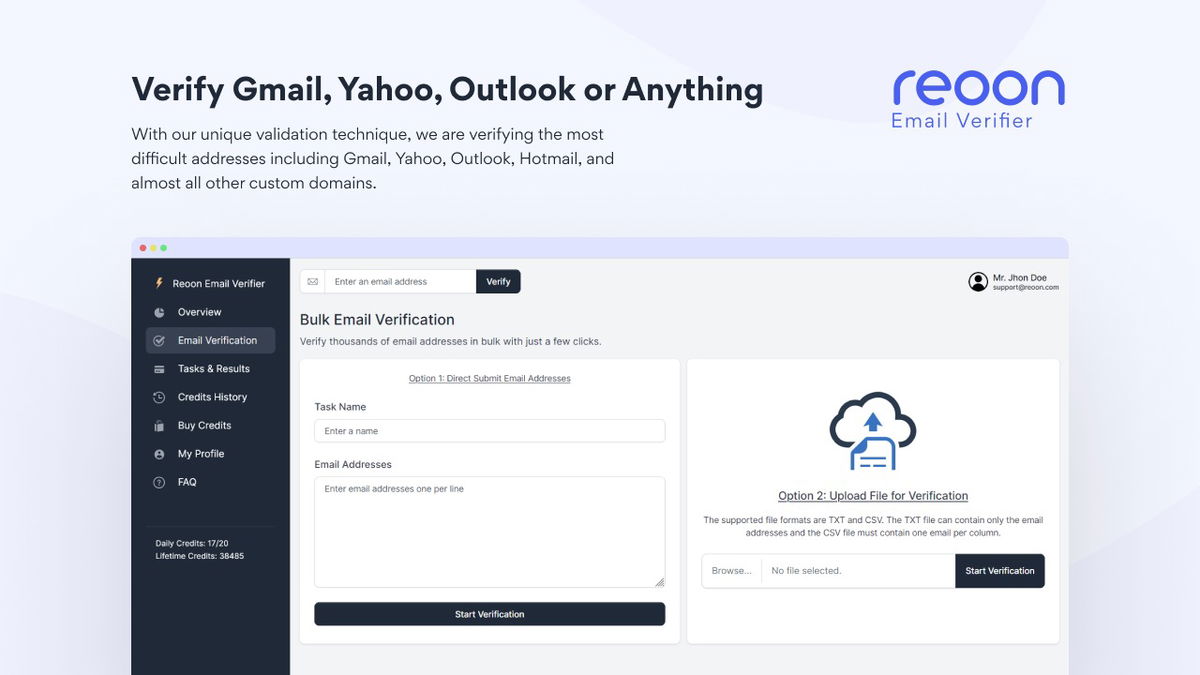
Reoon Email Verifier is a cloud-based platform designed for fast, accurate, and large-scale email list cleaning. It checks each email address through multiple steps—syntax, domain, mailbox existence, and more—without sending real emails. This makes it safe for use with any email list, large or small.
Key features include:
- Bulk file upload and processing
- Multiple verification steps
- API for automation
- User-friendly dashboard
- Fast processing even for large lists
- Detailed downloadable reports
Compared to manual checking or free tools, Reoon Email Verifier offers both speed and reliability. It’s trusted by marketers, agencies, and businesses who handle lists from a few hundred to millions of addresses.
Credit: appsumo.com
Understanding Email Verification: The Science Behind The Process
Before diving into how to use Reoon, it helps to understand what email verification actually does. Here’s a simple breakdown:
- Syntax check: Is the email address in a valid format? (example@domain.com)
- Domain check: Does the domain exist and can it receive emails?
- MX record check: Does the domain have mail servers set up?
- Mailbox check: Does the specific mailbox exist and is it active?
- Role-based address detection: Finds emails like info@ or sales@, which often don’t engage.
- Disposable email detection: Filters out temporary or one-time-use addresses.
- Catch-all domain detection: Flags domains that accept all emails, which can be risky.
Each step removes more risk and improves quality. But not every tool checks all these layers. Reoon’s multi-step process helps you avoid common mistakes—like thinking an address is valid just because it looks right.
Preparing Your Email List For Cleaning
To get the best results from Reoon Email Verifier, a little preparation goes a long way. Here’s what you should do before uploading your list:
- Consolidate your lists: Gather all your emails into one file, if possible.
- Remove obvious errors: Delete empty rows, duplicates, or addresses without “@”.
- Use a standard format: Excel (.xlsx) or CSV files work best.
- Avoid extra data: Only include the email column, or clearly label other columns.
A common mistake is uploading messy, unorganized data. This can slow down the process and make your results harder to interpret. Spending 10 minutes cleaning your file can save hours later.

Credit: sparkle.io
Step-by-step Guide: How To Clean Bulk Email Lists With Reoon Email Verifier
Ready to get started? Here’s how to use Reoon Email Verifier for bulk list cleaning, from signup to downloading your results.
1. Create An Account And Log In
- Go to the Reoon Email Verifier website.
- Register for a free or paid account, depending on your needs.
- Log in to access your dashboard.
Tip: Even on a free plan, you can test the process with a small list.
2. Prepare And Upload Your List
- Click on “Bulk Verification” or “Upload List.”
- Select your file (CSV or XLSX recommended).
- Map the correct column if you have other data (like names).
- Confirm upload.
Reoon will check the file’s structure and alert you to any errors before processing.
3. Configure Verification Settings
- Choose the verification speed (faster uses more credits).
- Select any special options (e.g., skip certain checks if needed).
- Confirm and start the process.
For most users, the default settings are best. But if you’re verifying very large lists, adjusting speed can help balance time and cost.
4. Wait For Processing
- The dashboard will show progress in real-time.
- Large lists (100,000+ emails) may take some time, but Reoon is built for speed.
- You’ll get a notification when done.
On average, Reoon can verify 100,000 emails in under 30 minutes, depending on network conditions.
5. Review And Download Results
- Once processing is complete, download the results file.
- The file will include status for each email: Valid, Invalid, Catch-all, Disposable, etc.
- Use filters to segment your list as needed.
Below is an example of how your results might look:
| Email Address | Status | Reason |
|---|---|---|
| john@example.com | Valid | Mailbox exists |
| info@sample.org | Catch-all | Domain accepts all emails |
| user@tempmail.com | Disposable | Temporary address |
| error@badsite.com | Invalid | Mailbox does not exist |
6. Clean And Update Your List
- Remove or segment invalid, disposable, and risky addresses.
- Keep only valid emails for your next campaign.
- Consider separate lists for catch-all or role-based addresses.
Many beginners forget to actually update their marketing platform after verification. Always upload the cleaned list to your email tool—don’t keep sending to everyone.
Key Features Of Reoon Email Verifier: What Sets It Apart?
Not all email verifiers are the same. Here’s what makes Reoon stand out:
- Bulk processing power: Handles millions of emails with high speed.
- Accurate multi-step checks: More than simple syntax or domain checks.
- API access: Automate verification as part of your signup or CRM processes.
- Detailed reporting: See not just valid/invalid, but why each address is flagged.
- Integration options: Can connect with many marketing tools and CRMs.
- Affordable pricing: Pay-as-you-go credits or monthly plans.
Below is a simple comparison with other leading tools:
| Feature | Reoon Email Verifier | Tool A | Tool B |
|---|---|---|---|
| Bulk Verification Speed | Very Fast | Average | Slow |
| Disposable Email Detection | Yes | Yes | No |
| Catch-all Domain Support | Yes | Limited | No |
| API Access | Yes | Yes | No |
| Cost | Low | High | Medium |

Credit: www.reoon.com
Best Practices For Cleaning Bulk Email Lists
Cleaning your list is not just about running a tool. To keep your data fresh and your results strong, follow these tips:
- Clean regularly: Don’t wait until your bounce rate spikes. Verify your list at least every quarter.
- Clean before every big campaign: Especially if you’re emailing after a long break.
- Don’t ignore catch-alls: These domains can still bounce. Treat them with caution.
- Segment your results: Use different messaging for role-based or risky addresses.
- Remove opt-outs and complaints: Never email people who unsubscribed or marked you as spam.
- Update your CRM: Sync cleaned results back to your marketing platform.
- Protect your data: Use secure tools and never share sensitive lists.
A mistake many make is only cleaning lists once. But addresses go stale—people change jobs, companies update servers. Regular cleaning is the only way to keep engagement high.
Common Mistakes To Avoid When Cleaning Email Lists
Even with a great tool, there are traps to watch out for:
- Uploading outdated lists: Old lists are more likely to have invalid addresses.
- Blindly trusting “catch-all” results: These can be risky; some ISPs later bounce your emails.
- Ignoring role-based addresses: They rarely reply or engage.
- Not backing up original data: Always save a copy of your raw list before cleaning.
- Using free/cheap tools only: Many miss subtle errors or skip deeper checks.
- Failing to act on results: Verification is only useful if you update your sending list.
Here’s a quick overview of mistakes and their impact:
| Mistake | Potential Result |
|---|---|
| Sending to unverified lists | High bounce rates, lower deliverability |
| Ignoring catch-all warnings | Unexpected bounces, spam flagging |
| Not removing unsubscribes | Legal problems, damaged reputation |
| Using free-only tools | Missed invalids, lower accuracy |
How To Interpret Reoon’s Results
After you clean your list, you’ll see several status labels. Here’s what they mean and what you should do:
- Valid: Safe to email. These are active, deliverable addresses.
- Invalid: Do not email. These will almost certainly bounce.
- Catch-all: The domain accepts all emails, but some may still bounce. Email with caution.
- Disposable: Temporary addresses, often used for testing or spam. Best to remove.
- Role-based: Addresses like support@ or info@. Rarely engage; may risk spam complaints.
If you’re not sure what to do with a segment, err on the side of caution. Sending to questionable addresses can harm your entire campaign.
Using Reoon Email Verifier’s Api: Automation For Large Lists
If you have ongoing signups, a CRM, or run multiple campaigns, manual uploads may not be enough. Reoon’s API lets you:
- Verify emails in real-time during signups or uploads.
- Automate bulk checks as part of your workflow.
- Integrate with platforms like Zapier, CRMs, or custom apps.
For example, a SaaS company might connect the API so that every new registration is checked instantly, blocking fake or invalid emails before they enter the system.
Real-world Example: Impact Of Cleaning A Bulk List
Let’s say you have 100,000 emails collected over three years. You run them through Reoon Email Verifier and get these results:
- 78,000 Valid
- 12,000 Invalid
- 5,000 Catch-all
- 3,000 Disposable
- 2,000 Role-based
If you had sent your campaign to the full list, you might have 12,000 bounces (over 10%). This would almost guarantee your sender score would drop and future emails would land in spam.
By cleaning, you now have a highly deliverable list. If your open rate is 20%, that’s 15,600 real people seeing your message—instead of wasted effort and possible blacklistings.
Data Security And Privacy When Using Email Verifiers
Many marketers worry about the safety of their email data. Reoon Email Verifier uses encryption and secure protocols to protect uploads and results. But you should also:
- Avoid sharing your list with untrusted third parties.
- Always download results to a secure location.
- Check that your verification tool is GDPR-compliant if you have EU contacts.
For deeper information on privacy and compliance, you can visit the official GDPR page on Wikipedia.
How Often Should You Clean Your List?
The frequency depends on how you collect and use your list:
- Active marketers (weekly emails): Clean every 1-2 months.
- Occasional senders: Clean before every campaign.
- Large, growing lists: Set up regular API checks or monthly cleaning.
Remember, even a few months of neglect can increase your risk of bounces and complaints. Some addresses “go bad” every week due to job changes, company closures, or people using fake signups.
Non-obvious Insights For Better Results
- Monitor your bounce rate after cleaning: Sometimes, removing invalids exposes other issues, like poor content or spammy templates.
- Keep an eye on engagement, not just deliverability: A clean list won’t help if your emails are not interesting or relevant.
- Check for repeated bounces from catch-all domains: Over time, you may need to stop emailing certain catch-all addresses if they never open.
- Use cleaned lists to build better segments: After cleaning, try splitting your audience by status, engagement, or signup source for more targeted campaigns.
- Regularly review your sign-up process: If you keep finding many invalids or disposables, your forms may be too open to abuse.
These steps are often missed by beginners who focus only on the “Valid” numbers.
Frequently Asked Questions
What Is The Difference Between A Valid And Catch-all Email In Reoon Results?
A valid email is confirmed to exist and can safely receive your messages. A catch-all email means the domain will accept any address, but the mailbox itself may not exist or be checked. Sending to catch-alls carries a higher risk of bounces. It’s best to monitor these addresses over time and remove any that bounce.
Can Reoon Email Verifier Detect Fake Or Temporary Emails?
Yes, Reoon can identify disposable (temporary) email addresses often used for one-time signups or spam. It also flags addresses that look suspicious or are from known fake domains. Removing these helps protect your sender reputation and ensures your messages reach real people.
How Accurate Is Reoon Email Verifier Compared To Other Tools?
Reoon uses a multi-step verification process that checks syntax, domain, mailbox existence, and more. This makes it highly accurate, especially for large lists. Accuracy can vary by provider, but Reoon’s results are competitive with top industry tools, as shown in several independent reviews.
Is It Safe To Upload Sensitive Email Lists To Reoon Email Verifier?
Reoon uses secure encryption for uploads and stores data temporarily, deleting it after processing. For extra safety, always use a strong password, download results promptly, and avoid sharing login details. Check privacy policies and compliance if you handle sensitive or regulated data.
Can I Automate Email List Cleaning With Reoon?
Yes, Reoon offers an API that lets you verify emails automatically as people sign up or upload data. This is ideal for businesses with ongoing registrations or large, dynamic lists. You can integrate with CRMs, websites, or custom apps to keep your data clean in real time.
Cleaning bulk email lists with Reoon Email Verifier is one of the smartest moves you can make for your email marketing. It protects your reputation, saves resources, and boosts real engagement. With the right preparation and regular cleaning, you’ll see better results from every campaign—and keep your business in good standing with inbox providers and customers alike.


About author









Add comment