

Free Ai Tools for Academic Research Writing: Boost Productivity Now
Academic research writing is changing quickly, thanks to artificial intelligence. Today, students and researchers can use free AI tools to save time, improve quality, and reduce stress. If you have ever spent hours searching for articles, fighting writer’s block, or worrying about grammar mistakes, you are not alone.
Many people face these problems. But with the right AI tools, you can work smarter, not harder.
This article will guide you through the world of free AI tools for academic research writing. We will show you how these tools help with searching literature, organizing citations, generating text, checking grammar, and more. You will discover practical examples, tips, and insights that most beginners miss. Whether you are writing your first paper or your tenth thesis, the right tools can make your work faster and better. Let’s explore how you can use AI to succeed in academic writing.
The Rise Of Ai In Academic Research
AI is not just a buzzword—it is a practical helper for research writing. In the past, researchers spent hours reading, summarizing, and editing their work. Today, AI can do some of these tasks in seconds. For example, AI can quickly scan thousands of papers, find key information, and even suggest improvements to your writing.
A 2026 survey by Nature found that over 40% of researchers now use AI tools for tasks like literature review and manuscript editing. Another study from Elsevier showed that papers using AI tools often have fewer errors and clearer language.
But the best part? Many AI tools are free. You do not need a big budget to get started. Some tools offer paid upgrades, but their basic features are open to everyone. This is a big advantage for students, early-career researchers, and anyone working in countries where academic resources are limited.
Free Ai Tools For Literature Search
Finding quality sources is the foundation of academic writing. AI tools can help you find, organize, and understand research faster.
Semantic Scholar
Semantic Scholar uses AI to scan millions of academic articles. It helps you find relevant papers by understanding the meaning of your search—not just the keywords. You can filter by publication date, journal, or topic. The tool also shows citation counts and highlights influential papers.
Example: If you search for “machine learning in healthcare,” Semantic Scholar will suggest papers and show how they connect to each other. It also provides summaries, so you do not have to read every article in full.
Connected Papers
Connected Papers creates visual maps of research papers. It uses AI to show how studies are linked by citations. You can see which papers inspired others, and which are most influential in your field.
Tip: Use Connected Papers to explore topics you do not know well. The visual map helps you understand the big picture and find gaps in the research.
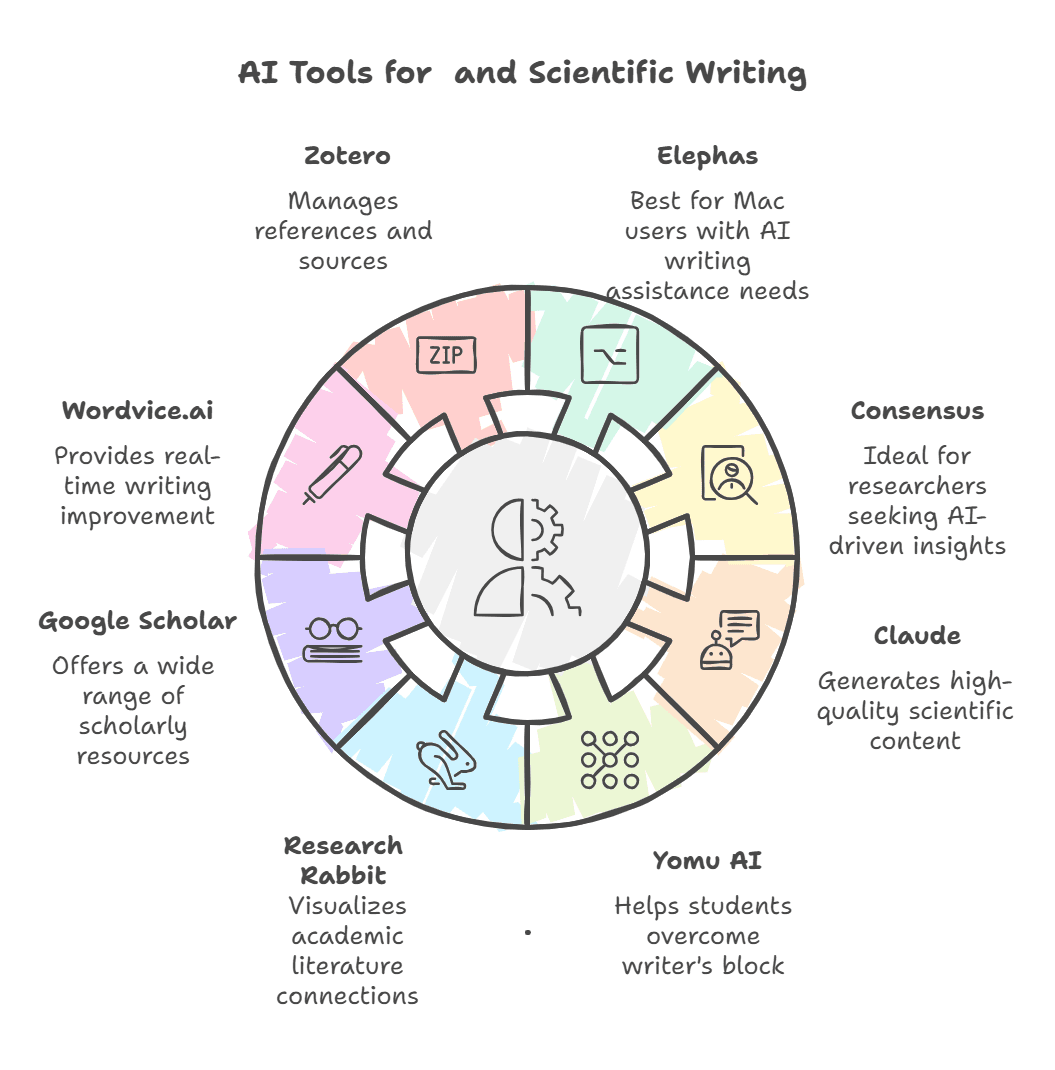
Research Rabbit
Research Rabbit is an AI-powered search tool. It lets you start with one paper and then expand your search by following citation links. You can build collections and track updates on your favorite topics.
Insight: Many beginners miss the value of tracking “related works.” Research Rabbit can alert you when new papers appear, so your review stays current.
| Tool | Main Feature | Best For |
|---|---|---|
| Semantic Scholar | AI-powered paper search | Finding high-quality sources |
| Connected Papers | Visual citation maps | Understanding research networks |
| Research Rabbit | Live paper tracking | Building collections, staying updated |
Credit: elephas.app
Ai Tools For Citation Management
Citations are critical in academic writing, but managing them can be tedious. AI tools help you organize, format, and check your references quickly.
Zotero
Zotero is one of the most popular free citation managers. It uses AI to detect metadata from papers and websites. With one click, you can save a paper and generate its citation in styles like APA, MLA, or Chicago.
Tip: Zotero can automatically sort your references by topic or author. Many beginners do not use the tagging feature, which can save hours when writing your bibliography.
Mendeley
Mendeley offers free reference management and PDF annotation. Its AI features suggest related papers and help you organize your library.
Data: Mendeley has over 6 million users worldwide. It is especially popular for collaborative research, because you can share collections and notes with your team.
Citethisforme
CiteThisForMe is a simple AI-powered citation generator. Enter a book, website, or journal, and it creates a formatted citation. The tool can check for errors and update styles as needed.
Common Mistake: Some users forget to double-check auto-generated citations. Always review for small errors, especially with author names or publication dates.
| Tool | Free Features | Supported Styles |
|---|---|---|
| Zotero | Reference management, tagging, citation generation | APA, MLA, Chicago, more |
| Mendeley | PDF annotation, library sharing, suggestions | APA, MLA, Harvard |
| CiteThisForMe | Quick citation generation, error checking | APA, MLA, Chicago |
Ai Writing Assistants For Academic Papers
Writing an academic paper is hard. AI writing assistants can help you brainstorm, organize, and refine your ideas.
Grammarly
Grammarly uses AI to check grammar, spelling, and clarity. The free version is great for fixing basic mistakes and improving readability. It also highlights wordy sentences and passive voice.
Example: If you write, “It is believed that the results are significant,” Grammarly may suggest, “The results are significant.” This makes your writing clearer.
Quillbot
QuillBot is an AI-powered paraphrasing tool. It helps you rewrite sentences, avoid plagiarism, and simplify complex ideas. The free version lets you paraphrase up to 125 words at a time.
Insight: Many beginners do not realize that QuillBot can also summarize long texts. Use it to create short abstracts from lengthy papers.
Chatgpt (free Version)
ChatGPT can generate academic text, answer questions, and help brainstorm ideas. The free version is available through OpenAI’s website. It is useful for outlining papers, generating introductions, and checking logic.
Common Mistake: Some users rely too much on ChatGPT for content. Use it as a helper, not a replacement. Always check facts and rewrite in your own voice.
Paperpal
Paperpal is an AI editor focused on academic writing. It checks for grammar, style, and structure. The free version highlights errors and suggests improvements.
Tip: Paperpal can spot inconsistencies in tense or terminology, which are common in multi-author papers.
| Tool | Main Use | Free Limit |
|---|---|---|
| Grammarly | Grammar and clarity checks | Basic editing |
| QuillBot | Paraphrasing, summarizing | 125 words/session |
| ChatGPT | Text generation, brainstorming | Unlimited (with restrictions) |
| Paperpal | Academic editing | Grammar, style checks |
Ai Tools For Research Summarization
Summarizing long papers is a key skill in academic writing. Free AI tools can save hours by creating clear, concise summaries.
Scholarcy
Scholarcy is an AI summarizer for academic articles. Upload a PDF, and it creates a summary with key points, figures, and references. The free version covers up to three papers per day.
Example: Scholarcy can turn a 20-page article into a one-page summary with main findings and data tables.
Smmry
SMMRY is a simple tool that summarizes text. Paste your article or paper, and it gives you a short version with the main ideas. It is helpful for quick reviews before deciding what to read in full.
Tip: SMMRY works best with clear, well-written articles. For technical papers, you may need to edit the summary for accuracy.
Resoomer
Resoomer specializes in summarizing argumentative texts. It uses AI to highlight main claims and supporting evidence.
Insight: Beginners often ignore the value of summarizing their own work. Use Resoomer to check if your paper’s main message is clear.
Ai Tools For Plagiarism Detection
Plagiarism can ruin your academic career. Free AI tools can check your work for copied content and help you write original papers.
Plagiarism Checker By Grammarly
Grammarly’s Plagiarism Checker scans your text against billions of web pages. The free version checks for direct matches and highlights problem areas.
Tip: Run your paper through the checker before submitting. Even accidental plagiarism can cause trouble.
Smallseotools
SmallSEOTools offers a free plagiarism checker. Paste your text, and it shows which sentences match online content. It is fast and easy to use.
Common Mistake: Some users forget to check their reference lists. Plagiarism tools can also flag copied citations, so review them carefully.
Quetext
Quetext provides a basic plagiarism detector. The free version checks up to 500 words at a time. It highlights matching phrases and gives a score.
Insight: Plagiarism checkers are not perfect. Always review flagged areas and rewrite if needed.
Ai Tools For Data Analysis And Visualization
Research papers often require data analysis and charts. Free AI tools can help with simple statistics and visualizations.
Chatgpt Plugins
With plugins, ChatGPT can process data and create basic charts. While plugins require a paid account, the free version can still help with explanations and code generation.
Example: Ask ChatGPT to write a Python script for plotting your survey results. Then run it in your local environment.
Google Sheets (ai Features)
Google Sheets now includes AI-powered features like “Explore.” You can ask questions about your data, and Sheets will suggest charts or calculate averages.
Tip: Use the “Explore” button for quick insights. Many beginners miss this feature, which can save time on simple analysis.
Tableau Public
Tableau Public is a free data visualization tool. It uses AI to suggest chart types and arrange data. You can publish interactive graphs and embed them in your paper or presentation.
Common Mistake: Overloading charts with too much data. Keep visuals simple and clear.
Ai Tools For Organizing Research Notes
Keeping your research notes organized is important. AI tools help you sort, search, and link ideas.
Notion Ai
Notion AI helps organize notes, summarize meetings, and generate outlines. The free version is limited but still useful for basic tasks.
Example: Use Notion AI to create a summary of a literature review meeting. Tag notes by topic for easy searching.
Obsidian
Obsidian is a free note-taking tool with AI plugins. You can link notes, create concept maps, and search your research easily.
Tip: Beginners often miss the value of linking related notes. Obsidian’s “graph view” helps you see connections between ideas.
Evernote Ai
Evernote offers AI-powered search and organization. The free plan lets you save research notes and quickly find them using keywords.
Insight: Use tags and notebooks to separate research topics. This makes writing your paper easier.

Credit: www.youtube.com
How To Choose The Right Free Ai Tool
Choosing the right AI tool depends on your needs, topic, and workflow. Here are some practical steps:
- Identify your main tasks: Are you searching for literature, writing, editing, or analyzing data?
- Compare features: Check if the tool offers what you need in the free plan.
- Check compatibility: Does it work on your device or with your reference manager?
- Test with a small project: Try the tool on a short paper or sample data.
- Review privacy and data policies: Make sure your research is safe.
| Task | Recommended Tool | Free Limit |
|---|---|---|
| Literature Search | Semantic Scholar | Unlimited |
| Citation Management | Zotero | Unlimited references |
| Writing Assistance | Grammarly, QuillBot | Basic editing, 125 words/session |
| Summarization | Scholarcy | 3 papers/day |
| Plagiarism Detection | SmallSEOTools | Unlimited checks |
| Data Visualization | Tableau Public | Unlimited charts |
| Note Organization | Obsidian | Unlimited notes |
Practical Tips For Using Free Ai Tools
To get the most from free AI tools, follow these tips:
- Start with one tool: Do not overwhelm yourself. Test one tool, learn its features, then add more as you need.
- Check accuracy: AI is powerful, but not perfect. Always double-check summaries, citations, and edits.
- Use tools together: Combine tools for best results. For example, use Semantic Scholar for searching, Zotero for citations, and Grammarly for editing.
- Protect your privacy: Only upload papers to trusted platforms. Avoid sharing unpublished work on unknown sites.
- Stay updated: AI tools change fast. Check for new features or updates every few months.
Non-obvious insight: Many researchers waste time by manually copying citations. Use reference managers’ browser plugins for instant saving. Also, do not ignore keyboard shortcuts—they speed up editing and note-taking.
Limitations Of Free Ai Tools
Free AI tools are helpful, but they have limits:
- Word limits: Many tools restrict the amount of text you can process for free.
- Feature gaps: Some advanced features are only available in paid plans.
- Accuracy: AI summaries and edits can miss context or change meaning.
- Privacy concerns: Some tools store uploaded data. Always read privacy policies.
- Dependence: Relying too much on AI can weaken your own writing skills.
Example: Scholarcy’s free plan only summarizes three papers per day. QuillBot limits paraphrasing to 125 words at a time. If you need more, consider using multiple tools or upgrading.
Common beginner mistake: Forgetting to review AI-generated content. Always check for mistakes, missing references, or unclear sentences.
Real-world Examples Of Ai In Academic Writing
Here are practical examples of how researchers use free AI tools:
- Student writing a thesis: Uses Semantic Scholar to find papers, Zotero to organize citations, Grammarly to edit text, and SmallSEOTools to check for plagiarism.
- Research team preparing a literature review: Uses Connected Papers to map influential studies, Scholarcy to summarize key articles, and Obsidian to organize notes.
- Early-career researcher analyzing survey data: Uses ChatGPT to generate Python code, Google Sheets for quick charts, and Tableau Public for final visualizations.
- Non-native English speaker publishing a paper: Uses QuillBot to paraphrase complex sentences, Grammarly to correct grammar, and Paperpal for academic style.
Non-obvious insight: Many researchers use AI tools to draft emails to journals or conference organizers. This saves time and reduces language mistakes.
Ethical Considerations When Using Ai Tools
AI is changing academic writing, but ethical use is important. Here are key points:
- Always cite sources: If an AI tool helps you paraphrase or summarize, cite the original paper.
- Avoid plagiarism: Use AI to check for copied content, not to copy text.
- Protect unpublished work: Only upload papers to trusted sites.
- Disclose AI use: Some journals ask authors to mention if they used AI tools.
Data: In 2026, Springer Nature began asking authors to report the use of AI tools in their papers. Some universities have new rules about AI in research writing.
Future Trends In Ai For Academic Writing
AI tools are evolving quickly. Here are trends to watch:
- Better summarization: New AI models can summarize papers with more accuracy.
- Multilingual support: Tools will help researchers write in many languages.
- Integrated platforms: All-in-one tools will combine search, citation, writing, and editing.
- Custom AI models: Researchers will train AI on their own data for specialized tasks.
Example: Semantic Scholar is testing new AI models that summarize papers in multiple languages. Zotero is adding AI-powered search to its reference manager.
Where To Find More Information
If you want to learn more about free AI tools for academic research writing, visit official websites or academic forums. For a detailed list of tools and comparisons, check out Wikipedia’s list of academic databases. This source is updated often and covers both free and paid options.
Frequently Asked Questions
What Are The Best Free Ai Tools For Academic Writing?
Some of the best free AI tools include Semantic Scholar for literature search, Zotero for citation management, Grammarly and QuillBot for editing, Scholarcy for summarizing, and SmallSEOTools for plagiarism checking. The right tool depends on your specific needs.
Can Ai Tools Replace Human Editing In Academic Papers?
No, AI tools help with editing but cannot fully replace human judgment. AI can fix grammar, suggest clarity, and summarize, but it may miss context or change meaning. Always review AI edits and ask a human expert for final checks.
Are Free Ai Tools Safe For Confidential Research?
Most free tools are safe, but always check privacy policies before uploading sensitive documents. Trusted tools like Zotero, Grammarly, and Semantic Scholar have clear privacy rules. Avoid unknown platforms for unpublished work.
How Do I Avoid Plagiarism When Using Ai Tools?
Use AI tools to check your work for plagiarism, not to copy text. Always rewrite content in your own words and cite original sources. Run your paper through a plagiarism checker before submitting.
What Should I Do If An Ai Tool Gives Incorrect Information?
Double-check AI-generated content. If you find mistakes, correct them yourself or ask a human expert. AI is powerful but not perfect, so always use your own judgment.
Academic research writing is easier than ever with free AI tools. By choosing the right helpers, you can save time, improve your papers, and avoid common mistakes. Remember to use AI responsibly, double-check your work, and keep learning about new developments.
The future of academic writing is bright—and with the right tools, you can be ready for it.

Credit: freeapihub.com


About author









Add comment