

Ahrefs Site Audit Technical Indexing Review: Boost SEO Performance
When you want your website to perform well in search engines, technical SEO is a must. But understanding what’s holding your site back can be hard, especially if you don’t have experience with crawling, indexing, and site architecture. This is where the Ahrefs Site Audit tool stands out. It gives you a clear technical indexing review, showing what search engines see when they crawl your website.
Many website owners focus on content and backlinks, forgetting about indexing issues that can quietly block pages from showing up in Google. You could have great content, but if your site isn’t indexed properly, nobody will find it. Ahrefs Site Audit helps you discover and fix these issues, making your site easier for search engines to understand and rank.
This article will guide you through how Ahrefs Site Audit reviews your site’s technical indexing, what the main reports mean, and how to take action on the results. Whether you manage a small blog or a large e-commerce site, knowing how to use this tool can make a big difference in your SEO results.
What Is Technical Indexing And Why Does It Matter?
Before diving into the tool, it’s important to understand technical indexing. Indexing is the process where search engines like Google collect information from your web pages and add them to their database. If a page isn’t indexed, it won’t appear in search results.
Technical indexing focuses on the factors that help or block this process. These include:
- Crawlability: Can search engines access your pages?
- Directives: Are your meta tags, robots.txt, and HTTP headers set up correctly?
- Internal linking: Are all important pages linked from other pages?
- Duplicate content: Does your site have repeated pages that can confuse search engines?
- Canonicalization: Are you telling search engines which version of a page is the main one?
Without good technical indexing, your site’s best content may never be seen. Even small mistakes, like a misplaced noindex tag, can cause major traffic losses.
How Ahrefs Site Audit Crawls And Analyzes Your Website
Ahrefs Site Audit works by crawling your website like a search engine bot. It collects data from every page it can find, following links and reading site files like robots. txt and sitemaps. The crawler behaves similarly to Googlebot, giving you a realistic picture of how your site appears to search engines.
Key steps in the Ahrefs Site Audit process:
- Setup: You enter your website URL and set crawl limits. You can crawl subdomains, include/exclude certain folders, or respect robots.txt.
- Crawling: The tool visits each page, downloading HTML, CSS, JavaScript, and images as needed.
- Data Collection: It checks status codes, meta tags, headers, canonical tags, internal links, and external links.
- Reporting: Ahrefs organizes findings into easy-to-read reports, highlighting errors and warnings.
- Recommendations: The tool provides actionable tips for fixing detected issues.
Ahrefs also lets you compare crawls over time, so you can see if technical fixes improve your site’s health.
Core Indexing Issues Detected By Ahrefs Site Audit
The strength of Ahrefs Site Audit lies in its deep technical analysis. Here are the main indexing issues the tool flags, and what they mean for your SEO.
1. Crawl Errors
Crawl errors stop search engines from accessing your content. Common crawl errors include:
- 404 Not Found: Pages that return a missing page error.
- 5xx Server Errors: Issues where your server fails to deliver a page.
- 403 Forbidden: Search engines are blocked from viewing a page.
Ahrefs shows these errors in a clear list, along with the affected URLs. If you have a large number of crawl errors, search engines may think your site is poorly maintained.
2. Noindex And Nofollow Directives
Sometimes, site owners accidentally block pages from being indexed or followed. Ahrefs flags:
- Noindex tags: These tell search engines not to index a page.
- Nofollow tags: These tell search engines not to follow links from a page.
A common mistake is adding noindex to important pages, making them invisible in Google. Ahrefs helps you quickly spot and fix this.
3. Robots.txt Blocking
The robots.txt file controls what parts of your site search engines can crawl. Misconfigurations here are easy to make. Ahrefs checks if key sections of your site are blocked accidentally, such as your product or category pages.
4. Canonicalization Issues
If you have duplicate or similar pages, canonical tags tell search engines which version to show in results. Ahrefs detects:
- Missing canonical tags
- Conflicting canonicals (pointing to different URLs)
- Self-referencing canonicals (best practice)
Getting canonicalization wrong can cause search engines to index the wrong pages or split your link equity.
5. Internal Linking Problems
Strong internal linking helps search engines find and rank all your pages. Ahrefs flags:
- Orphan pages: Pages with no internal links pointing to them.
- Deeply nested pages: Pages that are too many clicks from the homepage.
- Broken internal links: Links that lead to non-existent pages.
Improving your internal linking can make a big difference, especially for large sites.
6. Duplicate Content
Duplicate content confuses search engines and can hurt your rankings. Ahrefs scans for:
- Duplicate titles and meta descriptions
- Identical or very similar content on different URLs
- Parameter URLs creating multiple versions of a page
Ahrefs gives you a list of duplicate content issues, so you can consolidate or rewrite pages as needed.
7. Sitemap And Indexing Discrepancies
Your XML sitemap tells search engines which pages you want to be indexed. Ahrefs checks if:
- Pages in your sitemap are actually indexable
- Important pages are missing from the sitemap
- Blocked or redirected pages are listed in the sitemap
Fixing sitemap issues ensures search engines have the best guide to your site’s structure.
Understanding The Site Audit Indexability Report
Ahrefs organizes its technical findings in the Indexability report. This report is the starting point for most technical SEO checks.
Here’s what you’ll find in this key report:
- Indexable pages: Pages that can be indexed by search engines.
- Non-indexable pages: Pages blocked by noindex, robots.txt, or other issues.
- Reason for non-indexability: For each non-indexable page, Ahrefs lists the cause.
A typical Indexability report summary might look like this:
| Page Type | Count | Main Issue |
|---|---|---|
| Indexable | 1,250 | — |
| Noindex | 150 | Noindex meta tag |
| Blocked | 50 | robots.txt |
| Redirected | 200 | 301/302 redirects |
This makes it easy to spot trends and focus your attention.
How To Use Ahrefs Site Audit For Technical Indexing Review
Getting the most from your Site Audit means understanding the workflow. Here’s how to perform a technical indexing review with Ahrefs:
Step 1: Start A Crawl With Correct Settings
- Enter your domain and choose crawl scope (entire domain, subdomain, or specific folder).
- Set user agent to match Googlebot for realistic results.
- Make sure to include/exclude parameters as needed.
Step 2: Analyze The Indexability Report
- Go to the Indexability section.
- Review which pages are indexable and which are not.
- Check the reasons for non-indexability (e.g., noindex, robots.txt, canonical).
Step 3: Review Crawl Errors And Warnings
- Visit the Issues tab.
- Pay attention to errors with the highest count or that affect important pages.
- Fix broken links, server errors, and incorrect redirects first.
Step 4: Check Internal Linking
- Use the Internal Links report to find orphan pages.
- Look for broken or redirected internal links.
- Improve linking to key pages.
Step 5: Examine Canonical And Duplicate Content Issues
- In the Content Quality report, check for duplicate titles, descriptions, and content.
- Make sure canonical tags are set and correct.
- Merge or redirect duplicate pages where possible.
Step 6: Validate Robots.txt And Sitemap
- Review the robots.txt report for accidental blocking.
- Check the Sitemap report for missing or mislisted pages.
Step 7: Download Reports And Track Fixes
- Export issue lists for your developer or SEO team.
- Mark issues as fixed, and rerun the crawl to confirm changes.
Key Features That Make Ahrefs Site Audit Stand Out
Ahrefs Site Audit is not the only crawler on the market, but it has features that make it especially useful for technical indexing reviews.
Comprehensive Issue Detection
The tool checks for over 100 technical SEO issues, from basic crawl errors to advanced problems like Hreflang conflicts or pagination errors. It also updates regularly as Google’s algorithms evolve.
Visual Reports And Health Score
Ahrefs gives your site a health score (0–100) based on the number and severity of issues. Visual graphs show progress over time, making it easy to report results to clients or stakeholders.
Javascript Rendering
Modern websites often rely on JavaScript to load content. Ahrefs’ crawler can render JavaScript, so it finds issues that older crawlers (like Screaming Frog’s free version) might miss.
Customizable Crawling
You can set crawl speed, depth, user agent, and even whitelist or block certain URLs. This flexibility is key for large or complex sites.
Historical Comparison
Ahrefs stores previous audits, allowing you to compare technical health over time. This is critical for tracking the impact of technical fixes.
Integration With Other Ahrefs Tools
You can link Site Audit with Ahrefs’ Site Explorer and Keywords Explorer to see how technical issues affect rankings and traffic.
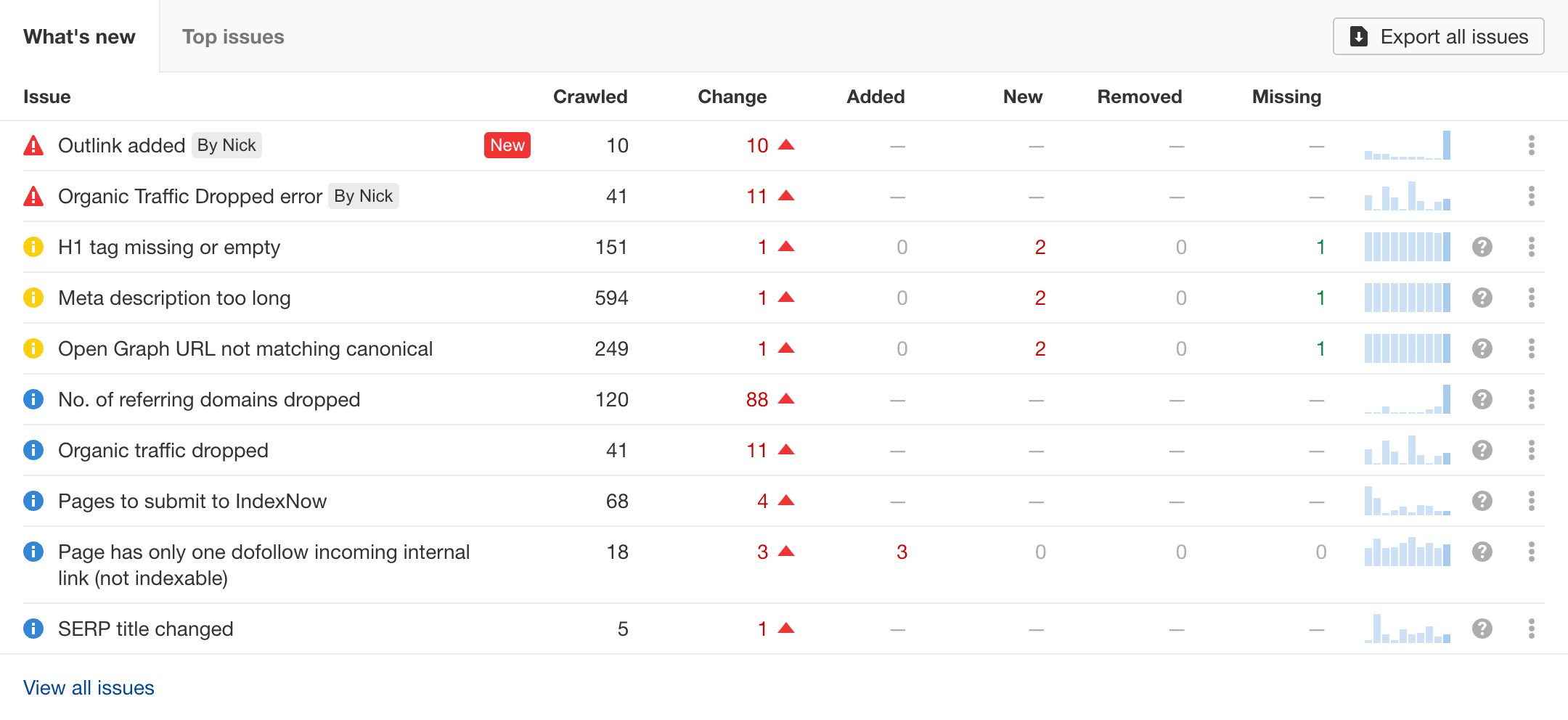
Credit: ahrefs.com
Data Table: Ahrefs Site Audit Vs. Other Seo Crawlers
To help you understand where Ahrefs stands, here’s a comparison with two other popular tools: Screaming Frog and SEMrush Site Audit.
| Feature | Ahrefs Site Audit | Screaming Frog | SEMrush Site Audit |
|---|---|---|---|
| Cloud-Based | Yes | No | Yes |
| JavaScript Crawling | Yes | Limited (paid) | Yes |
| Health Score | Yes | No | Yes |
| Integration with Backlink/Keyword Tools | Full | None | Partial |
| Historical Comparison | Yes | Yes (manual) | Yes |
| Free Plan | No | Yes (limited) | Yes (limited) |
Common Technical Indexing Problems Found By Ahrefs (with Examples)
Knowing what issues to look for is half the battle. Here are some real-world examples of technical indexing problems Ahrefs Site Audit often uncovers:
Accidental Noindex On Important Pages
A large e-commerce site once had its entire product category set to noindex. Ahrefs caught this, and after removing the tag, organic traffic increased by 40% in two months.
Orphan Content
A company blog had dozens of posts that were not linked from the main site. These orphan pages were invisible to Google. By adding internal links and updating the sitemap, the pages began ranking within weeks.
Robots.txt Blocking By Mistake
A developer accidentally blocked the /blog/ folder in robots. txt. Ahrefs’ crawl showed all blog posts were blocked from indexing. Fixing this mistake restored lost rankings.
Duplicate Content From Url Parameters
A travel site used parameters for sorting, creating hundreds of duplicate pages. Ahrefs flagged this, and the team implemented canonical tags to solve the problem.
Non-obvious Insights Beginners Miss
Most beginners focus only on fixing what looks like “errors.” But there are deeper issues that the best SEOs watch for:
- Index Bloat: Sometimes, too many low-value pages (like tag pages, filter pages, or thin content) are indexable. This “index bloat” can waste your crawl budget and dilute ranking signals. Ahrefs helps you spot and noindex or block these pages.
- Soft 404s: Pages that load but have little or no content, or a “Not Found” message in the body, are called soft 404s. Search engines may index them by mistake. Ahrefs can detect these by showing pages with very low word count or duplicate titles/descriptions.
- Mobile-Only Issues: With mobile-first indexing, some sites load differently on mobile than desktop. Ahrefs’ ability to crawl using a mobile user agent lets you catch these differences.
- Canonical Chains: Sometimes, a canonical tag points to a page that itself has a canonical tag to another page, creating a chain. This confuses search engines. Ahrefs highlights these chain issues for correction.
How To Prioritize And Fix Technical Indexing Issues
Not all technical issues are equally urgent. Here’s how to set priorities:
- High Priority: Errors that block key pages (404s on product pages, noindex on main categories, robots.txt blocks).
- Medium Priority: Issues that affect user experience or duplicate content (broken links, duplicate titles).
- Low Priority: Warnings that have minor SEO impact (missing alt text, long page titles).
Ahrefs lists issues by severity, making it easier to work on what matters most.
Example Fixing Workflow
- Start with high-impact errors (noindex, robots.txt, server errors).
- Clean up duplicate content and fix canonical tags.
- Improve internal linking to orphan pages.
- Remove or block low-value pages to reduce index bloat.
- Rerun the audit to confirm fixes.
The Role Of Ahrefs Site Audit In Ongoing Seo
Technical SEO is not “set and forget. ” Websites change, plugins update, and new content is added every week. Ahrefs lets you schedule regular crawls (weekly or monthly), so you catch new issues quickly.
Many SEOs also use Ahrefs Site Audit before and after a site migration or redesign. This ensures important pages stay indexed and traffic doesn’t drop after launch.
Data Table: Typical Site Audit Issues By Website Type
Different types of websites face different indexing challenges. Here’s a summary based on Ahrefs’ data:
| Website Type | Common Indexing Issue | Impact |
|---|---|---|
| Blogs | Orphan pages, index bloat from tags | Low rankings for posts |
| E-commerce | Duplicate pages from filters, noindex on categories | Lost product/category traffic |
| News Sites | Broken links, slow page speed | Articles not indexed fast |
| Corporate Sites | Misconfigured robots.txt, outdated sitemaps | Main pages missing in search |

Credit: www.upwork.com
Best Practices For Using Ahrefs Site Audit For Indexing
To get the most from Ahrefs Site Audit, follow these best practices:
- Schedule regular crawls so you always have up-to-date data.
- Check indexability after site changes (new sections, redesigns, plugin updates).
- Coordinate with developers so technical fixes are implemented correctly.
- Monitor the Indexability report to spot sudden drops or spikes.
- Set up alerts for critical errors (like noindex on key pages).
- Export and archive reports for ongoing SEO tracking.
When To Use Ahrefs Site Audit Vs. Other Tools
Ahrefs Site Audit is ideal for:
- Large sites with frequent updates
- Teams that already use Ahrefs for backlinks/keywords
- Agencies managing multiple client sites
However, if you need free, unlimited crawling for very small sites, Screaming Frog’s free version can be enough. For a more content-focused audit, tools like SEMrush may offer extra on-page suggestions.
For most businesses that care about SEO, Ahrefs Site Audit provides the best mix of power, speed, and actionable insights.
One External Resource Worth Exploring
For a deeper dive into Google’s own recommendations for technical indexing, you can check the official Google Search Central documentation.
The Value Of Technical Indexing Reviews For Seo Success
Technical indexing reviews are not just a “nice to have”—they are essential for any serious SEO strategy. If search engines can’t crawl, understand, and index your content, all your other SEO efforts (content, links, user experience) are wasted.
Ahrefs Site Audit makes it possible for anyone, even without a technical background, to see and fix the issues blocking their site’s growth. With regular use, you’ll avoid the most common mistakes and give your content the best chance to rank.
If you haven’t run a technical indexing review with Ahrefs yet, now is the time. Even a single audit can reveal hidden problems and unlock new traffic. Remember, the best SEO wins are often found in the details you can’t see—until you look with the right tools.

Credit: reviewedstack.com
Frequently Asked Questions
What Is The Difference Between Crawlability And Indexability?
Crawlability is whether search engines can access your pages. Indexability means search engines can not only access but also add those pages to their search results. A page can be crawlable but not indexable (for example, if it has a noindex tag).
How Often Should I Run An Ahrefs Site Audit?
For most websites, running a monthly audit is enough. If you update your site often or make big changes, run audits more frequently—weekly if possible.
Can Ahrefs Site Audit Find Mobile-only Seo Issues?
Yes, Ahrefs can crawl your site using a mobile user agent, helping you find issues that only appear on mobile devices. This is important for mobile-first indexing.
What Should I Do If Ahrefs Finds Hundreds Of Noindex Pages?
First, check if those pages are supposed to be noindexed (like thank you pages or admin pages). If important pages are noindexed by mistake, remove the noindex tag so they can be indexed.
Does Fixing Technical Indexing Issues Improve Rankings Immediately?
Fixes can help your site get indexed and ranked, but improvements are not always instant. Some changes are picked up by search engines quickly, while others may take weeks. Always monitor your traffic and use tools like Ahrefs to track progress.


About author









Add comment