
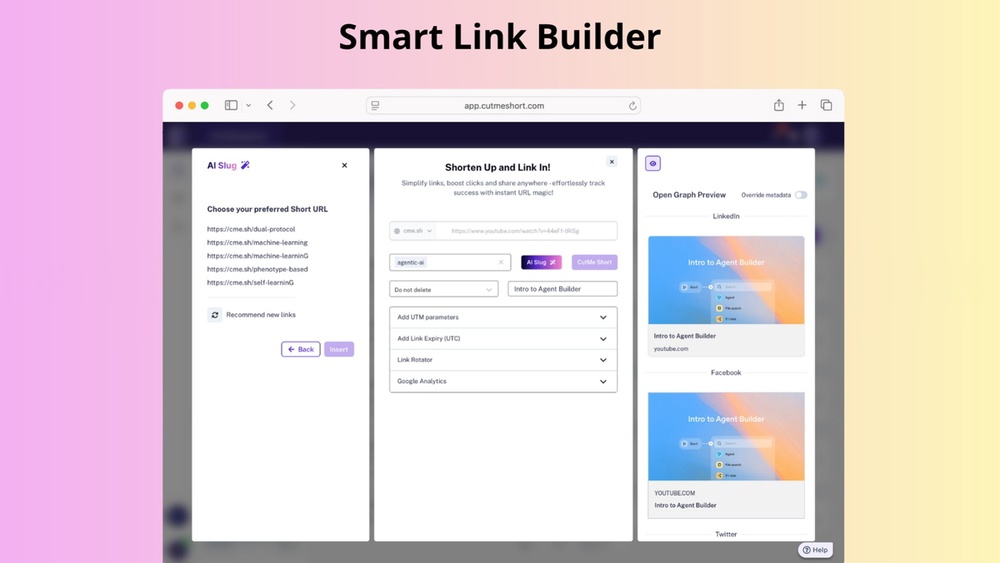
How to Set Up Custom Bio Link Pages With Cutme Short Effortlessly
Setting up a custom bio link page can change how you share content online. If you want to combine all your links, socials, and offers into one easy-to-share URL, tools like Cutme Short make it simple. But what does it really take to build a powerful bio link page? In this guide, you’ll learn step by step how to set up your own custom bio link page using Cutme Short. We’ll cover everything from the basics to advanced customization, practical use cases, best design practices, and common mistakes to avoid. Whether you’re a creator, small business, or just want a single link for all your profiles, you’ll find everything you need to get started—and stand out.
Why A Custom Bio Link Page Matters
Social platforms like Instagram, TikTok, and Twitter only allow one link in your profile. This can be a problem if you have multiple things to share—like your website, shop, newsletter, or latest project. A custom bio link page solves this by combining all those links into a single, branded landing page.
With a bio link page, your audience gets choices. They can follow you on other platforms, read your blog, or check out your products—all from one link. This makes it easier for people to connect with everything you offer, without confusion or extra clicks.
Cutme Short is a rising tool for this purpose. It stands out for its simple interface, powerful customization, and strong analytics. But like any tool, you need to know how to use it well to get the best results.
What Is Cutme Short?
Cutme Short is a URL shortener and bio link tool. It lets you create short links that redirect to longer URLs, but its bio link feature is what makes it popular for creators and businesses. With Cutme Short, you can build a personalized landing page that holds all your important links, images, and even contact forms. You get full control over the look and content of your page.
Unlike basic link in bio tools, Cutme Short also gives you analytics on how your links are performing. You can see how many people clicked, where they came from, and which links are most popular.
Getting Started With Cutme Short
Before you build your bio link page, you’ll need to sign up for a Cutme Short account. Here’s a quick overview of the process:
- Go to the Cutme Short website and choose Sign Up.
- Enter your email address and create a password.
- Confirm your email through the link sent to your inbox.
- Log in to your new account.
The free plan gives you basic features. If you want more advanced customization, analytics, or a custom domain, you may want to consider their paid plans.
Comparing Free Vs Paid Plans
It helps to understand what you get with each plan. Here’s a quick look:
| Feature | Free Plan | Paid Plan |
|---|---|---|
| Number of Bio Pages | 1 | Unlimited |
| Custom Branding | Basic | Advanced (colors, logo, fonts) |
| Analytics | Limited | Full (clicks, sources, devices) |
| Custom Domain | No | Yes |
| Support | Priority Support |
If you’re just starting, the free plan is usually enough. Upgrade only if you need extra features or branding.
Planning Your Bio Link Page
Before you start building, it’s smart to plan out what you want your bio link page to do. Ask yourself:
- Who is your main audience?
- What is the main action you want people to take? (Follow, buy, read, book)
- What are the 3-5 most important links you want to share?
- Do you need to collect emails or show social media feeds?
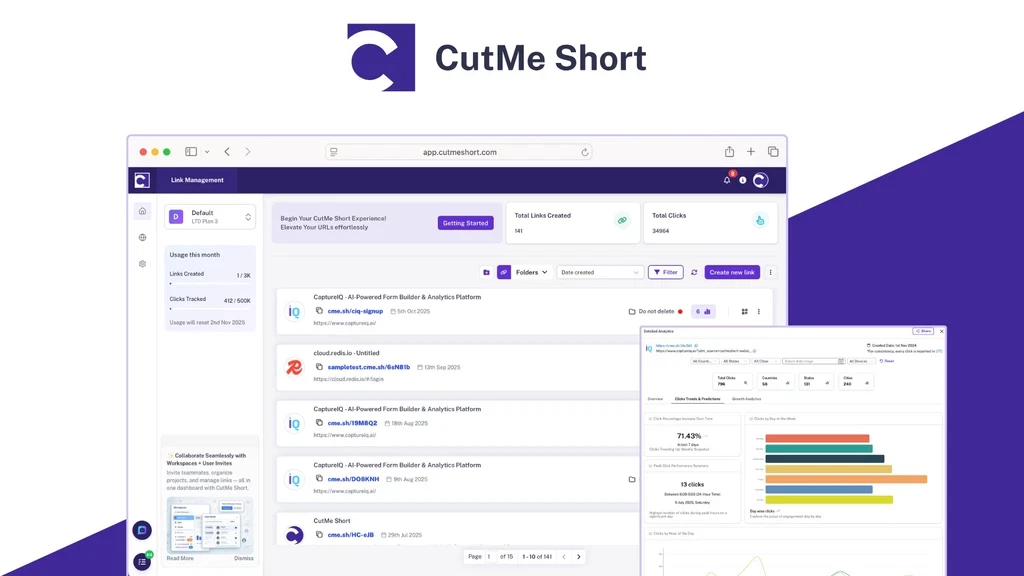
A well-planned page avoids clutter and keeps users focused. Too many links can confuse people and reduce clicks. Prioritize your most important links and keep things simple.
Credit: appsumo.com
Creating Your First Bio Link Page
Let’s walk through the process, step by step.
Step 1: Log In And Access The Bio Link Builder
Once logged in, look for the “Bio Link” tab or button in your Cutme Short dashboard. Click to open the builder.
Step 2: Choose A Template
Cutme Short offers several templates. These range from basic lists to pages with images, buttons, and social icons. Choose one that fits your style—but remember, you can always customize it later.
Step 3: Add Your Links
You’ll see fields for adding links. For each link, enter:
- The URL (where the button should send users)
- A Title (like “My Blog” or “Shop”)
- Optional: An icon or image
Order your links by importance. Place your main call-to-action (for example, “Subscribe to Newsletter”) near the top.
Step 4: Customize The Design
Here, you can change the look of your bio link page:
- Colors: Choose background and button colors that match your brand.
- Fonts: Select from available font styles for titles and links.
- Profile Image: Add your photo or logo at the top of the page.
- Social Icons: Add links to social profiles like Instagram, Twitter, or LinkedIn.
Some plans allow uploading a custom background or adding advanced animations.
Step 5: Add Extras (optional)
Cutme Short offers extra elements to make your page more useful:
- Contact form: Let visitors send you messages directly.
- Embedded video: Show a YouTube or Vimeo clip.
- Link scheduling: Set certain links to appear or disappear at specific times.
- Analytics pixel: Add Facebook Pixel or Google Analytics for advanced tracking.
Think about your goals when adding extras. Too many can distract visitors.
Step 6: Preview And Test
Always use the preview feature. Click every link, check the mobile view, and see how it looks on different devices. A page that looks good on desktop but breaks on mobile will lose you visitors.
Step 7: Publish And Copy Your Link
When you’re happy, click “Publish” or “Save.” Cutme Short will give you a unique URL—usually something like cutme.link/yourname. Copy this link and add it to your social profiles, emails, or business cards.
Best Practices For A High-converting Bio Link Page
Building the page is just the start. To get results, follow these best practices:
1. Keep It Simple
Less is more. Most people will click one or two links at most. Focus on your top goals.
2. Use Clear Calls-to-action
Instead of “Click here,” use action words like “Read My Blog,” “Shop Now,” or “Join My List. ”
3. Brand Your Page
Use your brand colors and logo. This builds trust and helps users recognize your page.
4. Update Regularly
Change your links as your content or offers change. If you’re running a special, move it to the top.
5. Track Your Analytics
Cutme Short shows which links are clicked most. Use this data to reorder or update your links for better results.
6. Optimize For Mobile
Most users will visit your page from a phone. Always check the mobile view and keep buttons large and easy to tap.
Advanced Customization: Making Your Page Unique
If you want to stand out, Cutme Short’s advanced features can help. Here’s how to take your page to the next level:
Custom Domains
Instead of a generic cutme.link address, you can use your own domain (like yourname.com/links). This looks more professional and is easier to remember. To set this up:
- Buy a domain from a registrar (if you don’t have one).
- Go to Cutme Short settings and select “Custom Domain.”
- Follow the instructions to point your domain to Cutme Short.
- Publish your page using your new branded URL.
Adding Custom Css
On higher-tier plans, you can add your own CSS for even more control. For example, you can change button shapes, add special hover effects, or adjust spacing.
Embedding Widgets
Some users add Spotify playlists, calendars, or other widgets. Check what’s allowed in the “Embed” section of the builder.
Scheduling And Expiry
If you promote time-limited offers, you can set links to appear or disappear at specific dates and times. This is great for flash sales or event registration.
Real Examples: How Different Users Benefit
A bio link page isn’t just for influencers. Here’s how different people use Cutme Short:
- Musicians: Share new tracks, merchandise, tour dates, and streaming platforms.
- Freelancers: List portfolio links, booking forms, and testimonials.
- Nonprofits: Direct to donation pages, volunteer signups, and newsletters.
- Small businesses: Combine shop links, reviews, location, and contact info.
Case Study: Artist Promotion
A digital artist uses Cutme Short to share their Instagram, online shop, commission form, and latest YouTube video. By highlighting the shop at the top, sales increased by 30% after switching from a single website link.
Case Study: Event Marketing
A conference organizer uses a custom bio page to share ticket sales, speaker bios, event schedule, and social hashtags. This helped attendees find all key info in one place, reducing support emails by 40%.
Credit: findfahim.com
Comparing Cutme Short With Other Bio Link Tools
Is Cutme Short the best tool for you? Here’s how it compares with popular alternatives like Linktree and Campsite:
| Feature | Cutme Short | Linktree | Campsite |
|---|---|---|---|
| Custom Domains | Yes | Yes (paid) | Yes (paid) |
| Advanced Analytics | Yes | Limited | Yes |
| Custom CSS | Yes (paid) | No | Yes (paid) |
| Free Plan | Yes | Yes | Yes |
| Widgets & Embeds | Yes | Limited | Yes |
Cutme Short is especially strong in customization and analytics for the price. If you need deep branding or tracking, it’s a smart choice.
Common Mistakes To Avoid
Even with a great tool, some users don’t get the results they want. Here are mistakes to watch out for:
Too Many Links
Trying to include every possible link can overwhelm visitors. Stick to your top 3-5.
Poor Branding
If your page uses default colors or no logo, it looks less trustworthy. Spend a few minutes on design.
Not Testing Links
Always test your links before sharing. A broken link can cost you followers or sales.
Ignoring Analytics
If you never check which links are clicked, you miss chances to improve your page.
Forgetting Mobile Users
A page that looks great on desktop but doesn’t fit on a phone will lose most visitors.

Credit: appsumo.com
Non-obvious Insights For Beginners
Most guides cover the basics, but here are a few advanced tips that many overlook:
Leverage Link Scheduling
Few users know that you can schedule links to appear only during launches or sales. This keeps your page relevant and timely without manual updates.
Use Utm Parameters
Add UTM parameters to your URLs. This helps you see exactly where your traffic comes from in Google Analytics. For example, “?utm_source=biolink&utm_medium=instagram” added to your shop URL can show you how many sales came from Instagram.
Rotate Content For Testing
Try switching the order of your links every few weeks. Sometimes, a link performs better simply by being at the top. Use analytics to see what works best.
Add A Welcome Message
A short intro or headline at the top (“Hey, I’m Alex! Here’s everything I do:”) can give context and increase engagement, especially for new visitors.
Collect Emails
If your goal is to grow an email list, use the contact form or embed a signup box right on your bio link page. Visitors who land here are already interested—make it easy for them to stay connected.
How To Drive More Clicks To Your Bio Link
A great bio link page is only useful if people actually visit it. Here’s how to get more eyes on your page:
- Add your bio link to every social profile (Instagram, TikTok, Twitter, Facebook, LinkedIn).
- Include it in your email signature.
- Share it in live streams or podcasts.
- Use QR codes on business cards or print materials, pointing to your bio link.
- Mention your bio link in video descriptions or podcast show notes.
Remember to use a consistent, branded URL across all channels for better recognition.
Security And Privacy Tips
Cutme Short is a secure tool, but users should still follow good practices:
- Use a strong, unique password for your account.
- Enable two-factor authentication if available.
- Never share your login details.
- Avoid adding sensitive information (like personal phone numbers) directly to your public bio link page.
- Check analytics for unusual activity.
If you work with a team, set up user roles so only trusted people can edit the page.
Understanding Analytics And Improving Performance
Cutme Short’s analytics dashboard shows valuable data:
- Total clicks: How many times your bio link was clicked.
- Top links: Which buttons get the most action.
- Traffic sources: Where your visitors come from (Instagram, TikTok, direct).
- Device types: Are people using mobile or desktop?
Analyze this data every week. If a link isn’t getting clicks, try changing the title, moving it up, or swapping it out. If most users are on mobile, make sure your page is simple and easy to tap.
Example Analytics Dashboard
| Metric | Value | Insight |
|---|---|---|
| Total Clicks | 1,500/month | High engagement—consider adding more CTAs. |
| Top Link | Shop | Promote products more in your content. |
| Device Split | 90% mobile | Optimize all designs for mobile first. |
| Traffic Source | Instagram (70%) | Focus content on IG audience needs. |
Accessibility: Making Your Bio Link Page Usable For Everyone
Accessibility means everyone can use your page, including people with disabilities. Here’s how to make your Cutme Short bio link page accessible:
- Use high contrast colors for text and backgrounds.
- Add alt text to images and icons.
- Use large, readable fonts.
- Make sure buttons are big enough to tap easily.
- Test with a screen reader if possible.
Accessible pages reach more people and show that you care about all users.
When To Update Or Change Your Bio Link Page
Some creators set up a bio link page once and never touch it again. That’s a mistake. Here’s when you should update your page:
- Launching a new product, service, or campaign
- Hosting a giveaway or event
- Changing your main call-to-action (for example, focus on email list instead of shop)
- Rebranding (new logo, colors, or messaging)
- After reviewing analytics and finding underperforming links
Frequent updates keep your audience engaged and show that you’re active.
Integrations: Connecting Cutme Short With Other Tools
Cutme Short works well with other marketing tools, making your workflow smoother:
- Email platforms: Embed a signup form from Mailchimp or ConvertKit.
- Google Analytics: Add your tracking ID for deeper data.
- Facebook Pixel: Track conversions from ads.
- Calendars: Embed a booking calendar (Calendly, Google Calendar) for appointments.
- YouTube/Vimeo: Display your latest video or playlist.
Check the integrations section in Cutme Short’s settings for the latest supported tools.
Legal And Compliance: What You Need To Know
If you collect data (like emails or form entries), follow basic legal guidelines:
- Add a privacy policy link if you collect any data.
- Make sure you have permission to use any images, music, or videos embedded on your page.
- For EU visitors, be aware of GDPR rules—don’t collect unnecessary data.
For more on privacy best practices, see the FTC’s privacy guidance.
Troubleshooting: What To Do If Something Goes Wrong
Even with the best tools, things can go wrong. Here’s how to fix common problems:
My Links Aren’t Working
- Double-check each URL for typos.
- Make sure links start with “https: //” for secure pages.
- Test from different devices and browsers.
Page Isn’t Updating After Edits
- Try clearing your browser cache.
- Wait a few minutes for changes to sync.
- Log out and back in to refresh your session.
Analytics Aren’t Tracking
- Make sure you’ve enabled analytics in the settings.
- Check that ad blockers aren’t blocking tracking scripts.
- Contact Cutme Short support if issues persist.
Custom Domain Isn’t Working
- Revisit your DNS settings.
- Allow 24-48 hours for DNS changes to take effect.
- Ask your domain provider for help if needed.
Frequently Asked Questions
How Many Links Can I Add To My Cutme Short Bio Link Page?
You can add as many links as you want, but it’s best to focus on your top 3-5. Too many links can confuse visitors and reduce clicks. On free plans, you might be limited to a certain number, but paid plans usually allow unlimited links.
Can I Use My Own Custom Domain With Cutme Short?
Yes, paid plans let you use your own domain for a more professional look. This means you can have a branded URL like “yourname. com/links. ” Just follow the domain setup instructions in the settings.
Is Cutme Short Secure For Business Use?
Cutme Short uses standard security features like HTTPS and password protection. For extra safety, use strong passwords and enable any available two-factor authentication. Don’t share sensitive information on your public page.
How Do I See Which Links Get The Most Clicks?
Use the analytics dashboard in your Cutme Short account. It shows total clicks, top links, and where your visitors come from. Check regularly to improve your page and focus on what works.
What Makes Cutme Short Better Than Other Bio Link Tools?
Cutme Short stands out for its deep customization, strong analytics, and affordable pricing. You get more branding options and integrations than most basic tools. For detailed feature comparisons, always check each tool’s official site.
Building a custom bio link page with Cutme Short can make sharing your content easier, more professional, and more effective. With the right setup, you’ll guide your audience exactly where you want them to go—helping you grow your brand or business with every click.

About author









Add comment