
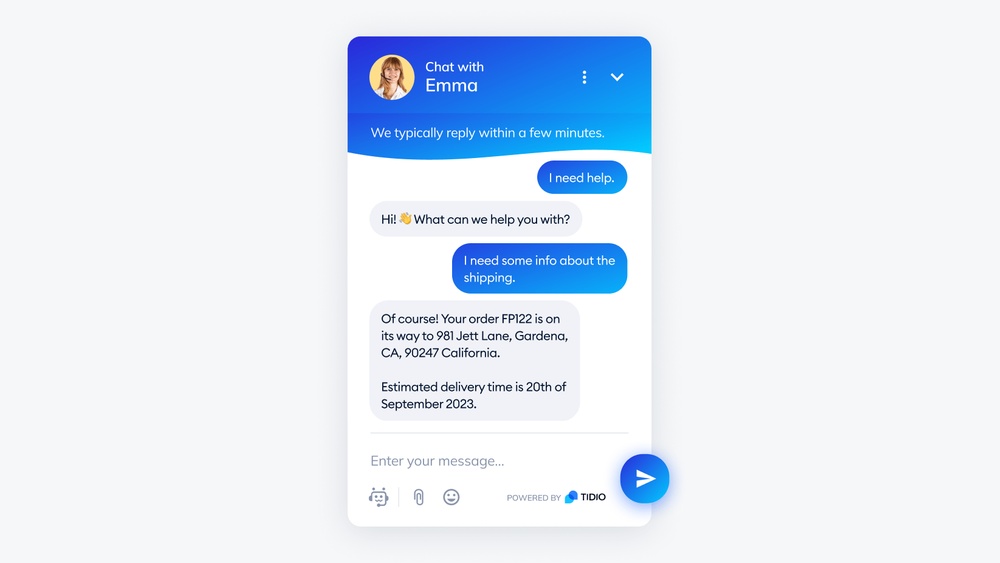
Best AI Chatbots for Customer Support: Top Picks for 2026
Businesses today need to respond to customers quickly, day and night. Many companies now use AI chatbots for customer support. These bots can answer questions, solve simple problems, and even help with sales—often better and faster than a human team.
But not all chatbots are the same. Some are smart and friendly, while others can be confusing or slow. Choosing the right AI chatbot for your business can change how your customers feel about your brand.
In this guide, you will learn about the best AI chatbots for customer support, what makes each one special, and how they fit different needs. You’ll also see side-by-side comparisons to help you decide faster. Whether you run a small online shop or a large company, the right chatbot can save time, lower costs, and keep your customers happy.
What Makes A Great Ai Chatbot For Customer Support?
Before looking at specific chatbots, it’s important to know what sets a great one apart. Here are the main things to consider:
- Ease of use: Can you set it up without coding skills?
- Accuracy: Does the bot understand real questions, even when people make typos?
- Integration: Can you connect it to your website, social media, or apps?
- Personalization: Does it remember users or adapt to their needs?
- Analytics: Does it show reports to help you improve service?
- Languages supported: Does it work in the languages your customers speak?
- Pricing: Is it affordable for your business size?
Many people only look at price or features and ignore how a bot fits their team or customer base. That’s a mistake—because a bot that’s hard to use or cannot answer real questions will frustrate customers and create more work.
Top 10 Ai Chatbots For Customer Support In 2026
Now, let’s explore the best options available this year. Each entry includes unique strengths, pricing info, and what kind of business it fits best.
1. Intercom
Intercom is a well-known tool for customer messaging. Its AI chatbot, called Fin, can answer questions, guide users, and hand off to humans when needed.
- Strengths: Deep integration with help centers, smart routing, easy to train.
- Works best for: Medium to large businesses needing complex support.
- Languages: 43+ languages.
- Price: Starts at $74/month (basic), with AI features as add-ons.
Pro insight: Intercom’s AI bot learns from your help articles. If you keep your knowledge base updated, it gets smarter over time.
2. Zendesk Answer Bot
Zendesk is a top support platform. Its Answer Bot uses AI to answer common questions, saving agents’ time.
- Strengths: Seamless with Zendesk ticketing, good for email, chat, and messaging.
- Works best for: Companies already using Zendesk.
- Languages: Over 18 languages.
- Price: Included in Suite plans starting at $49/agent/month.
Hidden value: It can suggest help articles in tickets, reducing back-and-forth.
3. Freshdesk Freddy Ai
Freddy AI is the chatbot inside Freshdesk, a popular customer support tool.
- Strengths: Prebuilt workflows, easy training, links with Freshdesk’s help desk.
- Works best for: Small to mid-size businesses, especially if using Freshdesk.
- Languages: 10+ languages.
- Price: AI features start at $79/agent/month.
Beginner tip: Freddy can automate tasks like ticket tagging and priority, which many users miss at first.
4. Drift
Drift is focused on real-time chat, especially for sales and lead generation. Their AI bot answers questions and qualifies leads.
- Strengths: Fast, engaging conversations, strong sales focus, website chat.
- Works best for: B2B companies wanting to connect sales and support.
- Languages: 25+ languages.
- Price: Custom pricing (starts around $2500/year).
Non-obvious insight: Drift’s AI can ask questions to qualify leads before sending to a human, saving your sales team time.
5. Tidio
Tidio offers a simple AI-powered chatbot that’s easy for beginners but still powerful.
- Strengths: Quick setup, easy drag-and-drop builder, affordable.
- Works best for: Small businesses, e-commerce sites.
- Languages: 10+ languages.
- Price: Free tier, paid from $29/month.
Value add: Tidio can also handle live chat, so you get both AI and real people in one place.
6. Ada
Ada is a no-code chatbot for large brands. It focuses on personalization and automation.
- Strengths: Advanced NLP (natural language processing), deep personalization, easy updates.
- Works best for: Large companies, banks, airlines.
- Languages: 100+ languages.
- Price: Custom pricing.
Pro insight: Ada can automate up to 80% of support requests if you train it well.
7. Liveperson
LivePerson powers bots for big brands like Delta and HSBC. It offers both AI and human chat.
- Strengths: Handles millions of messages, strong AI, connects to SMS and messaging apps.
- Works best for: Enterprises, global brands with complex needs.
- Languages: 30+ languages.
- Price: Custom quotes.
Hidden feature: LivePerson can connect to voice assistants like Alexa, not just text chat.
8. Hubspot Chatbot
HubSpot’s chatbot is part of their free CRM suite.
- Strengths: Free, works with sales and marketing, easy to set up.
- Works best for: Small businesses, startups, anyone using HubSpot CRM.
- Languages: English (with workarounds for other languages).
- Price: Free (paid upgrades for advanced features).
Beginner tip: Many users do not realize they can set up custom lead qualification questions in the free plan.
9. Chatfuel
Chatfuel is famous for Facebook Messenger bots but now supports websites too.
- Strengths: Fast setup, good for social media, affordable.
- Works best for: E-commerce, brands with big social media focus.
- Languages: 50+ languages.
- Price: Free tier, paid from $15/month.
Pro insight: Chatfuel supports payment integrations, so you can sell right inside chat.
10. Salesforce Einstein Bots
Salesforce Einstein brings AI chat to Salesforce’s huge CRM platform.
- Strengths: Deep CRM integration, advanced automation, handles complex cases.
- Works best for: Large businesses using Salesforce.
- Languages: 11 languages.
- Price: Add-on, starts at $50/100 conversations/month.
Hidden value: Einstein Bots can collect data and update customer records automatically during chats.
Ai Chatbot Comparison: Features At A Glance
To make your choice easier, here’s a direct comparison of top AI chatbots for customer support.
| Chatbot | No-Code Setup | Multi-Language | Integrates with CRM | Best For |
|---|---|---|---|---|
| Intercom | Yes | Yes (43+) | Yes | Medium/Large |
| Zendesk Answer Bot | Yes | Yes (18+) | Yes | Zendesk Users |
| Freshdesk Freddy AI | Yes | Yes (10+) | Yes | Small/Mid |
| Drift | No | Yes (25+) | Yes | B2B/Sales |
| Tidio | Yes | Yes (10+) | Limited | Small Biz |
| Ada | Yes | Yes (100+) | Yes | Enterprise |
| LivePerson | No | Yes (30+) | Yes | Enterprise |
| HubSpot Chatbot | Yes | English | Yes | Small Biz |
| Chatfuel | Yes | Yes (50+) | Limited | Social/E-com |
| Salesforce Einstein | No | Yes (11) | Yes | Large Biz |
Benefits Of Using Ai Chatbots For Customer Support
AI chatbots are popular for good reasons. Here’s what they bring to your support team:
- 24/7 support: Bots don’t sleep, so customers get answers anytime.
- Faster response times: No waiting in line; bots reply instantly.
- Lower costs: You can handle more chats without hiring extra staff.
- Consistent answers: Bots give the same info every time, reducing mistakes.
- Easy scaling: During busy times, bots handle more chats without breaking down.
A non-obvious benefit: Bots can handle simple tasks (like checking order status), letting your human team focus on complex problems. Many companies see a 30–50% drop in support tickets after adding a smart chatbot.
How To Choose The Right Ai Chatbot For Your Business
Picking an AI chatbot is not just about features. Here’s a step-by-step way to make a smart choice:
1. List Your Main Support Needs
Do you need simple FAQs, or do your customers ask complex questions? If most requests are simple, a basic bot is enough. If you need in-depth help or lots of integrations, choose a more advanced option.
2. Check Integration
Your chatbot should work with your website, help desk, or messaging apps. Some bots, like Intercom and Zendesk, offer wide integration options. Others may be limited.
3. Look At Language Support
If you have users in different countries, pick a bot that supports their languages. Ada and Chatfuel are strong here, while HubSpot is mostly English-focused.
4. Review Analytics
Good bots show you what questions are common and where the bot gets stuck. This helps you improve both the bot and your support in general.
5. Test With Real Users
Many businesses forget to test bots with real customers. Start with a pilot group and gather feedback. Look for places where the bot fails or creates confusion.
Tip: Don’t just ask your team to test; real users ask questions in ways your team may not expect.
6. Compare Costs
Some bots are free, but may have limits. High-end bots can cost hundreds per month. Make sure you know what’s included—sometimes “cheap” bots end up costing more due to missing features or support.
7. Plan For Growth
Choose a bot that can scale as your business grows. Switching bots later can be a headache, so think ahead.
Common Mistakes When Adding A Chatbot
Even the best chatbot can fail if you make these errors:
- No human backup: Bots should hand off tough questions to humans. If not, customers get frustrated.
- Poor training: If you don’t update FAQs or teach the bot, it will give bad answers.
- Ignoring analytics: Many skip reviewing reports. This means the same mistakes happen over and over.
- Over-automation: Don’t try to automate every support request. Some issues need a human touch.
A hidden risk: Some businesses forget to tell customers they are talking to a bot. Always be clear—it builds trust.
Ai Chatbot Pricing: What To Expect
AI chatbot prices vary widely. Here’s a quick look at typical pricing.
| Chatbot | Free Plan | Starting Price (Paid) | Best for Business Size |
|---|---|---|---|
| Intercom | No | $74/month | Medium/Large |
| Zendesk Answer Bot | No | $49/agent/month | Medium/Large |
| Freshdesk Freddy AI | No | $79/agent/month | Small/Mid |
| Drift | No | $2500/year | Medium/Large |
| Tidio | Yes | $29/month | Small Biz |
| Ada | No | Custom | Enterprise |
| LivePerson | No | Custom | Enterprise |
| HubSpot Chatbot | Yes | Upgrades available | Small Biz |
| Chatfuel | Yes | $15/month | Small/Medium |
| Salesforce Einstein | No | $50/100 convos | Large Biz |
Non-obvious insight: “Free” plans can have limits, like the number of conversations per month or fewer integrations. Always check the details before you decide.
Advanced Features To Watch For
Some chatbots now offer advanced features that can make a big difference:
- Natural language processing (NLP): Lets bots understand slang, typos, or complex questions.
- Sentiment analysis: The bot can tell if a customer is angry or happy and respond differently.
- Omni-channel support: Use the same bot across website, email, Facebook, WhatsApp, and more.
- Proactive messaging: The bot can reach out to users (for example, if they are stuck at checkout).
- Custom workflows: Set up unique paths for different types of customers.
For example, Drift and Intercom both use sentiment analysis to decide when to pass a chat to a human. Ada and LivePerson support proactive outreach, which can reduce cart abandonment in e-commerce.

Credit: www.revechat.com
Real-world Examples: How Businesses Use Ai Chatbots
Here are examples of how real companies use AI chatbots to improve customer support:
- E-commerce store: A small online shop adds Tidio to handle questions like “Where is my order?” and “Do you ship to Canada?” Result: 60% fewer basic support emails.
- Airline: A major airline uses Ada to help with flight changes, baggage policies, and check-in. The bot answers in 20 languages and handles 70% of requests with no human needed.
- Bank: A bank installs LivePerson’s bot to let customers check balances or report lost cards via SMS. Now, agents spend more time on fraud cases instead of password resets.
Lesson: The real value is not just in saving time—it’s also in freeing up your staff for the problems that really need a human.
How To Train And Improve Your Ai Chatbot
No AI chatbot is perfect on day one. Here’s how to make yours better over time:
- Feed it real questions: Use actual chat logs or support tickets as training data.
- Update FAQs often: As products or policies change, keep your bot’s answers current.
- Review analytics: Check what questions the bot fails to answer and add those to its training.
- Add new skills: Over time, teach your bot to handle more complex tasks (like refunds or upsells).
- Ask for feedback: Let users rate bot answers. Use low ratings to improve weak areas.
Many companies forget step 3—analytics. This is where you find out which questions stump your bot. Fixing these makes a big difference in customer satisfaction.
Credit: www.comm100.com
Security And Privacy: What You Need To Know
AI chatbots deal with sensitive data—names, emails, even payment info. Make sure your bot follows these rules:
- Data encryption: All chats should be encrypted, both stored and sent.
- Privacy policies: Tell users what data you collect and how you use it.
- GDPR/CCPA compliance: If you have customers in Europe or California, your bot must meet these privacy laws.
- Human handoff: For sensitive issues (like payments), always give users the option to speak to a human.
A common mistake: Some businesses forget to disable logging of sensitive data, which can create a security risk.
The Future Of Ai Chatbots In Customer Support
AI chatbots are getting smarter every year. Here’s what to expect in the near future:
- Voice bots: Soon, more chatbots will handle voice, not just text (think Alexa for customer service).
- Deeper personalization: Bots will remember your past orders, favorite products, or even your mood.
- Better empathy: Sentiment analysis will help bots show empathy and handle upset customers better.
- Integration with IoT: Bots may help you fix smart devices or connect to home assistants.
One thing is clear: Chatbots will become a standard part of customer support. Companies that use them well will stand out.
Credit: dapta.ai
Frequently Asked Questions
What Is The Difference Between A Chatbot And Live Chat?
A chatbot is an automated program that answers questions, while live chat connects customers to real people. Many businesses use both: a bot handles simple requests, and humans step in for complex issues.
Can Ai Chatbots Handle All Customer Questions?
No. While bots can answer many common questions, they still struggle with complex, emotional, or new issues. That’s why the best bots always offer a way to talk to a human.
How Do I Know If My Chatbot Is Helping Or Hurting My Support?
Check analytics: Are customers happy with answers? Are support tickets going down? If people keep asking for a human or leaving bad ratings, your bot needs more training.
Are Ai Chatbots Safe For Sensitive Information?
Most top chatbots use strong encryption and privacy controls. Always check that your provider follows laws like GDPR or CCPA. Never let bots handle payment info without secure handoff.
Where Can I Learn More About Ai Chatbots For Customer Support?
A great place to start is the Wikipedia Chatbot page. It covers history, technology, and best practices.
AI chatbots are changing customer support for good. The right bot can save time, reduce costs, and make your customers happier. Take the time to pick the best fit, train your bot well, and keep improving. In the world of customer service, a smart chatbot is now as important as a friendly agent.


About author









Add comment