
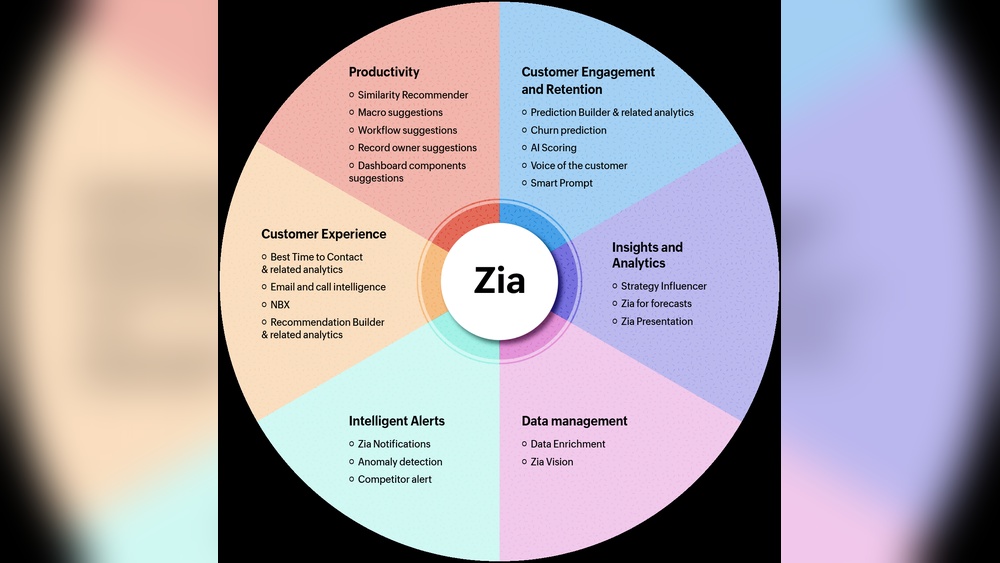
Zoho Zia Predictive Sales Forecasting: Boost Your Revenue Now
Zoho Zia Predictive Sales Forecasting: A Complete Guide
Sales forecasting is one of the most important, yet challenging, parts of running a business. Knowing how much you’re likely to sell helps you plan inventory, manage cash flow, and set realistic targets. But traditional sales forecasting often relies on guesswork or old spreadsheets. In the modern digital world, this isn’t enough. That’s where Zoho Zia Predictive Sales Forecasting comes in.
Zoho Zia is an AI-powered assistant built into Zoho CRM. It’s designed to help sales teams work smarter, not just harder. With predictive sales forecasting, Zia takes your CRM data and uses machine learning to predict future sales with impressive accuracy.
This means more confidence in your pipeline and fewer surprises at the end of the quarter.
This article explores how Zoho Zia Predictive Sales Forecasting works, its main benefits, and how businesses can use it to get ahead of their competition. Whether you’re already using Zoho CRM or just want to understand how AI can change sales forecasting, you’ll find clear explanations, real examples, and expert insights here.
What Is Zoho Zia Predictive Sales Forecasting?
Zoho Zia Predictive Sales Forecasting is an advanced tool inside Zoho CRM. Zia uses artificial intelligence and machine learning to analyze your existing sales data. It then predicts what your sales figures will be in the future, based on the patterns it finds.
This isn’t just about looking at past numbers. Zia considers things like:
- The stage of each deal in your pipeline
- Historical trends for each sales rep or team
- The size and industry of each customer
- Seasonality and other outside factors
Zia’s predictions get better over time as it “learns” from more data. That means your forecasts become more accurate the longer you use Zoho CRM.
How Does Zia’s Predictive Sales Forecasting Work?
At its core, Zia uses machine learning algorithms to spot patterns and trends that humans often miss. Here’s how the process works:
1. Data Collection
Zia gathers data from all your CRM activities. This includes leads, deals, sales calls, emails, and even lost opportunities.
2. Data Cleaning And Preparation
Not all data is useful. Zia filters out incomplete or irrelevant information, focusing only on what matters for accurate forecasts.
3. Pattern Recognition
Zia looks at which types of deals are likely to close, how long sales cycles usually take, and which reps or teams hit their numbers.
4. Prediction Modeling
The AI builds models based on all this information. It then predicts likely sales outcomes for each deal and for your overall pipeline.
5. Continuous Learning
Zia keeps learning from new data. If your market changes, or your sales process improves, Zia’s predictions adjust automatically.
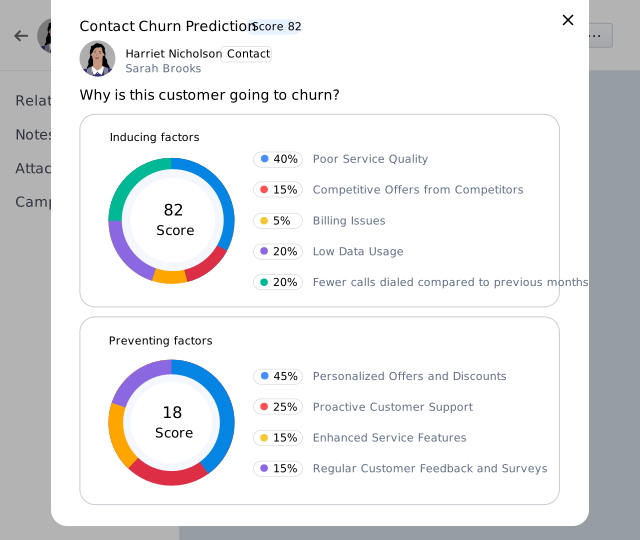
Zia also highlights deals that may be at risk, giving you time to take action before it’s too late. This is a huge advantage over static forecasting methods.
Credit: www.zoho.com
Key Features Of Zoho Zia Predictive Sales Forecasting
Zoho Zia offers several features that make sales forecasting both smarter and easier. Here are the ones you’ll notice right away:
Ai-driven Forecasts
Unlike traditional methods, Zia uses AI-driven analysis. This means it looks at much more than simple totals or averages.
Deal-level Predictions
Zia doesn’t just predict overall revenue. It also predicts the outcome of each individual deal, showing the likelihood of winning or losing.
Forecast Categories
Zia groups deals into categories like Best Case, Committed, and Pipeline. This helps you understand where your numbers are strong and where you need to focus.
Visual Dashboards
You get clear, interactive charts that show your sales forecast in real time. These dashboards are customizable and easy to share with your team.
Sales Rep And Team Forecasts
Zia can break down forecasts by individual rep, team, product, or region. This makes it easy to spot who is performing well and who needs support.
Anomaly Detection
If something unusual happens—like a sudden drop in pipeline activity—Zia alerts you. This helps you catch problems early.
Integration With Zoho Crm
Zia works directly inside Zoho CRM. No need for extra tools or complex setups. Your forecasts update automatically as your CRM data changes.
Customization
You can adjust how Zia weighs different factors. For example, you might want to give more importance to deal size or sales stage. Zia can be tuned to fit your unique business.
Real-world Example: How Zia Changes Forecasting
Consider a mid-sized software company using Zoho CRM. Before Zia, their sales manager spent hours each month updating spreadsheets. Forecasts were often off by 20–30%. After switching to Zia Predictive Sales Forecasting:
- The manager spends less than an hour per week reviewing forecasts.
- Forecast accuracy improved to within 7% of actual results.
- The team now catches “at-risk” deals early and can intervene.
- Sales reps understand their pipeline better and set smarter goals.
This is not just theory. Many Zoho CRM users report similar results, with less time wasted on admin and more focus on closing deals.
Why Accurate Sales Forecasting Matters
Getting your sales forecast wrong can lead to serious problems. Overestimate, and you may end up with too much inventory or wasted marketing spend. Underestimate, and you could run out of stock or miss opportunities.
Accurate forecasting helps you:
- Plan hiring and resources with confidence
- Manage cash flow more effectively
- Align sales and marketing activities
- Set realistic targets for sales reps
- Avoid surprises that upset senior management or investors
AI-powered forecasting goes beyond what even the best sales manager can do with spreadsheets. It can spot subtle trends and risks that are easy to miss when you’re busy with day-to-day work.
Comparing Zia To Traditional Sales Forecasting
It’s useful to see how Zia’s approach compares to older forecasting methods. Here’s a side-by-side look:
| Feature | Traditional Forecasting | Zia Predictive Forecasting |
|---|---|---|
| Data Source | Manual entry, spreadsheets | Real-time CRM data |
| Accuracy | Subject to human error, bias | AI-based, continuously improving |
| Deal-Level Insights | Rarely available | Always available |
| Anomaly Alerts | No | Yes |
| Time to Update | Slow, manual | Instant, automatic |
The main advantage is speed and accuracy. Zia reduces manual work and the risk of human mistakes, while providing deeper insights.
Credit: www.zoho.com
Setting Up Zia Predictive Sales Forecasting In Zoho Crm
Getting started with Zia is straightforward, but there are a few steps to ensure you get the best results.
1. Clean Your Crm Data
Zia’s predictions are only as good as the data you feed it. Make sure your CRM data is up to date:
- Remove duplicate or fake leads
- Fill in missing fields (like deal value, close date, etc.)
- Close old deals that are no longer active
2. Activate Zia In Zoho Crm
Zia is available in most Zoho CRM paid editions. You may need admin access to enable it. Go to the Setup menu, find “Zia,” and turn on predictive sales forecasting.
3. Configure Your Forecasting Preferences
Decide how you want forecasts to be grouped (by rep, team, product, or region). Set your fiscal year, quotas, and any custom categories.
4. Train Zia With Historical Data
The more historical data you have, the better. Zia typically needs at least 6–12 months of sales data to make accurate predictions. If you’ve just started with Zoho CRM, consider importing past sales records.
5. Review And Refine
Once Zia is running, review its predictions regularly. If something feels off, check your data quality or adjust Zia’s weighting for different factors.
6. Share Insights With Your Team
Use Zia’s dashboards to keep everyone on the same page. Encourage sales reps to check their individual forecasts and take action on at-risk deals.
Practical Tips For Using Zia Effectively
Even the best AI tool won’t help if your team doesn’t use it well. Here are proven tips for making the most of Zia:
- Regularly update CRM data – Make it a habit for reps to log every call, meeting, and deal update.
- Hold forecast review meetings – Use Zia’s predictions as the starting point for team discussions.
- Act on Zia’s alerts – When Zia flags a deal as “at risk,” investigate quickly. These early warnings are valuable.
- Customize for your sales process – Every business is different. Adjust the way Zia weighs deal stages or other factors.
- Monitor forecast accuracy – Compare Zia’s predictions to actual results. If there’s a big gap, look for data issues or market changes.
A common mistake is to “set and forget” AI tools. The best results come from ongoing review and team involvement.
What Data Does Zia Use For Predictions?
Zia pulls from all the information in your Zoho CRM. Here are some of the main data points:
- Deal stage (e.g., Prospecting, Negotiation, Closed Won/Lost)
- Deal size and expected close date
- Sales rep activity (calls, meetings, emails)
- Lead source (how the prospect found you)
- Customer industry and company size
- Past win/loss rates for similar deals
- Time spent in each sales stage
The more complete your data, the smarter Zia’s predictions become. Even small details—like how quickly a rep follows up—can influence the forecast.
The Science Behind Zia’s Ai
Zia uses several machine learning techniques, including:
- Regression analysis – to predict deal values and close dates
- Classification algorithms – to sort deals into “likely to win” or “at risk”
- Time series modeling – to handle seasonality and trends over time
Zia’s models are trained on your company’s data, not just general industry data. This means the forecasts are tailored to your specific business, market, and team.
Credit: help.zoho.com
Dealing With Forecast Uncertainty
No forecasting tool is perfect. Economic changes, new competitors, or sudden big deals can throw off even the best AI. Zia handles this by:
- Showing a confidence range for each forecast (e.g., 80% chance of hitting $1.2M in sales)
- Highlighting deals or trends that look unusual
- Learning from new data so predictions get better over time
Smart sales leaders use Zia as a guide, not a guarantee. It’s a tool to drive better decisions, not a crystal ball.
Benefits Of Using Zia Predictive Sales Forecasting
The advantages go far beyond simple number-crunching. Here are the biggest benefits:
Increased Forecast Accuracy
Zia’s AI models reduce human error and bias. Many companies see their forecast accuracy improve by 10–25% after switching from spreadsheets.
Time Savings
Sales managers save hours each week by not having to update or check spreadsheets. Reps can focus on selling, not admin work.
Early Warning On At-risk Deals
Zia flags deals that are likely to slip or be lost, giving you time to act.
Better Resource Planning
With more reliable forecasts, you can plan inventory, hiring, and marketing spend with confidence.
Improved Team Accountability
Breakdowns by rep or team make it clear who is performing and who needs help.
Data-driven Coaching
Managers can use Zia’s insights to coach reps on where to focus their efforts.
Real-time Insights
Forecasts update automatically as new data comes in, so you’re always looking at the latest picture.
Two Common Misconceptions About Predictive Sales Forecasting
Many beginners assume:
1. Ai Can Replace All Human Judgment.
In reality, Zia is a powerful assistant, but it works best when combined with human experience. Sales managers still need to review forecasts, understand market context, and make strategic calls.
2. The More Data, The Better—no Matter The Quality.
Feeding Zia lots of old or inaccurate data can actually hurt your forecasts. It’s better to have less data that’s clean and well-organized than a huge, messy dataset.
Potential Drawbacks And Limitations
No tool is perfect. Here are some things to consider before relying fully on Zia:
- Needs good data. If your CRM is filled with errors or missing information, predictions will be off.
- May require training. Teams used to spreadsheets might need time to trust and use the AI tools.
- Complex sales cycles. For very long or unpredictable sales cycles, forecasts can be less reliable.
- Not a full BI tool. Zia is focused on sales forecasting, not on every aspect of business analytics.
Still, for most small and medium businesses, the benefits greatly outweigh these challenges.
Comparison: Zia Vs. Other Predictive Sales Tools
Zoho Zia isn’t the only AI tool out there. How does it stack up against other popular options? Here’s a quick look:
| Feature | Zoho Zia | Salesforce Einstein | HubSpot Forecasting |
|---|---|---|---|
| Works inside CRM | Yes (Zoho CRM) | Yes (Salesforce CRM) | Yes (HubSpot CRM) |
| AI-Driven Insights | Yes | Yes | Basic |
| Customizable Models | Yes | Yes | No |
| Deal-Level Predictions | Yes | Yes | No |
| Price | Affordable | High | Mid-range |
| Best For | SMBs, Zoho users | Enterprises | SMBs |
Zia stands out for its balance of power, ease of use, and cost—especially for small and mid-sized companies already using Zoho CRM.
Case Study: Improving Sales Pipeline Accuracy
A large distribution company was struggling with missed sales targets. Their old method was a weekly spreadsheet, filled by each rep. Errors and delays were common. After switching to Zoho Zia Predictive Sales Forecasting:
- Pipeline accuracy improved from 65% to 90% within 6 months.
- The company caught a $200,000 deal at risk and saved it with quick action.
- Managers spent 40% less time on admin, focusing more on coaching.
This real-world example shows the practical value of predictive forecasting.
Security And Privacy With Zia
Data security is a top concern for any business. Zoho is known for strong security features:
- Data encryption at rest and in transit
- User access controls so only authorized staff see forecasts
- Compliant with GDPR and other privacy laws
Your CRM data stays private and is not shared outside your organization. For more details, you can review Zoho’s official privacy documentation or visit their Security and Privacy Center.
Integration With Other Zoho Apps And Third-party Tools
Zia works best inside the Zoho ecosystem, but it can also integrate with other apps:
- Zoho Analytics for deeper business intelligence
- Zoho Books for connecting sales and finance
- Email, chat, and phone integrations to track all customer interactions
For businesses using tools like Slack, Google Workspace, or Office 365, Zoho CRM offers connectors that keep everything in sync.
How Zia Handles Seasonality And Market Changes
One of Zia’s advanced features is its ability to spot seasonal trends. For example, if your sales usually spike in December, Zia will factor this into the forecast. If there’s a sudden dip in activity (maybe from a market downturn), Zia can adjust its predictions automatically.
This is a big upgrade from static spreadsheets, which can’t “see” these patterns without lots of manual work.
How To Train Your Team To Use Zia
Adopting new technology is easier when your team understands the benefits. Here are steps to get everyone on board:
- Run a live demo showing Zia’s dashboards and predictions.
- Explain the “why” – how AI forecasts save time, reduce surprises, and help reps hit their targets.
- Hold Q&A sessions so reps can ask questions and share concerns.
- Set clear expectations for updating CRM data.
- Celebrate wins – When Zia helps catch a risk or hits an accurate forecast, share the success.
Change management is key. Even the best AI won’t help if your team ignores its insights.
Common Mistakes When Using Predictive Sales Forecasting
Many businesses make similar errors at first. Here’s what to avoid:
- Ignoring data quality. Outdated or incomplete records will lead to poor forecasts.
- Not acting on insights. Zia’s alerts are only helpful if you follow up.
- Relying on a single metric. Look at the full picture, not just top-line numbers.
- Failing to customize. Default settings may not fit your sales process—take time to adjust Zia’s preferences.
Learning from these mistakes helps you get the most value from predictive sales forecasting.
Future Trends: Where Is Predictive Sales Forecasting Going?
AI in sales forecasting is moving fast. Here’s what’s coming next:
- Deeper integration with marketing data. Future AI tools will connect sales and marketing for even better forecasts.
- Natural language queries. Soon, you may be able to ask Zia questions like, “What’s the chance we’ll hit quota this quarter?” and get instant answers.
- Predictive coaching. Not just showing forecasts, but recommending next actions for each rep.
- Industry benchmarks. Comparing your pipeline to similar companies to spot gaps and opportunities.
Staying ahead means adopting these tools early and continuing to improve your processes.
Frequently Asked Questions
What Is Zoho Zia Predictive Sales Forecasting?
It’s an AI-powered tool inside Zoho CRM that predicts future sales based on your company’s real CRM data. Zia uses machine learning to analyze deals, sales activities, and trends, then provides highly accurate sales forecasts.
How Accurate Are Zia’s Sales Forecasts?
Zia’s accuracy depends on the quality of your CRM data and how much historical data you have. Most users see a 10–25% improvement in forecast accuracy compared to manual methods. The longer you use Zia, the better it gets.
Do I Need To Be A Data Scientist To Use Zia?
No. Zia is designed for regular sales teams. Setup is easy, and the dashboards are user-friendly. However, you should invest time in cleaning your data and training your team to use the forecasts effectively.
Can Zia Predictive Sales Forecasting Handle Complex Or Long Sales Cycles?
Yes, but with limits. Zia works best when you have enough data and clear sales stages. For very complex, multi-year deals, forecasts may be less precise, so it’s important to combine AI predictions with human judgment.
Is My Data Safe With Zia And Zoho Crm?
Yes. Zoho takes data security seriously, using encryption, access controls, and compliance with global privacy laws. Your sales data is not shared outside your company.
Adopting AI tools like Zoho Zia Predictive Sales Forecasting is no longer just for big enterprises. Even small and mid-sized businesses can now enjoy accurate, real-time sales predictions. With Zia, you get the power of artificial intelligence in a tool that’s easy to use and fits right into your existing workflow.
This means less time spent worrying about “what might happen”—and more time closing deals and growing your business.


About author









Add comment