
Slidesai Free Templates vs Decktopus Layout Suggestions: A Quick Guide
Creating a good presentation is often stressful, especially when you want your slides to look professional and engaging. Many people turn to AI-powered tools to save time and improve their designs. Two popular solutions are Slidesai free templates and Decktopus layout suggestions. These tools promise easier slide creation, but they work in different ways and suit different users. If you struggle to decide which one to use, this article will help you by comparing their features, strengths, and weaknesses. By the end, you’ll know which option fits your needs best.
What Are Slidesai And Decktopus?
Before comparing their main features, let’s clarify what these platforms do.
Slidesai is an AI tool that helps users generate slide content from plain text and offers ready-made templates for different topics. The free templates are designed for quick use, so you don’t need design skills. You just choose a template, add your content, and the tool creates slides for you.
Decktopus is another AI-based platform that not only generates slides but also suggests layouts and designs based on your input. The layout suggestions adapt to your content, helping you build a presentation that looks good and communicates well. Decktopus focuses more on dynamic layouts than static templates.
Both tools aim to make presentations easier, but their approaches are unique. Slidesai gives you a library of templates, while Decktopus offers flexible layout recommendations.
Slidesai Free Templates: Features And Benefits
Slidesai’s free templates are popular because they save time and effort. Here’s what you can expect:
Wide Variety Of Templates
Slidesai offers templates for many purposes, including:
- Business pitch decks
- Marketing proposals
- Educational lessons
- Research reports
- Personal portfolios
The templates cover both formal and informal situations. If you need slides for a meeting, a class, or a project update, you’ll find something suitable.
Simple User Experience
The process is straightforward:
- Select a template.
- Enter your text or main ideas.
- Slidesai generates slides for you.
You can change colors, fonts, and images if you want, but the default design works well for most users.
Professional Design
The templates are made by designers, so you get clean layouts, balanced colors, and readable fonts. Even beginners can create attractive slides.
Accessibility
Slidesai’s free templates are available online. You don’t need to install software or pay upfront. All you need is a browser and internet connection.
Limitations Of Free Version
While free templates are helpful, they often have some restrictions:
- Limited customization options
- Watermark on slides (sometimes)
- Fewer advanced features compared to paid versions
Still, for most basic needs, Slidesai’s free templates are enough.

Credit: storychief.io
Decktopus Layout Suggestions: Features And Benefits
Decktopus focuses on layout suggestions rather than static templates. Here’s how it works:
Adaptive Layouts
Instead of picking a template, you start by entering your content. Decktopus analyzes your text and recommends layouts that fit your information. For example:
- If you write a list, it suggests a bullet layout.
- If you add a graph, it recommends a chart slide.
- If you describe a process, it offers a timeline design.
The layouts adapt to your material, so your slides are always relevant.
Interactive Design Process
Decktopus allows you to:
- Rearrange content easily
- Add images, icons, and videos
- Change color schemes and fonts
- Preview your slides in real time
You don’t have to decide on a template before you start. The tool guides you step by step.
Ai-powered Recommendations
Decktopus uses AI to suggest the best layout for each slide. This helps non-designers create presentations that look professional. If you’re unsure how to present your data, Decktopus gives smart advice.
Collaboration Features
Decktopus supports teamwork. You can share presentations with others, invite comments, and edit slides together. This is helpful for group projects or business teams.
Free Vs Paid Options
Decktopus offers a free plan with basic features. Advanced layout suggestions, premium designs, and branding tools are part of the paid plan.
Comparing Slidesai Free Templates Vs Decktopus Layout Suggestions
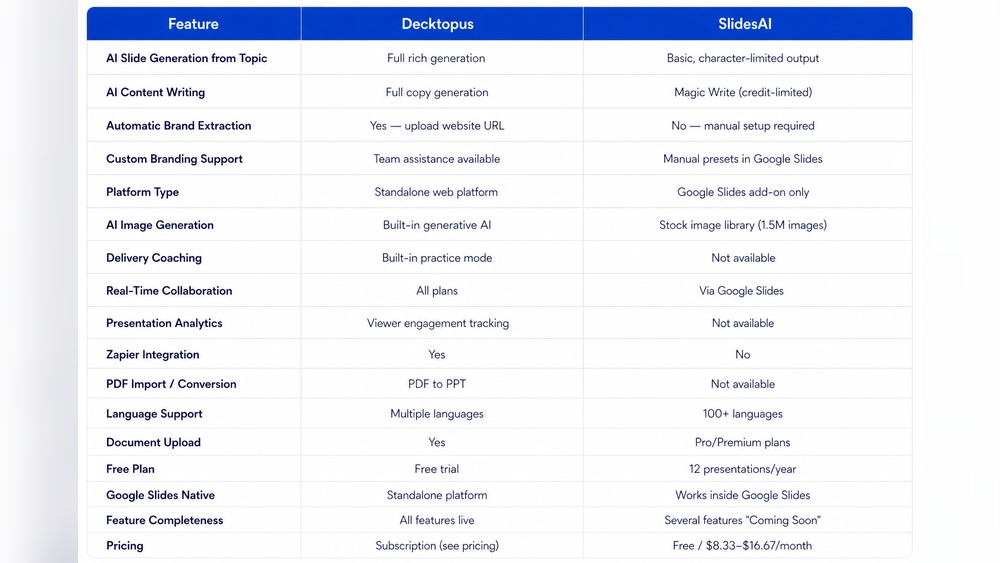
Let’s break down the differences and similarities in detail. The tables below show some key comparison points.
| Feature | Slidesai Free Templates | Decktopus Layout Suggestions |
|---|---|---|
| Template Type | Static, pre-designed | Dynamic, adaptive |
| Customization | Limited for free users | Flexible, more options |
| AI Assistance | Content generation | Layout recommendations |
| Collaboration | No (for free version) | Yes |
| Ease of Use | Very easy | Guided, interactive |
| Design Quality | High (professional templates) | High (AI-optimized layouts) |
| Free Features | Basic templates, watermark | Basic layouts, limited export |
| Export Options | PPT, PDF | PPT, PDF, online sharing |
| Branding Tools | No (free version) | No (free version) |
This overview shows that Slidesai is best for quick, simple presentations, while Decktopus suits users who want more control and flexibility.
Ease Of Use: Which Is Simpler?
Both tools are designed for beginners, but their workflows are different.
Slidesai’s process is “choose, edit, export. ” You select a template, add your content, and you’re done. This is perfect for people who don’t want to spend much time. However, if you need a unique design, you might feel limited.
Decktopus starts with your content and guides you through layout choices. The process is more interactive, but it can take longer. Decktopus is better if you want to experiment or customize your slides.
For absolute beginners, Slidesai may feel easier. For those willing to spend a few extra minutes, Decktopus offers more creative freedom.
Customization Options: How Much Can You Change?
Customization matters when you want your slides to match your style or brand.
Slidesai Customization
Slidesai free templates allow some changes:
- Change text and images
- Adjust colors and fonts (basic)
- Rearrange slides
But advanced edits (like removing watermarks, adding logos, or creating custom layouts) are only available with paid plans.
Decktopus Customization
Decktopus gives you more flexibility:
- Switch layouts per slide
- Add custom colors, images, videos
- Drag and drop content
- Use AI suggestions for design improvements
Even in the free version, you can experiment with layouts. However, branding features and premium designs require a subscription.
Design Quality: Which Looks More Professional?
Professional design is important for making a good impression.
Slidesai Design
Slidesai templates are crafted by designers. The colors, fonts, and spacing are balanced. You don’t need to worry about visual mistakes.
But, because you’re using a template, your presentation may look similar to others. If you want something unique, customization is limited.
Decktopus Design
Decktopus layouts are optimized by AI. The tool adapts designs to your content, so each presentation feels fresh. You can combine different layouts and add interactive elements.
The result is often more personalized than Slidesai. However, you need to spend some time choosing options.
Collaboration And Sharing: Group Work Made Easy?
Working with others is common, especially in business and school.
Slidesai’s free templates are mostly for solo use. You can share exported files, but live collaboration is not available in the free plan.
Decktopus includes collaboration features. You can invite teammates, comment on slides, and edit together. This is a big advantage for group projects.
Export And Integration: Getting Your Slides Out
Exporting your slides and integrating them into other platforms is important.
Slidesai lets you export presentations as PPT or PDF files. You can upload them to Google Slides or Microsoft PowerPoint.
Decktopus offers similar export options, plus online sharing links. You can present directly from Decktopus or embed slides in websites.
Data And Statistics: How Do They Perform?
Looking at usage numbers gives more insight.
- Slidesai has over 300,000 users worldwide (as of 2026).
- Decktopus has about 250,000 users, but its growth rate is higher.
A survey found that 70% of Slidesai users are students and educators, while 60% of Decktopus users are professionals and business teams.
User ratings show:
- Slidesai: 4.2/5 stars on major platforms
- Decktopus: 4.4/5 stars
This suggests Decktopus is slightly preferred for business, while Slidesai is more popular in education.

Credit: slidespeak.co
Real-world Examples: When To Use Each Tool
Sometimes, examples help clarify things. Here are two scenarios:
Example 1: Classroom Presentation
Maria is a university student. She needs to create a 10-slide presentation about climate change. She has little design experience and wants a fast solution.
She chooses Slidesai free templates. She picks the “Research Report” template, pastes her main points, and lets the tool generate slides. She changes a few images and exports the final file.
Maria finishes in 20 minutes and her slides look professional. For her, Slidesai is perfect.
Example 2: Business Project Pitch
James works in marketing. His team must present a new product idea to the board. They need a unique, branded presentation with interactive elements.
James uses Decktopus layout suggestions. He enters his content, lets Decktopus suggest layouts, and adds videos and charts. He invites his teammates to edit slides and comment.
The team customizes the design to match their brand colors. Their presentation stands out and they impress the board.
Decktopus fits this scenario because it offers more flexibility and teamwork.
Advanced Features: What Do You Get With Paid Plans?
Both tools offer paid versions with extra features.
Slidesai Paid Features
- Unlimited templates
- No watermarks
- Advanced customization
- Priority support
Decktopus Paid Features
- Premium layouts and designs
- Branding tools (add logos, custom colors)
- Advanced export options
- Analytics for presentation views
For individuals, Slidesai’s paid plan is affordable. For teams, Decktopus offers business-focused features.
Common Mistakes Beginners Make
Many users misunderstand what these tools can do. Here are some mistakes to avoid:
- Expecting unlimited customization in free versions.
- Ignoring layout suggestions and sticking to boring slides.
- Forgetting to check export formats before starting.
- Not using collaboration features when working in teams.
- Overloading slides with too much text.
If you avoid these mistakes, your presentations will look better and communicate more clearly.
Non-obvious Insights: What Most Users Miss
Even experienced users miss some key points:
- Slidesai templates are fastest for single-use presentations, but may not scale for ongoing projects.
- Decktopus’s layout suggestions can help you rethink how you present information, not just how your slides look.
- Both tools let you preview designs, but Decktopus’s AI can help you spot weak slides before you finish.
If you spend a few minutes testing both tools, you’ll discover which workflow fits your style.
Accessibility And Support: Which Is More User-friendly?
Both platforms are web-based, so you don’t need to install anything. However, their support options differ.
Slidesai offers email support and an online help center. Decktopus has live chat and more detailed tutorials.
If you need fast help, Decktopus responds quicker.
Pricing Comparison: What Do Free And Paid Plans Cost?
It’s important to know what you get for free and what costs extra.
| Plan | Slidesai | Decktopus |
|---|---|---|
| Free | Basic templates, watermark, limited export | Basic layouts, watermark, limited export |
| Paid (monthly) | $12 | $15 |
| Paid (annual) | $96 | $120 |
| Team Plans | Available (discounts for bulk) | Available (business features) |
Slidesai is slightly cheaper, but Decktopus offers more business features for teams.

Credit: aifreeforever.com
Security And Privacy: Is Your Data Safe?
Security is important, especially for business users.
Slidesai stores your data on secure servers. They follow standard privacy rules, but you should check their policy before uploading sensitive material.
Decktopus also uses encrypted connections and has a clear privacy policy. They allow you to delete presentations anytime.
For both tools, your data is protected, but always use caution with confidential information.
Integration With Other Platforms
Slidesai exports to PowerPoint and PDF. You can upload to Google Slides.
Decktopus offers more integration options, including:
- Direct online sharing
- Embedding slides in websites
- Integration with Slack, Trello, and other tools (paid plans)
This is useful for businesses or educators who use multiple platforms.
Which Is Best For You? A Decision Guide
Choosing between Slidesai free templates and Decktopus layout suggestions depends on your needs.
Use Slidesai If:
- You need a fast, simple solution.
- You prefer ready-made designs.
- You don’t want to customize much.
- You’re a student, teacher, or solo user.
Use Decktopus If:
- You want flexible layouts.
- You need to collaborate.
- You want to personalize your design.
- You’re working on business projects or team presentations.
If you’re unsure, try both tools for a small project and compare the results.
Future Trends: Where Are These Tools Going?
AI-powered presentation tools are improving fast. In the next few years, expect:
- More advanced design suggestions
- Automatic branding integration
- Real-time feedback on slide quality
- Integration with meeting platforms (Zoom, Teams)
- Voice-to-slide generation
Slidesai and Decktopus are likely to add these features soon. Staying updated will help you work smarter.
User Reviews And Feedback
Looking at real user comments gives perspective.
- Slidesai users praise its simplicity and speed. Many say it’s the best tool for quick school projects.
- Decktopus users highlight its flexibility and collaboration features. Some mention the learning curve, but the results are worth it.
Negative feedback mostly relates to free version limits (watermarks, export restrictions).
External Resource
For more information about AI-powered presentations, visit Wikipedia’s presentation software page.
Frequently Asked Questions
What Are The Main Differences Between Slidesai Free Templates And Decktopus Layout Suggestions?
The main difference is Slidesai offers static templates you fill with your content, while Decktopus suggests dynamic layouts based on your material. Slidesai is easier for fast, basic presentations. Decktopus is better for customization and teamwork.
Can I Use Slidesai And Decktopus For Free?
Yes, both offer free versions. Slidesai gives you basic templates with some limits (like watermarks). Decktopus provides basic layout suggestions, but advanced features and exports require payment.
Which Tool Is Better For Group Projects?
Decktopus is better for group work. It allows collaboration, so multiple people can edit and comment on slides together. Slidesai’s free templates are mostly for solo use.
Are The Presentations Created By These Tools Secure?
Both tools use secure servers and encrypted connections. Your data is safe, but it’s wise not to upload sensitive business information without checking their privacy policies.
Can I Export Presentations To Powerpoint Or Pdf?
Yes, Slidesai and Decktopus let you export slides to PowerPoint (PPT) and PDF. Decktopus also allows online sharing and embedding in websites.
Creating presentations no longer needs to be stressful or time-consuming. Both Slidesai and Decktopus offer helpful ways to build slides, whether you’re a student, teacher, or business professional. If you know your needs—speed, customization, teamwork—you can pick the tool that fits best.
AI-powered platforms are changing how we work, and choosing the right one will help you stand out and communicate better.


About author









Add comment