
Pipedrive Smart CRM AI Features: Boost Sales Productivity Fast
Pipedrive Smart CRM AI Features: The Modern Guide to Smarter Sales
Every business wants to close more deals and manage customers better. But as your company grows, old tools and manual processes can slow you down. That’s where Pipedrive Smart CRM AI features step in. These tools use artificial intelligence to make your sales team faster, smarter, and more productive.
If you’ve ever felt lost in your sales pipeline, struggled to keep up with leads, or wondered where your next big deal will come from, Pipedrive’s AI-powered features can help. They’re built for real users—sales reps, managers, and small business owners who need clear, simple ways to work smarter, not harder.
In this guide, you’ll discover how Pipedrive’s Smart CRM AI features work, which tools matter most, and how they change your daily sales workflow. You’ll see real examples, practical advice, and even what most beginners overlook. By the end, you’ll know exactly how to use these features to close more deals, save time, and grow your business.
What Makes Pipedrive A Smart Crm?
To understand Pipedrive’s smart features, it helps to know what a Smart CRM really is. Traditional CRMs (Customer Relationship Management tools) are like digital notebooks. They store contact data, notes, and sales tasks. But they don’t think for you.
A Smart CRM uses AI to help you decide what to do next. It looks at your sales data, finds patterns, and gives you suggestions. You get reminders, predictions, and even automation—all based on real sales activity.
Pipedrive started as a simple sales CRM, but today it’s one of the first platforms to add advanced AI for small and medium businesses. The result? Less guesswork, more sales, and better customer relationships.
Core Ai Features In Pipedrive’s Smart Crm
Pipedrive’s Smart CRM offers a mix of built-in AI tools. Each one solves a real sales problem, from managing leads to predicting results. Let’s break down the most important AI-powered features and how they work in practice.
Ai Sales Assistant
The AI Sales Assistant is the heart of Pipedrive’s smart tools. Think of it as your virtual sales coach. It watches your sales activities—calls, emails, deals—and gives you helpful suggestions.
What Can The Ai Sales Assistant Do?
- Personalized tips: It notices if you haven’t followed up with a lead or if a deal is moving slowly. Then it tells you what to do next.
- Reminders: You get alerts about important activities, so you never miss a follow-up.
- Smart recommendations: It suggests which deals need attention, which leads are “hot,” and even when to reach out.
Example: If you have a deal that’s been stuck for weeks, the AI Sales Assistant might remind you to send an email or schedule a meeting. It learns from your habits and gets smarter over time.
Lead And Deal Scoring
Not all leads are equal. Some are ready to buy; others are just browsing. Pipedrive uses AI-based lead scoring to rate each lead and deal by how likely they are to close.
How Does Lead Scoring Work?
- Analyzes past deals: The AI checks which leads became customers and what they had in common.
- Assigns scores: Each lead gets a score (for example, 1–100) based on factors like company size, industry, or deal activity.
- Focus on high-value leads: Sales reps know where to spend time—and who to call first.
This saves hours of guesswork. Instead of calling every lead, you focus on the ones most likely to buy. For beginners, it’s easy to overlook how much time this saves over weeks or months.
Ai-powered Workflow Automation
Manual tasks can waste hours each week. Pipedrive’s AI Workflow Automation turns repetitive work—like sending emails or updating deal stages—into simple, automatic processes.
Key benefits:
- Triggers and actions: Set rules (like “when a deal reaches Stage 3, send a contract email”) and let AI handle the rest.
- Smart suggestions: The system can recommend new automations based on your activity patterns.
- Reduces human error: Important tasks never get missed, and your sales process stays consistent.
Some users miss that you can automate almost anything. For example, after closing a deal, you could trigger an automatic follow-up email, create a new task, and update your CRM—all without lifting a finger.
Ai Email And Communication Tools
Communication is key in sales, but writing and sending emails can take up much of your day. Pipedrive uses AI to streamline this process.
What’s Included?
- Smart email templates: The system learns which emails get responses and suggests content or subject lines.
- AI-generated email replies: Some plans offer automatic draft replies, based on your style and past conversations.
- Email tracking: See who opened your email and when, so you know the best time to follow up.
Many beginners don’t realize that even small changes—like a better subject line—can double your response rates. Pipedrive’s AI helps you test and improve these details.
Predictive Sales Analytics
Pipedrive’s AI analytics help you see the future. Instead of just showing past results, it predicts which deals will close, which reps will hit targets, and where your pipeline needs help.
How Does It Work?
- Pattern recognition: The AI studies your sales data and finds hidden trends.
- Forecasting: Get realistic predictions for next week, month, or quarter.
- Custom reports: See which activities drive results and which bottlenecks slow you down.
For managers, this means better planning. For sales reps, it helps set clear goals and track progress.
Ai-powered Chatbot
The Pipedrive Chatbot uses AI to talk to website visitors, capture leads, and answer basic questions—even when your team is offline.
Main features:
- 24/7 lead capture: Never miss a potential customer, day or night.
- Automatic qualification: The bot asks questions and sorts leads by interest or budget.
- Instant CRM sync: Every chat is logged in Pipedrive, so your team can follow up fast.
A common mistake is to set up a chatbot once and forget about it. The best results come when you review chat transcripts, update questions, and let the AI learn from real conversations.
Data Enrichment And Smart Contact Insights
Sales teams waste time searching for information about leads. Pipedrive’s AI features data enrichment—it fills in missing details like company size, industry, or social media profiles.
How Does It Help?
- Faster research: Get full profiles without leaving the CRM.
- Updated information: The system checks for changes and updates records automatically.
- Deeper insights: Know more about your leads before the first call.
Beginners often overlook how much time is lost on manual research. With smart contact insights, you walk into every meeting prepared.

Credit: solvaa.co.uk
Real-world Example: Pipedrive’s Ai In Daily Sales Workflow
Let’s look at how a typical sales rep uses Pipedrive’s Smart CRM AI features during a normal workday.
- Morning review: The AI Sales Assistant shows a summary of high-priority leads and overdue tasks.
- Email follow-ups: The system suggests which leads to email, offers draft replies, and tracks opens.
- Pipeline updates: Deals move stages automatically when certain actions happen, thanks to workflow automation.
- Lead qualification: The chatbot captures a new website lead overnight, asks qualifying questions, and adds them to the CRM.
- Deal scoring: The rep sees which deals are most likely to close this week and focuses on those.
- End-of-day report: AI-powered analytics predict which deals are at risk and which need more attention.
This daily routine saves hours—and helps reps focus on selling, not admin work.
Comparison: Pipedrive Ai Vs. Other Smart Crms
It’s not enough to know what Pipedrive offers. How does it stack up against other popular Smart CRMs like Salesforce, HubSpot, and Zoho?
Below is a simple comparison:
| Feature | Pipedrive | Salesforce | HubSpot | Zoho CRM |
|---|---|---|---|---|
| AI Sales Assistant | Yes (Built-in) | Einstein AI (Advanced, extra cost) | Basic AI suggestions | Zia AI (Moderate) |
| Lead Scoring | AI-powered, simple UI | Advanced, customizable | Good, but less flexible | Included, less intuitive |
| Workflow Automation | Easy, AI suggestions | Complex, many options | Easy, but manual setup | Moderate, needs setup |
| Email AI Tools | Smart templates, tracking | Available, advanced | Basic templates | Basic |
| Predictive Analytics | Simple, clear | Very powerful | Good, limited depth | Available, basic |
| AI Chatbot | Yes (Add-on) | Yes (Advanced) | Available (Extra) | Included |
What stands out: Pipedrive keeps AI features simple and user-friendly, especially for small businesses. Salesforce and HubSpot have more advanced options, but they’re often harder to set up and can cost much more. Zoho offers a balance, but some tools are less polished.

Credit: www.pipedrive.com
How To Set Up And Get The Most From Pipedrive’s Ai Tools
Getting started with Pipedrive’s Smart CRM AI features is simple, but to get the best results, follow these key steps:
1. Clean Your Data First
AI works best with good data. Before using any smart features, make sure your contacts, deals, and activities are up to date. Remove duplicates, fill in missing fields, and organize your pipeline stages.
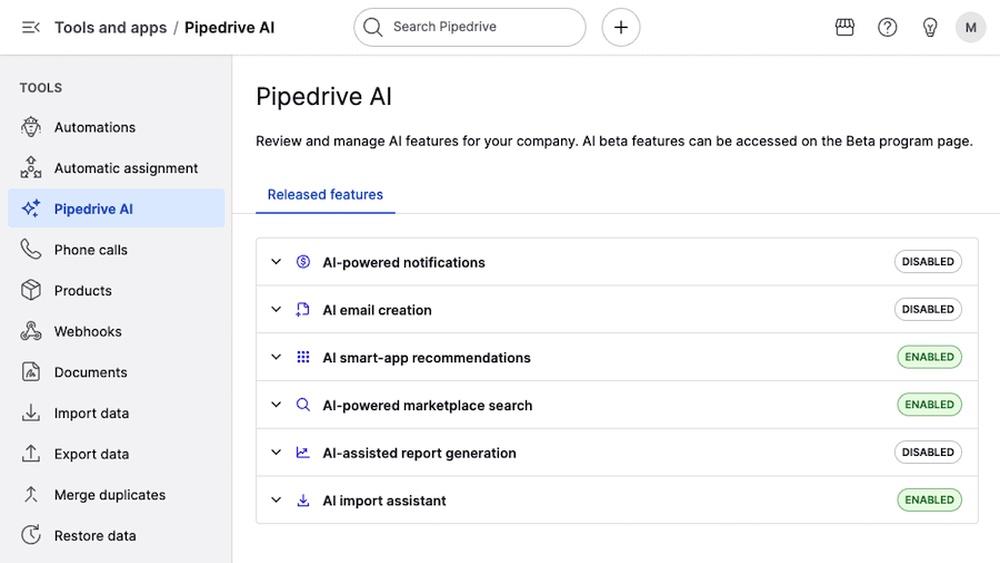
2. Enable Ai Features
In Pipedrive, most AI tools are available on Advanced plans or higher. Check your subscription, and turn on features like the AI Sales Assistant, lead scoring, and workflow automation.
3. Set Clear Sales Stages
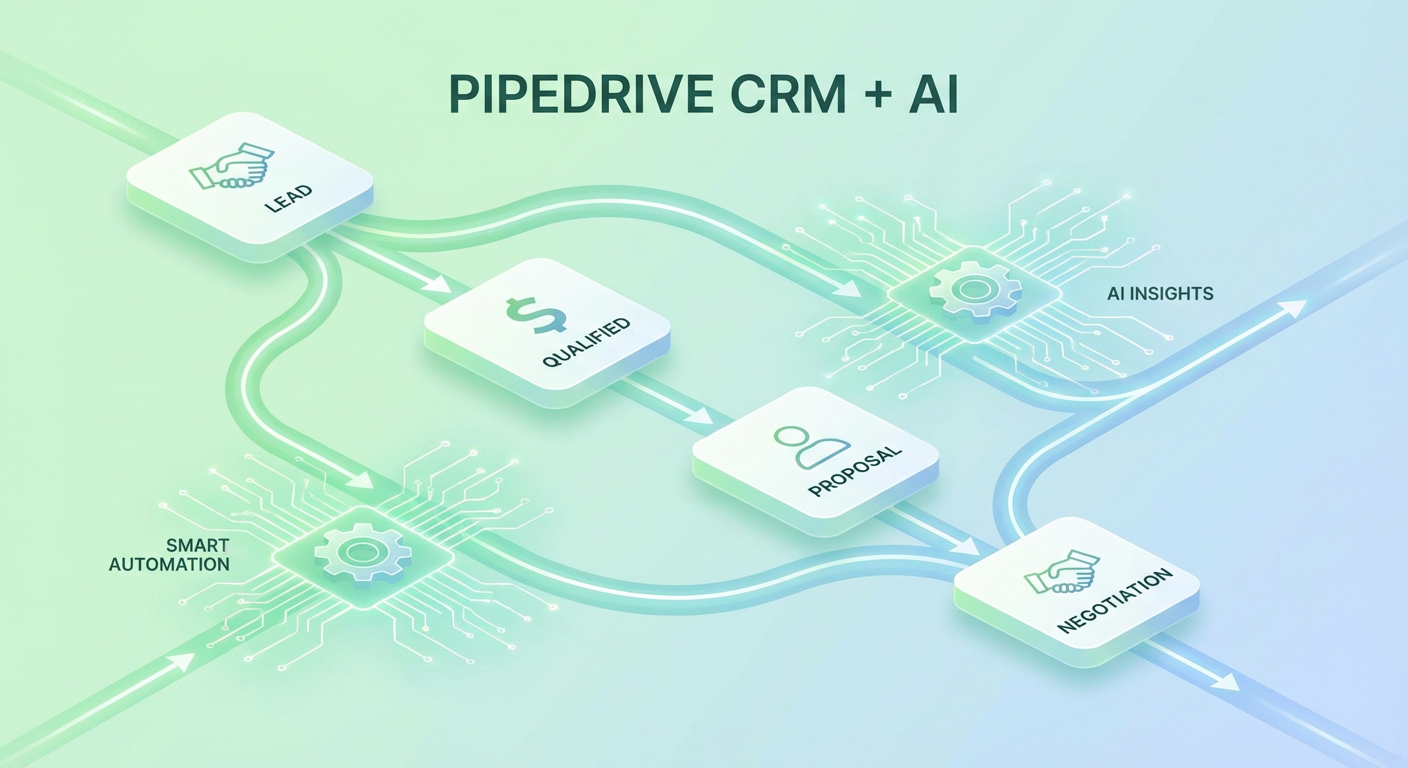
AI can’t help if your sales process is unclear. Map out each stage (for example: New Lead, Qualified, Proposal Sent, Closed Won). This lets Pipedrive’s automation and analytics work correctly.
4. Use Templates And Automations
Start with built-in email templates and workflow automations. Over time, customize these based on your team’s feedback and the AI’s suggestions.
5. Review Ai Suggestions Regularly
Check the AI Sales Assistant’s tips daily. Over time, the system learns from your actions and gives better advice. If you ignore suggestions, you miss out on the real value.
6. Train Your Team
Show your sales team how to use the AI features. Encourage them to log activities, update deals, and follow the assistant’s advice. The more data you add, the smarter the system gets.
7. Measure And Adjust
Use Pipedrive’s analytics to see what’s working. If an automation isn’t helping, tweak it. If deal scoring feels off, adjust your fields or lead sources.
Data Security And Privacy In Ai-powered Crms
With so much information in one place, it’s natural to worry about data security. Pipedrive uses industry-standard encryption to protect your data—both in transit and at rest.
Key points:
- GDPR compliant: Pipedrive follows strict European privacy rules, even if you’re outside the EU.
- User permissions: Control who can see, edit, or delete data.
- Audit logs: Track every change or access for full transparency.
For companies in finance, healthcare, or legal fields, always ask your IT team to review any CRM’s security details before adding sensitive data.
Common Mistakes When Using Pipedrive Ai
Pipedrive’s AI tools are powerful, but some new users make mistakes that limit their value.
- Ignoring AI recommendations: The Sales Assistant gives helpful tips. If you ignore them, you miss the point of smart CRM.
- Poor data quality: Garbage in, garbage out. If your contacts are messy, the AI will make bad suggestions.
- Over-automating: Automation is great, but don’t automate every task. Some deals need a human touch.
- Not reviewing analytics: Predictive tools are only helpful if you check the reports and adjust your strategy.
- Setting and forgetting chatbots: AI bots need regular updates to stay effective. Review transcripts and tweak questions often.
The Impact Of Pipedrive’s Ai On Sales Performance
How much difference do these smart features make? Recent research shows that companies using AI-powered sales tools see:
- Up to 30% more closed deals (source: Pipedrive customer survey, 2026)
- 20–40% less time spent on admin work
- Faster lead response times (often under 10 minutes)
Here’s a quick look at how sales teams feel about AI features in Pipedrive:
| Benefit | Percentage of Users Reporting Improvement |
|---|---|
| Increased deal closure rates | 68% |
| Less time on manual tasks | 74% |
| Better sales forecasting | 62% |
| Improved lead qualification | 59% |
| More accurate reporting | 66% |
For growing businesses, these numbers can mean thousands of dollars in new revenue each year.
Practical Tips To Maximize Your Roi With Pipedrive’s Smart Crm
To get the most from Pipedrive’s AI-powered tools, keep these tips in mind:
- Start small: Try one or two AI features at first. Don’t overwhelm your team.
- Customize to your process: Adjust automations and templates to fit your sales cycle.
- Monitor results: Use analytics to see which AI tools give the best ROI, then double down.
- Combine automation with personal touch: Use AI to handle routine tasks, but always personalize big deals and key communications.
- Stay updated: New AI features are released often. Check Pipedrive’s blog or help center for updates.
Most importantly, remember that AI is a tool—not a magic solution. The best results come when your team combines smart technology with real human effort.
The Future Of Ai In Pipedrive And Sales Crms
AI in CRMs is still growing fast. In the next few years, expect even smarter features in Pipedrive, such as:
- Deeper integration with social media: AI may suggest LinkedIn connections or track important social signals.
- Voice and call analysis: The system could analyze sales calls and suggest improvements.
- Advanced document automation: Automatic contract creation, e-signatures, and follow-up reminders.
- More predictive insights: AI could alert you before a deal goes cold or spot upsell opportunities.
Staying ahead means testing new tools early and giving feedback to the Pipedrive team. As AI gets better, so will your sales results.
Credit: cotera.co
Frequently Asked Questions
What Is The Main Benefit Of Pipedrive’s Smart Crm Ai Features?
The main benefit is increased sales productivity. Pipedrive’s AI tools help you focus on the right leads, automate routine tasks, and make smarter decisions. This leads to more closed deals and less wasted time.
Are Pipedrive’s Ai Features Available On All Plans?
No, many AI-powered features (like the AI Sales Assistant and advanced automation) are only available on higher-tier plans. Check your subscription to see which tools you can access, and consider upgrading if you need more smart features.
Can Pipedrive’s Ai Integrate With Other Tools I Use?
Yes. Pipedrive offers integrations with popular apps like Gmail, Outlook, Slack, and Zapier. You can connect your CRM to marketing tools, invoicing software, and more. For advanced needs, use the API or third-party connectors. Learn more at the Pipedrive Integrations page.
How Secure Is My Data With Pipedrive’s Ai Features?
Pipedrive uses advanced encryption and strong privacy controls. It is GDPR compliant and offers detailed user permissions, so you control who sees your data. Always review security settings before adding sensitive information.
Will Ai Replace Human Sales Reps In The Future?
No. AI in Pipedrive is designed to assist, not replace. It handles repetitive tasks, suggests next steps, and predicts outcomes. But building relationships, negotiating, and closing big deals will always need a human touch.
Pipedrive’s Smart CRM AI features are changing how sales teams work—making it easier to focus on what matters: building relationships and closing deals. By using these tools wisely, you’ll save time, sell smarter, and stay ahead of your competition. If you want to learn more about the future of CRM and AI, check out this Gartner overview. The future of smart selling starts now—are you ready?


About author









Add comment