
How to Design a Pitch Deck Fast Using Gamma App: Step-by-Step Guide
Designing a pitch deck can feel overwhelming, especially when time is short and stakes are high. Whether you’re preparing for investors, partners, or a new client, your presentation needs to look polished, tell a compelling story, and be easy to understand. Traditionally, this meant hours spent on PowerPoint or Google Slides, tweaking every slide and worrying about design. But today, apps like Gamma are changing the process. Gamma uses AI and smart templates to make pitch deck creation fast, professional, and simple—even for people who aren’t designers.
This guide walks you through how to use Gamma App to design a pitch deck quickly, without sacrificing quality. You’ll learn step-by-step how to structure your deck, add content, and use Gamma’s features to save time. We’ll also cover tips that beginners often miss, common mistakes, and real examples.
If you want to impress your audience and move fast, this article is for you.
Why Gamma App Is Ideal For Fast Pitch Decks
Gamma is not just another slide tool. It’s a modern platform built for speed and ease. Unlike traditional software, Gamma uses AI to help you create slides, organize ideas, and improve design automatically. Here are some reasons why Gamma stands out:
- AI-powered slide creation: You type your ideas, Gamma turns them into slides.
- Smart templates: Professional layouts for pitch decks, reports, and more.
- Collaboration tools: Work with teammates in real-time.
- Easy media integration: Add images, charts, and videos in seconds.
- Responsive design: Decks look great on any device.
Many startups, consultants, and business teams now use Gamma to cut hours from deck creation. According to Gamma’s own data, users report completing decks 60% faster than using PowerPoint or Google Slides.
Real Example: Startup Pitch Deck
A fintech startup needed to create a new investor deck under tight deadlines. Using Gamma, the team built a full presentation (15 slides) in less than 2 hours. The deck included custom branding, charts, and clear story flow. Investors commented on its clarity and visual impact.
Planning Your Pitch Deck: What To Include
Before opening Gamma, it’s important to plan your deck. A good pitch deck tells a story, highlights your strengths, and answers key questions for your audience.
Typical Pitch Deck Structure
Most successful pitch decks include these sections:
- Title slide: Company name, logo, tagline.
- Problem: What issue are you solving?
- Solution: How does your product solve it?
- Market: Size, growth, and opportunity.
- Product: Features, demos, screenshots.
- Business model: How do you make money?
- Traction: Results, users, revenue.
- Competition: How are you different?
- Team: Who’s behind the company?
- Financials: Basic numbers, projections.
- Ask: What do you want from investors?
You can adjust the order or add/remove slides depending on your needs. Gamma offers templates for all these sections.
Common Mistakes When Planning
- Too much text: Slides should be visual and simple.
- Missing story flow: Decks must follow a logical order.
- Ignoring audience needs: Tailor your deck for who will see it.
- Skipping traction or financials: Investors want proof.

Credit: academy.evalcommunity.com
Getting Started: Setting Up Gamma App
Gamma is web-based, so you don’t need to install anything. Just visit the site, sign up, and start creating.
- Go to gamma.app and create an account.
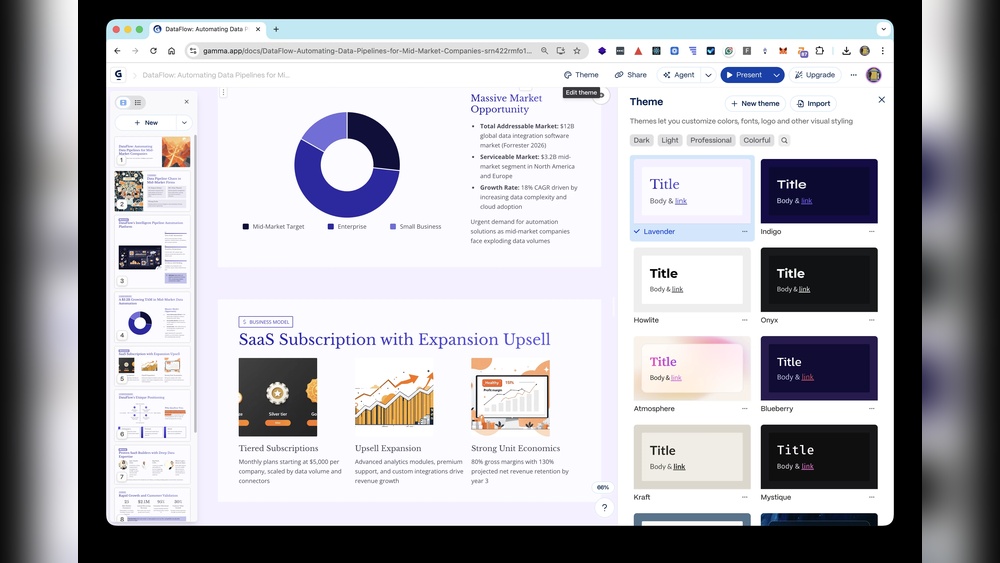
- Click “Create New” and select “Pitch Deck” template.
- Name your project and invite collaborators if needed.
Gamma’s onboarding is quick. You’ll see a blank deck and a sidebar with templates and tools.
Comparing Gamma To Powerpoint And Google Slides
Here’s a quick comparison of Gamma vs. classic tools:
| Feature | Gamma App | PowerPoint | Google Slides |
|---|---|---|---|
| AI Slide Creation | Yes | No | No |
| Templates for Pitch Decks | Modern & built-in | Basic | Basic |
| Real-time Collaboration | Yes | Limited | Yes |
| Mobile Responsive | Automatic | Manual | Manual |
| Fast Media Integration | Easy | Manual | Manual |
| Export Options | PDF, HTML | PDF, PPTX | PDF, PPTX |
Building Slides Quickly With Gamma’s Ai
One of Gamma’s biggest strengths is its AI slide builder. Instead of designing every slide by hand, you type your content and let Gamma create slides for you.
Step-by-step: Creating Slides With Ai
- Click “Add Slide” and choose a section (e.g., Problem, Solution).
- Type your main points or paste your outline.
- Hit “Generate”—Gamma turns your text into formatted slides.
- Review and edit. You can rearrange, add images, or change layout.
Gamma’s AI suggests layouts, headlines, and visuals. If you want to change a slide’s style, click “Remix” and Gamma will offer new designs.
Example: Problem Slide
You type: “Small businesses struggle to manage cash flow. Our app helps them track income and expenses easily.”
Gamma creates a slide with a headline, bullet points, and a relevant image. You can tweak colors and add your logo.
Practical Tips For Fast Slide Creation
- Write in short sentences: Gamma works best with clear, simple text.
- Use bullet points: Avoid large paragraphs.
- Add numbers or stats: AI can highlight data visually.
- Upload images early: Gamma will fit them into slides automatically.
Choosing And Customizing Templates
Gamma offers dozens of pitch deck templates. Each template comes with design elements, color schemes, and layouts optimized for business presentations.
How To Select A Template
- Open the template gallery from the sidebar.
- Filter by “Pitch Deck”, “Startup”, or other relevant tags.
- Preview different templates. Look for ones that match your brand style.
You can change templates anytime, even after you add content. Gamma automatically adjusts your slides to fit the new template.
Customizing Templates
- Brand colors: Upload your logo, select colors, and Gamma updates all slides.
- Fonts: Choose from modern, readable fonts.
- Slide layouts: Drag-and-drop sections to rearrange order.
- Visuals: Add icons, charts, and photos from Gamma’s library.
Example: Customizing For A Saas Startup
A SaaS company used Gamma’s blue-and-white startup template. They uploaded their logo and switched to their brand’s font. Gamma updated all 20 slides in seconds.
Non-obvious Insight: Preview Mode
Gamma’s Preview Mode lets you see how your deck will look to investors or clients. Use this feature before finalizing. Many beginners skip previewing and miss errors in layout or text.
Adding Visuals And Data: Charts, Images, Videos
Visuals make your pitch deck more engaging. Gamma has built-in tools to add charts, images, and even video clips.
Adding Charts
- Click “Insert Chart” on any slide.
- Choose chart type: Bar, line, pie.
- Enter your data. Gamma formats and styles the chart.
Example: Market Size Slide
You need to show market growth. Gamma’s chart tool lets you input numbers and generates a colorful bar graph instantly.
Uploading Images
- Drag-and-drop images onto slides.
- Gamma resizes and places them automatically.
- Use stock photos from Gamma’s library if you don’t have your own.
Embedding Videos
- Paste a YouTube or Vimeo link.
- Gamma adds a video player to your slide.
Common Beginner Mistake
Some users overload slides with visuals, making them crowded. Stick to one key visual per slide for clarity.
Data Table Example: Traction Slide
Suppose you want to show growth numbers for your business.
| Year | Users | Revenue ($) | Growth (%) |
|---|---|---|---|
| 2026 | 1,200 | 25,000 | — |
| 2026 | 3,500 | 80,000 | 220% |
| 2026 | 9,400 | 210,000 | 162% |
Gamma lets you create tables like this fast, and you can style them to match your deck.
Collaborating With Your Team
Gamma’s collaboration features help teams work together in real-time. You can invite teammates, assign sections, and leave comments.
How Collaboration Works
- Click “Share” and invite team members.
- Assign slides to each person.
- Use comment boxes to give feedback.
Changes appear instantly, and you can track who edited what. This is useful when preparing decks for big meetings.
Practical Tip: Version Control
Gamma saves every version of your deck. If someone makes a mistake, you can restore an earlier version. This feature is often overlooked by beginners.
Exporting And Sharing Your Pitch Deck
Once your deck is ready, Gamma offers several ways to share it.
Export Options
- PDF: Download as a PDF for email or print.
- HTML link: Share a web link for online viewing.
- Embed: Add your deck to your website.
Gamma decks are responsive, so they look good on laptops, tablets, and phones.
Comparing Export Methods
| Export Method | Best Use Case | Pros | Cons |
|---|---|---|---|
| Emailing investors | Universal, printable | Static, no animation | |
| HTML Link | Live presentations | Interactive, updates instantly | Requires internet |
| Embed | Website showcase | Easy access, branded | May need web developer |
Advanced Features For Speed And Impact
Gamma offers extra tools that can save even more time and improve your deck.
Slide Remixer
If a slide doesn’t look right, use Slide Remixer. Gamma gives you several layout options instantly. Choose the one that fits best.
Magic Writing
Gamma’s Magic Writing tool helps rewrite text for clarity. Paste your draft, and Gamma edits it to be more concise or persuasive.
Example
Original: “Our company is focused on creating innovative solutions for financial management.”
Gamma’s Magic Writing: “We build tools that make managing money simple.”
Analytics
Gamma tracks how viewers interact with your deck. You’ll see which slides they spend time on. This helps you improve future presentations.
Non-obvious Insight: Using Analytics
Many beginners don’t check analytics. If investors skip certain slides or spend extra time on others, use this feedback to adjust your deck.
Practical Advisor Tips: Avoiding Common Mistakes
When you’re in a hurry, it’s easy to make errors. Here are practical tips to avoid the most common mistakes:
- Overloading slides with text: Use short phrases, not paragraphs.
- Skipping visuals: Add images or charts to every key slide.
- Forgetting brand consistency: Use your logo, colors, and fonts on every slide.
- Ignoring audience needs: Customize your deck for each meeting.
- Failing to rehearse: Practice your pitch before sharing.
Examples Of Strong And Weak Pitch Deck Slides
Strong Slide Example:
- Title: “Market Opportunity”
- Visual: Bar chart showing market growth
- Text: “$2B market, growing 12% per year”
Weak Slide Example:
- Title: “Market Opportunity”
- Visual: None
- Text: “There is a big market for our product and it’s growing fast.”
Real-life Case Study: Fast Deck Creation With Gamma
A consulting firm needed to pitch a new service to a large client within 24 hours. Using Gamma, they:
- Selected a consulting template
- Added their outline (10 slides) in 30 minutes
- Used AI to generate slides
- Customized branding and visuals
- Exported as PDF and HTML
The final deck was ready in under 90 minutes. The client commented on the clarity and design. The firm won the project.
Data: Gamma’s Impact On Speed
According to Gamma’s own research, average users build complete decks in 1.8 hours (compared to 4.5 hours with PowerPoint). This speed is critical for startups and consultants facing deadlines.
Gamma App Vs. Other Ai Deck Builders
Gamma is not the only AI-powered deck tool, but it’s one of the most popular. Let’s compare Gamma with two other AI slide apps: Beautiful.ai and Slidebean.
| Feature | Gamma App | Beautiful.ai | Slidebean |
|---|---|---|---|
| AI Text-to-Slide | Yes | No | Yes |
| Smart Templates | Yes | Yes | Yes |
| Collaboration | Yes | Yes | No |
| Mobile Responsive | Yes | No | No |
| Analytics | Yes | Yes | No |
| Price | Free & Paid | Paid | Paid |
Gamma’s unique features, such as AI slide generation and responsive design, make it stand out for fast, professional pitch decks.
Practical Steps To Finish Your Deck Faster
If you want to finish your pitch deck in under two hours, follow these steps:
- Prepare your outline: Write main points for each slide.
- Open Gamma and select a template: Pick a style matching your brand.
- Paste your outline: Use AI to generate slides.
- Add visuals and charts: Use Gamma’s media tools.
- Customize branding: Upload your logo and choose colors.
- Collaborate with teammates: Assign slides and review together.
- Preview your deck: Check layout and flow.
- Export or share: Choose PDF or HTML link.
Extra Tips
- Use Gamma’s Magic Writing for clear, concise text.
- Preview your deck on mobile and desktop.
- Check analytics after sharing to see which slides get most attention.
Advanced Customization: Going Beyond Templates
If you need a unique look, Gamma lets you customize every detail.
- Custom backgrounds: Upload your own images or gradients.
- Unique layouts: Build slides from scratch or remix existing ones.
- Interactive elements: Add clickable links or buttons.
Beginners often stick to default templates, but using custom features can make your deck stand out.

Credit: www.prezent.ai
When To Use Gamma App (and When Not To)
Gamma is perfect when you need:
- Fast, professional pitch decks
- Team collaboration
- Responsive design for mobile and web
- AI-powered writing and layout
However, if you need highly complex animations or deep custom coding, PowerPoint or specialist tools may be better.
Useful External Resource
If you want more tips on pitch deck design, check out this expert guide: Y Combinator Pitch Deck Guide. It covers what investors look for and how to structure your story.
Frequently Asked Questions
How Is Gamma Different From Powerpoint?
Gamma uses AI to generate slides from your text, offers smart templates, and is web-based. PowerPoint is manual, requires design skills, and is installed locally. Gamma is faster for pitch decks, especially for non-designers.
Can I Use Gamma For Free?
Gamma offers a free plan with basic features. Paid plans include more templates, branding options, and advanced export tools. For simple decks, the free plan is usually enough.
How Can I Collaborate With My Team In Gamma?
You invite teammates by email, assign slides, and use comments to give feedback. Changes are real-time, and Gamma keeps track of all edits and versions.
What Export Options Does Gamma Provide?
Gamma lets you export as PDF, HTML link, or embed on your website. PDF is best for printing or emailing. HTML link is great for live, interactive presentations.
Is Gamma Secure For Confidential Pitch Decks?
Gamma uses encrypted storage and secure sharing options. You control who can view or edit your deck. For sensitive presentations, you can limit access and download offline copies.
Final Thoughts
Designing a pitch deck fast doesn’t mean you have to sacrifice quality. With Gamma App, you can create polished, professional decks in a fraction of the time. The AI-powered tools, smart templates, and real-time collaboration make the process simple and effective.
Remember to plan your story, use visuals, customize your branding, and preview your deck before sharing. If you follow these steps, you’ll impress your audience and save hours of work.
Gamma is now a top choice for startups, consultants, and businesses that need to move quickly. Try it for your next pitch—and you might never go back to old slide tools.

Credit: dokie.ai


About author









Add comment