
How to Build Landing Pages That Convert Without Coding Fast
Building landing pages that convert is a dream for many business owners, marketers, and side hustlers. You want a page that turns visitors into customers, but hiring developers or learning to code can be expensive and time-consuming. The good news?
Today, you can build high-converting landing pages without writing a single line of code.
Modern no-code tools, easy-to-use design platforms, and smart strategies make it possible for anyone to create professional landing pages. But there’s more to a successful landing page than just pretty colors and catchy headlines. It’s about understanding what makes people act—and how you can guide them from clicking an ad to taking the action you want.
Let’s look at how you can build landing pages that really convert, even if you don’t know how to code. You’ll discover the right tools, the key elements that drive conversions, and practical steps you can follow—even if you’re new to marketing.
Along the way, you’ll learn insights that most beginners miss, so you can avoid common mistakes and get better results from day one.
Why Landing Pages Matter For Conversion
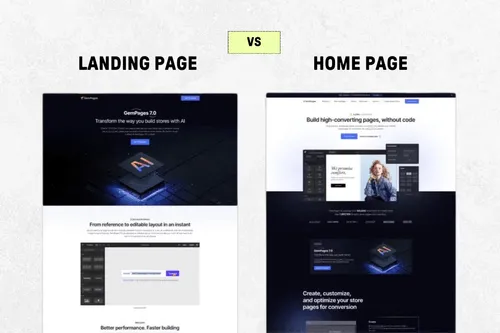
Landing pages are not just another page on your website. They are focused, purpose-driven pages designed to get visitors to take one specific action—like signing up, buying, or downloading. Unlike your homepage or product pages, they remove distractions and guide visitors toward a single goal.
A good landing page can improve your conversion rate dramatically. For example, according to WordStream, the average landing page conversion rate across all industries is about 2.35%, but the top 25% convert at 5.31% or higher. That’s more than double the results, simply from better landing page design and strategy.
If you rely only on your homepage, you’re probably missing opportunities. Homepages try to do too many things at once. A landing page, on the other hand, speaks directly to the visitor’s needs. That’s why businesses that use 10-15 landing pages see 55% more leads than those with fewer pages.
The Core Elements Of High-converting Landing Pages
Before you start building, it’s important to understand what makes a landing page convert. There are several key elements that work together to turn visitors into leads or customers.
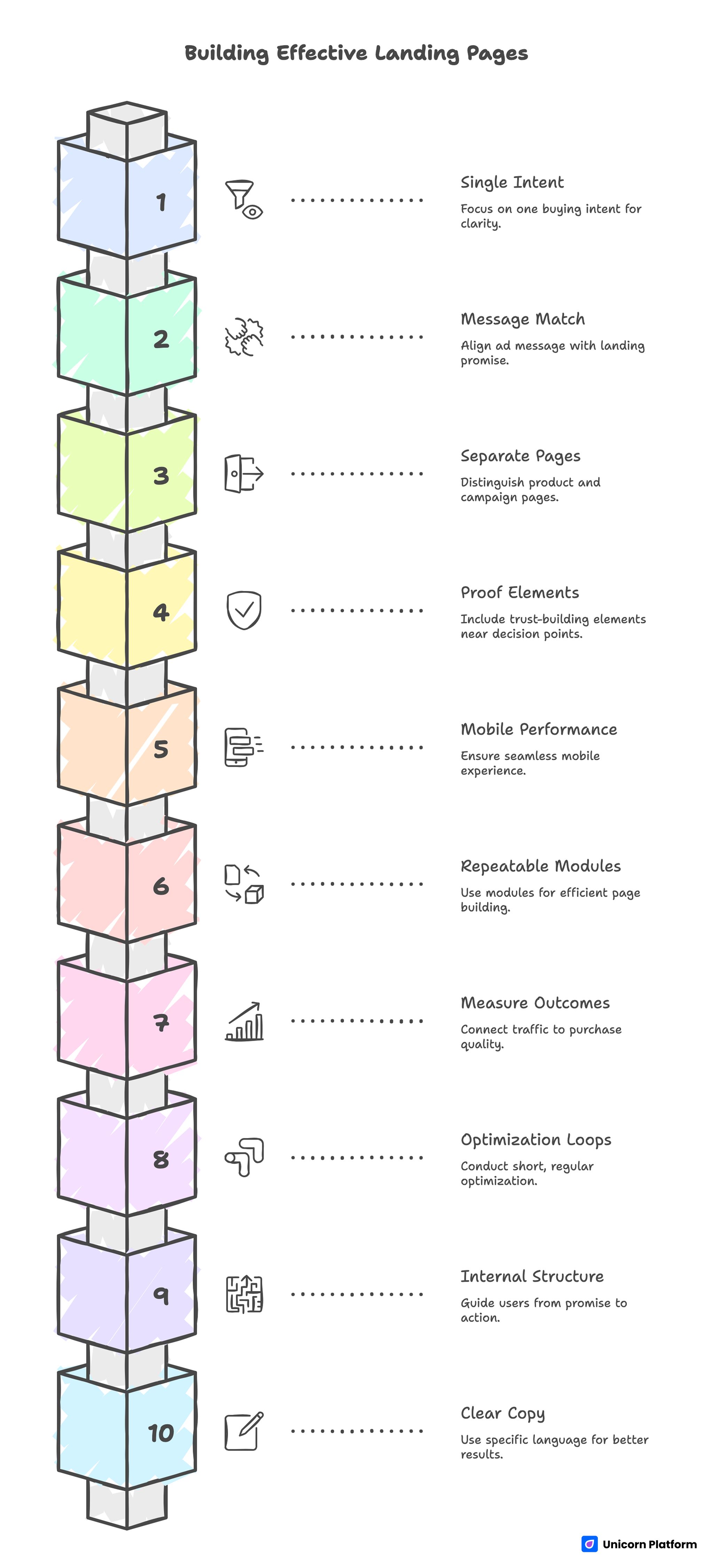
1. A Clear, Compelling Headline
Your headline is the first thing people see. It should grab attention and make it clear what the page is about. Use simple language and focus on the main benefit.
Example:
“get Your Free Guide To Healthy Eating In 7 Days”
2. Strong, Supportive Subheadline
The subheadline supports your main headline. It adds more detail and encourages the visitor to keep reading.
Example:
“Discover easy meal plans, shopping lists, and expert tips to start eating better today. ”
3. Relevant Images Or Videos
Visuals help people understand your offer faster. Use images or videos that show the product, service, or outcome your visitor wants.
- Avoid generic stock photos
- Show real people using your product
- Short explainer videos (30–90 seconds) can boost conversions
4. Clear, Focused Call-to-action (cta)
Your CTA is the button or link that tells visitors what to do next. It should stand out and use action words.
Examples:
- “Download Now”
- “Get Started”
- “Claim Your Discount”
5. Simple, Easy-to-use Form
If you’re collecting information, keep your form short. Only ask for what you really need. Research shows that reducing the number of fields from 11 to 4 can increase conversion rates by up to 120%.
6. Social Proof
People trust other people more than they trust companies. Use:
- Testimonials from real customers
- Reviews and ratings
- Trust badges (e.g., “As seen on,” “1000+ happy customers”)
7. Benefit-oriented Copy
Focus on what the visitor gets, not just what your product does. Explain the results or transformation.
Non-obvious insight: Beginners often list features (like “10 GB storage”) instead of benefits (“Never worry about running out of space”).
8. Remove Distractions
High-converting landing pages have no navigation menus, sidebars, or extra links. Each extra option is a chance for visitors to leave without converting.
9. Fast Loading Speed
A slow landing page means lost conversions. According to Google, if your page takes longer than 3 seconds to load, over 50% of mobile users will leave.
10. Mobile-first Design
Over half of web traffic now comes from mobile devices. If your landing page doesn’t look good and work well on a phone, you’ll lose leads.
Choosing The Right No-code Landing Page Builder
You don’t need coding skills to build great landing pages. Today, there are many no-code tools designed for non-technical users. But not all tools are equal. Some are better for beginners, some have more features, and some are best for specific industries.
Here’s a comparison of three popular no-code landing page builders:
| Tool | Ease of Use | Templates | Pricing (Starting) | Special Features |
|---|---|---|---|---|
| Unbounce | Very Easy | 100+ | $90/mo | AI copywriter, A/B testing |
| Wix | Beginner Friendly | 500+ | $16/mo | Drag-and-drop, mobile editor |
| Carrd | Simple | 75+ | $19/yr | One-page sites, low cost |
What To Look For In A No-code Builder
- Drag-and-drop editor: You should be able to move elements around easily.
- Responsive templates: Choose from designs that look good on all devices.
- Integrations: Connect with email tools, CRMs, or payment systems.
- A/B testing: Test different versions of your page to see what works best.
- Analytics: Track how many people visit and convert.
Common Mistake: Picking The Cheapest Tool Only
A low price is nice, but a tool that saves you hours or helps you get more conversions is usually worth more. Look for value, not just the lowest cost.
Step-by-step: Building Your Landing Page Without Code
Let’s walk through the practical steps of building a landing page, using a no-code platform as an example. You can follow this process with most popular tools.
1. Define Your Goal
Decide what you want visitors to do. Is it:
- Sign up for a newsletter?
- Buy a product?
- Register for a webinar?
- Download an ebook?
Your goal shapes every part of your landing page.
2. Choose Your Template
Start with a template designed for your goal. Most tools let you filter templates by purpose, like “Lead Generation” or “Product Launch. ”
Non-obvious insight: Don’t worry about finding the perfect template. The most important things are clarity and focus. You can always adjust the design later.
3. Write Your Headline And Subheadline
Use simple, direct language. Speak to the main benefit your audience wants.
- Avoid: “Welcome to Our Website”
- Try: “Start Your Free 14-Day Trial—No Credit Card Needed”
4. Add High-quality Visuals
Upload images that show your product, your team, or the result your visitor wants. If you use video, keep it short and focused.
5. Insert Your Call To Action
Add a button or form. Make sure your CTA stands out—use a color that pops, and action-focused text.
- Avoid: “Submit”
- Try: “Get My Free Guide”
6. Build Your Form (if Needed)
Keep it simple. Only ask for information you truly need. For example, just ask for a name and email, not address or phone, unless necessary.
7. Add Social Proof
Place testimonials, reviews, or badges near your CTA. They build trust and reduce visitor hesitation.
8. Remove Distractions
Delete navigation menus, extra links, and anything that could pull attention away from your main goal.
9. Optimize For Mobile
Preview your page on different devices. Most builders have a mobile view. Adjust text size, button placement, and images so everything is easy to see and tap.
10. Set Up Analytics
Connect your page to Google Analytics or your platform’s built-in tracking. This helps you measure what’s working and what to improve.
11. Test And Publish
Before you go live, check:
- All links and buttons work
- Forms send data correctly
- Page loads fast
- Looks good on desktop and mobile
Then Hit Publish!
Advanced Tips To Boost Conversion Rates
Once your landing page is live, you’re not done. The highest converting pages are always being tested and improved. Here are some tips that go beyond basics:
Run A/b Tests
Create two versions of your landing page with one small difference (like the headline or CTA color). See which one gets better results.
Example: Changing a CTA button from blue to orange increased conversions by 32% for one company.
Use Exit-intent Popups
If visitors try to leave, show a popup with a special offer or reason to stay. But don’t overdo it—popups can annoy if used too often.
Personalize Where Possible
If you can, use the visitor’s name or location (if you have it) in the headline or copy. Personalization can increase conversions by up to 202%.
Keep Page Load Times Low
Compress images, avoid heavy scripts, and use fast hosting. Every extra second of load time can cut conversions by 7%.
Add Urgency Or Scarcity
Phrases like “Limited Time Offer” or “Only 5 Spots Left” can encourage faster action. Be honest—don’t fake scarcity.
Use Directional Cues
Arrows, images of people looking at your CTA, or lines that “point” to the button can help guide visitor attention.
Real-world Example: A Landing Page That Converts
Let’s look at an example of a high-converting landing page.
Scenario: An online language school wants more trial signups.
- Goal: Get visitors to sign up for a free trial lesson.
- Headline: “Speak Spanish in 30 Days—Start Your Free Lesson Today”
- Subheadline: “No payment needed. Join 10,000+ happy students.”
- Image: Smiling student with a Spanish textbook on video call.
- CTA: Bright red button—“Book My Free Lesson”
- Form: Name and email only.
- Social proof: 5-star reviews, “As seen on” media badges.
- No navigation menu or extra links.
- Fast loading, mobile-friendly design.
Results: Conversion rate increased from 2.1% (old homepage) to 8.7% (focused landing page).

Credit: www.youtube.com
Table: Homepage Vs. Landing Page Performance
To see the impact, compare a homepage and a focused landing page:
| Metric | Homepage | Landing Page |
|---|---|---|
| Conversion Rate | 2.1% | 8.7% |
| Average Time on Page | 0:45 | 1:34 |
| Bounce Rate | 68% | 34% |
Key takeaway: Focused landing pages outperform homepages in almost every metric that matters.
How To Write Copy That Converts
Even with a beautiful design, your landing page won’t convert if the words don’t connect. Here are some best practices:
Address The Visitor’s Problem
Start by showing you understand the visitor’s pain point or goal.
Example: “Tired of wasting hours on meal planning?”
Show The Value Fast
Explain what’s in it for the visitor—right away.
Example: “Download our free 5-day meal plan and save 10 hours this week.”
Use Simple Words And Short Sentences
Avoid jargon or complex explanations. People scan, they don’t read every word.
Focus On Benefits, Not Features
Turn features into benefits.
- Feature: “24/7 customer support”
- Benefit: “Get help anytime, so you never get stuck”
Add Social Proof Early
Put a testimonial or review near the top so visitors see it before they decide.
Non-obvious insight: Even one clear testimonial can increase trust more than a long list of features.
Create A Clear Next Step
Tell the visitor exactly what to do, and what happens next.
- “Enter your email to get the free guide instantly.”
- “Click below to start your free trial.”
Common Mistakes To Avoid
Many beginners make the same mistakes when building landing pages. Avoid these to boost your results:
- Too many links: Each extra link is a chance for visitors to leave without converting.
- Asking for too much info: Only request what you truly need. More fields = fewer signups.
- Generic headlines: “Welcome to our website” doesn’t tell visitors what’s in it for them.
- Slow load times: Use compressed images and avoid heavy scripts.
- Forgetting mobile users: Always test your page on phones and tablets.
- No clear CTA: If your button doesn’t stand out, visitors might miss it.
- Ignoring analytics: If you’re not tracking results, you can’t improve.
- Not testing: Always try new headlines, images, or CTAs to see what works best.
- Using fake reviews or testimonials: This can destroy trust if discovered.
- Ignoring accessibility: Use readable fonts, good color contrast, and alt text for images so everyone can use your page.
Integrating Your Landing Page With Other Tools
A landing page works best when it connects with your other marketing tools. Most no-code builders make this easy.
Email Marketing
Connect your landing page form to tools like Mailchimp, ConvertKit, or SendinBlue. This way, new leads go straight into your email list.
Crm And Sales Tools
Send leads directly to your sales CRM (like HubSpot or Salesforce). This helps you follow up quickly.
Payment Systems
If you’re selling something, integrate with Stripe or PayPal so visitors can buy right away.
Analytics And Tracking
Use Google Analytics or built-in tracking to see how many people visit, fill out forms, or click your CTA.
Non-obvious insight: Set up “thank you” pages after conversion. This makes it easier to track completed actions and lets you offer a next step, like a special offer or video.
Table: Essential Integrations For Landing Pages
Here’s a quick view of common integrations you might need:
| Integration | Purpose | Example Tools |
|---|---|---|
| Email Marketing | Send follow-up emails | Mailchimp, ConvertKit |
| CRM | Manage leads and sales | HubSpot, Salesforce |
| Payment | Collect money instantly | Stripe, PayPal |
| Analytics | Track performance | Google Analytics |
Measuring Success: What To Track
You should always measure your landing page’s performance. Key metrics include:
- Conversion rate: Percentage of visitors who take your desired action.
- Bounce rate: Percentage who leave without taking action.
- Average time on page: More time can mean higher engagement.
- Cost per lead/sale: How much you pay to get each signup or customer.
- Source of traffic: Where your visitors come from (ads, social, search, etc. ).
Most no-code platforms have built-in analytics, but connecting Google Analytics gives you deeper insights.
Non-obvious insight: Track “micro-conversions,” like button clicks or video views, not just form completions. This helps you spot where people drop off.
Keeping Your Landing Pages Fresh
Landing pages are not “set it and forget it. ” Update them regularly to keep results high.
- Test new headlines, images, or offers every few months.
- Remove outdated testimonials, badges, or features.
- Check mobile performance as new devices come out.
- Stay updated on design trends—simple, clean pages often convert better.
When To Hire A Pro (and When You Don’t Need To)
You don’t need a developer to build your first landing page. But sometimes, hiring a designer or copywriter can help if:
- You’re spending a lot on ads and need top performance.
- You want custom features not offered by no-code tools.
- Your industry is very competitive and every percent matters.
For most people, though, starting with no-code tools and simple best practices will get you 90% of the way. You can always upgrade or hire help once you see results.
Credit: unicornplatform.com
Learn From The Best
Look at landing pages from companies in your industry. See what they do well:
- Clear, benefit-focused headlines
- Simple forms
- Strong visuals
- Obvious CTAs
Sites like HubSpot share real-world examples and best practices.
Tip: Don’t copy exactly—use these pages for inspiration, but make your page fit your audience and offer.
Frequently Asked Questions
What Is A Landing Page?
A landing page is a single web page designed for one focused goal, like getting visitors to sign up, buy, or download. It removes distractions and guides people toward one action.
Do I Need Coding Skills To Build A Landing Page?
No, you do not need coding skills. Modern tools let you build landing pages by dragging and dropping elements. You can create professional pages without writing code.
What Is The Ideal Length For A Landing Page?
There is no single “ideal” length. Short pages work well for simple offers, while longer pages work for expensive or complex products. The key is to give enough information to answer questions and remove doubts.
How Can I Improve My Landing Page’s Conversion Rate?
Test different headlines, images, and CTAs. Make sure your page loads fast, is mobile-friendly, and only asks for necessary info. Add social proof and remove distractions.
Which Tool Is Best For Beginners?
Tools like Wix and Carrd are very beginner-friendly. They offer easy editors, ready-to-use templates, and built-in integrations to get you started quickly.
The world of landing pages is now open to everyone. With smart tools and the right strategy, you can build landing pages that convert—without coding, big budgets, or headaches. Start simple, keep testing, and watch your conversions grow.
Credit: www.bulldozer-collective.com

About author









Add comment