

Envato Graphic Templates Vs Nextdocs Customizable Layouts: Ultimate Showdown
When you need great-looking designs fast, templates are a lifesaver. But choosing between Envato graphic templates and Nextdocs customizable layouts isn’t simple. Both offer powerful tools, but each has its own style, strengths, and limitations. If you’re trying to pick the right option for your project, you need to look deeper than just price or popularity. This article compares Envato’s ready-made graphic templates with Nextdocs’ customizable layouts, showing you what really matters for quality, speed, flexibility, and value.
What Are Envato Graphic Templates?
Envato is one of the largest online marketplaces for digital assets. Their graphic templates are pre-designed files you can use for logos, flyers, social media posts, presentations, and more. You download a template, open it in a design program like Photoshop or Illustrator, and customize it for your needs. The goal: save time and get professional results without hiring a designer.
Popular Uses
- Business cards
- Presentation slides
- Brochures and flyers
- Social media banners
- Website graphics
Envato’s library is huge — over 70,000 templates covering almost every style and purpose. Most files are compatible with Adobe and other popular tools. Many templates are made by freelance designers from all over the world, so you get a wide variety of looks.
Key Features
- Pre-built, polished designs
- Easy to edit text, colors, and images
- Supports popular formats (PSD, AI, PPT, etc.)
- Instant download after purchase
- One-time or subscription pricing
Envato templates are best for users who want something quick, attractive, and ready to use. But they have limits: you can only customize so much before the original design breaks or looks strange.
What Are Nextdocs Customizable Layouts?
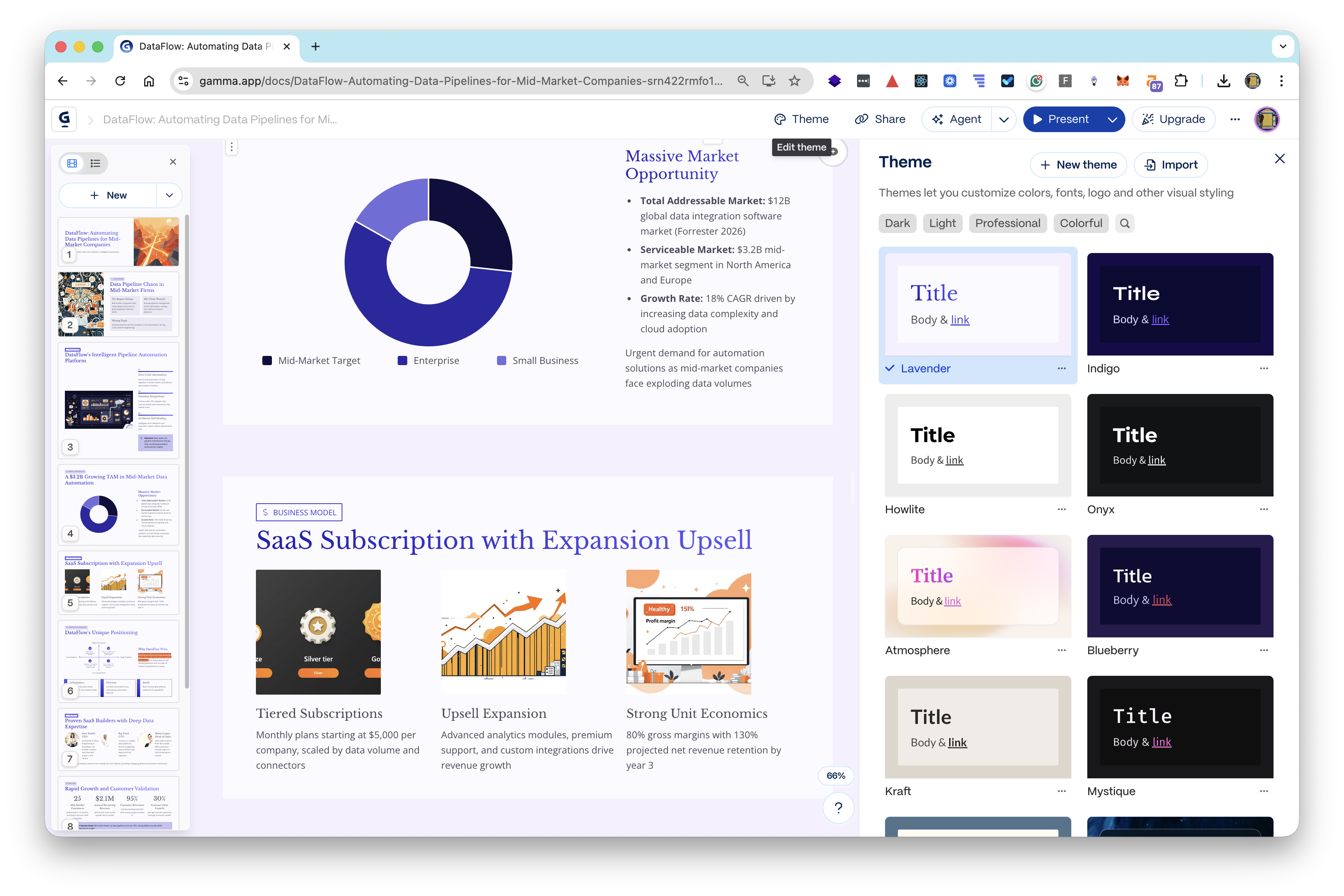
Nextdocs is a newer platform focused on customizable layouts for documents, presentations, and web content. Unlike traditional templates, Nextdocs layouts are built for flexibility. You get a basic structure, but the platform lets you change almost everything — fonts, colors, blocks, spacing, graphics, even the layout itself.
How Nextdocs Works
Instead of downloading a file, you work inside Nextdocs’ online editor. Layouts are modular: you can add, remove, or rearrange sections like building blocks. The editor uses drag-and-drop tools, so you don’t need design software. You can export your finished document as PDF, Word, or web page.
Typical Uses
- Business proposals
- Reports and whitepapers
- Slide decks and presentations
- Web landing pages
- Portfolios
Nextdocs is made for people who need custom layouts but don’t have design skills. It’s especially helpful for teams who need consistent branding or documents that look unique every time.
Key Features
- Modular, drag-and-drop editor
- Deep customization (fonts, colors, layout)
- Built-in brand tools
- Exports to multiple formats
- Cloud-based, collaborative editing
Nextdocs layouts are more flexible but require more time and creativity. You don’t just fill in blanks — you build the document yourself.
Comparing Envato Templates And Nextdocs Layouts
Let’s dive into the main differences. Each platform has its strengths, so the best choice depends on your project, skill level, and goals.
Quick Overview
Here’s a side-by-side look at some key factors:
| Feature | Envato Templates | Nextdocs Layouts |
|---|---|---|
| Design Quality | High, polished, ready-made | High, but depends on user customization |
| Ease of Use | Simple edits, needs design software | Drag-and-drop, no software needed |
| Customization | Limited, mostly colors/text/images | Deep, layout and structure can change |
| Collaboration | Single-user editing | Real-time team editing |
| Format Support | PSD, AI, PPT, etc. | PDF, Word, web page |
| Pricing | One-time or subscription | Subscription, free tier available |
Design Flexibility
Envato templates are fixed designs. You can change the main elements, but the layout is set. If you want a flyer with a new section or different shape, you may need to start over.
Nextdocs layouts are built for change. You can add new blocks, move sections, or even create a totally new look. This makes Nextdocs better for custom documents, but it requires more input from you.
Non-obvious insight: Many users think changing an Envato template is easy, but deep edits often break the design. If you want a unique look, Nextdocs is safer.
Editing And Usability
Envato templates require software like Adobe Photoshop or Illustrator. If you don’t have these tools, or don’t know how to use them, you’ll struggle. Nextdocs is cloud-based and works in your browser. No installation needed.
Nextdocs uses drag-and-drop editing. You see changes instantly, and you don’t need to worry about file compatibility. Teams can work together in real time.
Beginner mistake: People often buy Envato templates thinking they can edit in PowerPoint or Canva, but many files only work in Adobe apps.
Customization Depth
You can change text, colors, and images in Envato templates. Some offer smart layers for quick edits, but core design features are locked. Nextdocs lets you adjust almost everything — from page size to spacing to custom graphics.
| Customization Option | Envato | Nextdocs |
|---|---|---|
| Text | Editable | Editable |
| Color | Editable | Editable |
| Layout | Fixed | Fully changeable |
| Sections/Blocks | Limited add/remove | Add/remove/rearrange freely |
| Branding | Manual | Brand toolkit |
Hidden advantage: Nextdocs’ modular layouts mean you can reuse blocks across projects. If you build a proposal, you can use the same intro block next time and just update the details.
Collaboration And Workflow
Envato is single-user. You download, edit, and send your file. If you want feedback, you must email or share files manually.
Nextdocs is collaborative. Teams can edit together, comment, and track changes. This is useful for remote teams or projects needing approval.
Practical tip: For group presentations or joint reports, Nextdocs saves time and avoids version confusion.
Supported Formats
Envato offers templates for PSD, AI, PPT, and other popular file types. You must export or convert files yourself if you need different formats.
Nextdocs layouts export to PDF, Word, or web pages directly. You can also share a link for live editing or viewing.
Real-world example: If you need a brochure in both print and web formats, Envato gives you the print file, but you must adjust for web. Nextdocs lets you create both versions from the same layout.
Pricing And Value
Envato’s pricing depends on the asset. You can buy a single template ($5–$30), or subscribe to Envato Elements ($16. 50/month) for unlimited downloads. Nextdocs offers a free tier (limited features), and paid plans ($10–$25/month) with extra layouts and team features.
Data point: Envato Elements has over 2 million active subscribers, while Nextdocs’ user base is smaller but growing fast.
Money-saving tip: If you need just one flyer, Envato is cheaper. If you create many documents or work in a team, Nextdocs gives more value per month.
Real-life Scenarios: Which Platform Fits Best?
Choosing between Envato and Nextdocs depends on what you need.
Scenario 1: Quick Marketing Materials
You need a flyer, social media post, or business card fast. You don’t want to spend hours customizing.
- Envato is ideal. Pick a template, edit text and colors, and you’re done.
- Nextdocs is slower for single-use graphics, but better if you need matching sets.
Example: A local restaurant wants a new menu and promo flyer. Envato templates deliver fast, attractive results with minimal effort.
Scenario 2: Custom Reports And Presentations
You need a business report, proposal, or presentation that fits your brand and message.
- Nextdocs wins. Build layouts from scratch or use modular blocks.
- Envato can work for presentations, but limits deep customization.
Example: A consulting team creates monthly reports. With Nextdocs, they use a branded layout and update blocks. Envato would require buying or designing a new template each time.
Scenario 3: Team Collaboration
Your project needs input from multiple people. You want comments, edits, and version control.
- Nextdocs is built for teams. Real-time editing and sharing saves time.
- Envato is single-user. Collaboration is manual and slow.
Non-obvious insight: Many users overlook how much time is lost emailing files. Nextdocs avoids this.
Scenario 4: Branding And Consistency
You want every document to look on-brand, with consistent fonts, colors, and layout.
- Nextdocs offers brand toolkits. Apply your logo and style across all layouts.
- Envato templates require manual changes, and consistency is harder to keep.
Example: A growing startup uses Nextdocs to make all their proposals match the company brand. Envato templates often clash in style.
Scenario 5: Creative Control
You want total freedom to design a unique document or presentation.
- Nextdocs gives full control. Change layouts, add blocks, try new styles.
- Envato is limited by the template’s structure.
Beginner mistake: Some think Envato templates can be changed completely, but they are not made for deep edits.
Credit: skywork.ai
User Experience: What Real Users Say
Feedback from designers and business users shows the real-world strengths and weaknesses of both platforms.
Envato Templates
- Pros: Easy to use, high-quality designs, huge library
- Cons: Requires design software, limited customization, not built for teams
User quote: “Envato templates save me time for simple projects, but I struggle when clients want unique layouts.”
Nextdocs Layouts
- Pros: Flexible, collaborative, brand-friendly
- Cons: Steeper learning curve, slower for simple graphics, fewer ready-made designs
User quote: “Nextdocs lets us build reports that fit our brand, and my team can edit together. We never worry about version control.”
Hidden insight: Envato is popular for freelancers, while Nextdocs is growing with startups and business teams needing custom documents.
Performance And Speed
Time is money. Here’s how each platform performs for different tasks.
Envato
- Download and edit a flyer: 15–30 minutes
- Presentation slides (basic edits): 20–40 minutes
- Deep customization: 1–2 hours, often with frustration
Nextdocs
- Build a report from scratch: 40–90 minutes
- Update blocks in a template: 10–20 minutes
- Team edits and comments: Real-time, saves review time
Data point: Envato’s average template download time is under 5 minutes. Nextdocs’ average document build time is 1 hour, but drops with experience.
Practical tip: If you need speed for small projects, Envato is faster. For complex or repeat projects, Nextdocs saves time long-term.
Credit: themeforest.net
Support And Community
Support matters, especially for beginners.
Envato
- Email and forum support
- Large community of designers
- Tutorials for popular templates
Nextdocs
- Live chat and email support
- Smaller, but growing community
- Help center with guides and videos
External resource: For more on template editing, see Adobe’s official Photoshop tutorials.
Non-obvious insight: Nextdocs’ live chat is more responsive, but Envato’s forums have more answers for design software issues.
Common Mistakes When Choosing
Many buyers make simple errors that waste time and money.
- Ignoring software needs: Envato templates often require Adobe tools. If you only have PowerPoint, check file compatibility first.
- Expecting deep edits: Envato templates are not made for big changes. If you want a custom layout, Nextdocs is better.
- Overlooking branding: Consistent style is hard with Envato unless you buy similar templates. Nextdocs offers brand kits.
- Underestimating collaboration: For team projects, Envato can be slow. Nextdocs is made for group work.
- Not considering export formats: Envato files need conversion for web or PDF. Nextdocs exports directly.
Practical tip: Always check if your chosen platform fits your workflow and tools before buying.
Security And File Management
File safety and easy access are important.
Envato
- Files stored locally
- Manual backup needed
- Risk of losing files if computer fails
Nextdocs
- Cloud storage
- Automatic version control
- Team access anytime, anywhere
Hidden advantage: Nextdocs’ cloud saves all changes. You can restore earlier versions if needed.
Advanced Features And Integrations
Some projects need extra features.
Envato
- Limited integrations (some templates work with Canva)
- No automation or API access
Nextdocs
- API for custom integrations (CRM, analytics)
- Automation for recurring documents
Beginner mistake: Many buyers don’t realize Nextdocs can connect to other business tools for seamless workflows.
Accessibility And Mobile Use
More people work on tablets and phones.
Envato
- Editing best on desktop
- Limited mobile support
Nextdocs
- Fully browser-based
- Works on tablets and phones
Practical tip: If you edit documents on the go, Nextdocs is more mobile-friendly.
Cost Comparison: Which Is Cheaper?
Let’s look at real numbers for a typical user.
| Scenario | Envato Cost | Nextdocs Cost |
|---|---|---|
| Single flyer | $10–$20 (one-time) | $0 (free tier) |
| Monthly reports (team) | $30–$60/month (multiple templates) | $15–$25/month (team plan) |
| Brand toolkit | Manual setup, extra cost | Included in paid plan |
| Collaboration | Manual sharing | Included in paid plan |
Money-saving tip: For individual projects, Envato is cheaper. For teams or repeated documents, Nextdocs offers more features for less.

Credit: wpsoul.com
Future Trends: Where Are Templates Going?
Design platforms are changing fast. Here’s what to expect.
- AI-powered customization: Nextdocs is working on AI tools to suggest layouts and automate edits. Envato is adding AI search for templates.
- Integrated workflows: More platforms will connect design tools with business software.
- Mobile-first editing: Editing on tablets and phones will become standard.
- Brand automation: Platforms will help companies keep every document on-brand automatically.
Hidden insight: Nextdocs is ahead in AI-powered layouts, while Envato leads in template variety.
How To Decide: Key Questions
Ask yourself these questions before choosing:
- What kind of project are you making — flyer, report, presentation?
- Do you need deep customization, or just quick edits?
- Will you work alone or with a team?
- What software do you have?
- How often will you make similar documents?
- Do you need branding tools?
- What is your budget?
Practical tip: Write down your answers and compare them to the features of each platform.
Summary: Main Takeaways
- Envato graphic templates are fast, attractive, and affordable for simple projects and solo users.
- Nextdocs customizable layouts give deep flexibility, branding, and collaboration for teams and custom documents.
- Envato needs design software; Nextdocs is browser-based.
- Envato is best for quick marketing assets; Nextdocs is best for reports, proposals, and team work.
- Both platforms are improving, but your needs decide which is better.
Final advice: If you want speed and simplicity, Envato delivers. If you need custom layouts, branding, and team editing, Nextdocs is the smarter choice.
Frequently Asked Questions
What Is The Main Difference Between Envato Templates And Nextdocs Layouts?
Envato templates are fixed designs you download and edit in design software. Nextdocs layouts are flexible structures you build and customize in a browser, with deep control over layout and branding.
Do Envato Templates Require Adobe Software?
Most Envato templates need Adobe Photoshop, Illustrator, or InDesign. Some work with PowerPoint or Canva, but always check the file type before buying.
Can I Use Nextdocs Layouts For Marketing Graphics?
Nextdocs is better for documents, presentations, and web pages. For quick marketing graphics like flyers or social posts, Envato is faster and offers more ready-made designs.
Is Nextdocs Good For Team Collaboration?
Yes, Nextdocs is built for real-time team editing, comments, and sharing. It’s ideal for group projects, joint reports, and presentations needing feedback.
Which Platform Is Cheaper For A Small Business?
Envato is cheaper for single projects or occasional use. Nextdocs offers more value for teams, repeated documents, and branding needs, especially with its paid plans.
Making the right choice depends on your project and workflow. Both Envato and Nextdocs are excellent platforms, but knowing their strengths and weaknesses helps you work smarter and get better results.


About author









Add comment