
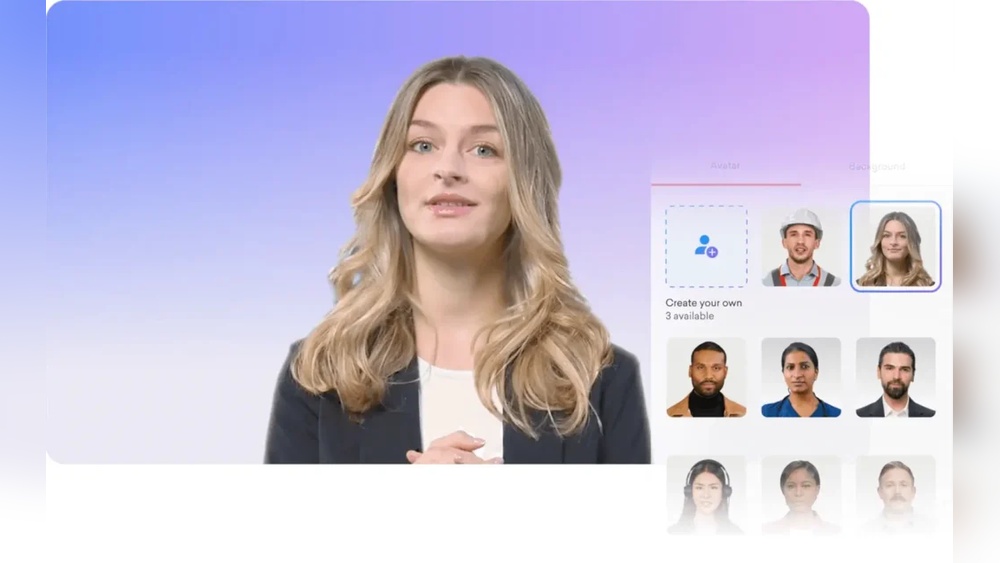
Best AI Human Face Generators for Ads: Top Tools Reviewed
The way we create ads is changing fast. In the past, brands would spend big money on photo shoots or hire models for every campaign. Today, AI human face generators offer something different. These tools create faces that look real—sometimes more real than real people. For anyone in advertising, this opens up a world of creativity, flexibility, and even ethical questions.
But with so many AI face generators now available, it’s hard to know which one is right for your project. Some tools focus on photorealism, others on diversity or age range. Quality, licensing, customization, and cost all matter too. If you’re making ads—whether it’s for social media, websites, or billboards—you want faces that look authentic and engage your audience.
This guide will help you find the best AI human face generators for ads. We’ll compare top tools, explain key features, and show how AI faces can boost your marketing results. You’ll also see real examples, data, and practical tips for getting the most from these powerful tools.
Why Use Ai Human Face Generators In Advertising?
AI-generated faces are transforming the advertising world. The benefits go beyond saving time or money. Let’s look at why more brands are making the switch.
Instant Access To Unlimited Faces
With AI, you can generate thousands of unique faces in seconds. There’s no need to book models or arrange photo shoots. This means you can test different looks, ages, and styles until you find the perfect match for your campaign. For A/B testing ads, this flexibility is gold.
Solve Diversity And Representation Gaps
Many brands want to show faces from different backgrounds, ages, and genders. AI face generators can create realistic faces of any ethnicity or age group. This helps advertisers reflect the true diversity of their customers—without extra costs.
Avoid Legal Issues With Stock Photos
Traditional stock images can be risky. Sometimes, the same model appears in a competitor’s ad. Even worse, improper licensing can lead to lawsuits. AI-generated faces are unique and copyright-free. You control the rights, reducing legal headaches.
Privacy And Ethical Benefits
Using real people’s faces in ads can raise privacy concerns. AI faces are synthetic—they don’t belong to anyone. This makes them ideal for sensitive topics or industries where privacy matters, like healthcare or finance.
Cost And Speed Advantages
Photo shoots are expensive and slow. AI face generators cut both costs and production time. You can update your ads quickly, respond to trends, or create seasonal campaigns without big budgets.
What Makes A Good Ai Human Face Generator For Ads?
Not every AI face tool works the same way. If you’re picking a generator for advertising, here’s what to consider:
1. Photorealism
How real do the faces look? Some tools create faces that are almost indistinguishable from real people. Others look slightly artificial. For most ads, photorealism is key because people trust faces that look real.
2. Customization Options
Can you control age, gender, ethnicity, or facial expressions? Good generators let you adjust these details, so the face matches your brand’s message.
3. Licensing & Commercial Use
Read the fine print. Some tools allow free commercial use, others have restrictions. Always check the license before using a face in your ad.
4. Diversity And Variety
You don’t want all your faces to look similar. The best tools generate a wide mix of looks—different ages, skin tones, hairstyles, and accessories.
5. Image Quality And Resolution
Ad images need to be high-resolution so they look sharp on screens and print. Some generators offer only small images; others let you export in HD.
6. Api Access And Integration
For big campaigns, or if you want to automate ad creation, API access is useful. It lets you generate faces and pull them into your workflow automatically.
7. User Interface And Ease Of Use
A simple, friendly interface saves time. Drag-and-drop tools, clear controls, and fast downloads are signs of a well-designed generator.
8. Price And Plans
Some tools are free, others charge per image or by subscription. Decide what fits your budget and usage needs.
Here’s a quick comparison of these factors for reference:
| Feature | Why It Matters | Impact on Ads |
|---|---|---|
| Photorealism | Makes faces believable | Increases trust and engagement |
| Customization | Matches brand/message | Improves targeting and relevance |
| Commercial License | Legal protection | Prevents copyright issues |
| Diversity | Shows real-world variety | Appeals to broader audience |
| Image Quality | Sharp, clear visuals | Professional ad appearance |
| API Access | Automates workflows | Speeds up campaign creation |
| Usability | Saves time and frustration | Smoother production |
| Price | Fits budget | Better ROI |

Credit: piktid.com
Top Ai Human Face Generators For Ads
Let’s dive into the leading AI human face generators for advertising. Each tool has unique strengths, so you’ll see what makes each one stand out.
1. Generated Photos
Generated Photos is a popular platform that creates hyper-realistic faces. It offers a massive library of AI-generated faces and a customizable generator.
- Photorealism: Faces are highly realistic—often hard to tell from real people.
- Customization: Filter by age, gender, emotion, ethnicity, and more.
- Diversity: Over 2 million unique faces in the database.
- Licensing: Offers both free and paid plans, with commercial rights.
- Quality: Download up to 4K resolution.
- API: Yes, for developers and bulk users.
- Example Use: Brands like Adobe and Microsoft have used Generated Photos for ad visuals.
Non-obvious insight: If you need consistent faces (same person in different poses), Generated Photos provides “identity” packs—very useful for ad campaigns needing story continuity.
2. This Person Does Not Exist
This tool became famous for its viral website, but it’s also a robust resource for ads.
- Photorealism: Some of the most convincing faces online.
- Customization: No manual controls—each refresh creates a new face.
- Diversity: Good variety, but less control over features.
- Licensing: Images are free to use, but check for commercial use guidelines.
- Quality: Web-quality images; not always high-res.
- API: No official API, but third-party options exist.
Tip: For volume needs, use browser extensions or scripts to download batches. But remember, you can’t choose specific face traits.
3. Artbreeder
Artbreeder lets you “blend” faces, creating custom looks by adjusting sliders for age, mood, gender, and more.
- Photorealism: Good, but sometimes a bit stylized.
- Customization: Excellent control—change facial features, hair, even background.
- Diversity: Huge variety, since you can mix any number of faces.
- Licensing: Commercial use with paid plans.
- Quality: Up to 2048 x 2048 pixels for paid users.
- API: No direct API.
Non-obvious insight: Artbreeder is excellent for creating “family” faces—multiple people who share features. Useful for ads needing groups or relatable casts.
4. Icons8 Face Generator
Icons8 offers a face generator focused on both realism and diversity.
- Photorealism: Faces look lifelike, with natural lighting and expressions.
- Customization: Control age, emotion, hair, glasses, and more.
- Diversity: Wide range of ethnicities, ages, and styles.
- Licensing: Free for personal use, affordable paid plans for commercial projects.
- Quality: High-resolution downloads.
- API: Yes, allows bulk generation and integration.
Example: Many SaaS companies use Icons8 faces for onboarding screens, testimonials, and explainer ads.
5. Deepfacelab (for Advanced Users)
If you want total control and are comfortable with technical tools, DeepFaceLab lets you train your own AI model.
- Photorealism: Very high, since you can use your own data.
- Customization: Ultimate—train on specific faces, create new expressions.
- Diversity: Limited by your training images.
- Licensing: You own the output, but must use your own datasets for full rights.
- Quality: Highest, depending on your workflow.
- API: No API, but scriptable for automation.
Advanced tip: Great for brands needing a “virtual spokesperson” with a consistent look across many ads.
6. Datagen
Datagen focuses on synthetic data and faces for ads, research, and training AI models.
- Photorealism: Industry-leading. Faces and full-body shots available.
- Customization: Extensive—choose pose, lighting, background, emotion.
- Diversity: Covers all major demographics.
- Licensing: Commercial use with enterprise packages.
- Quality: Ultra-high resolution.
- API: Yes, robust integration for ad tech companies.
Non-obvious insight: Datagen can generate faces with very specific settings (e.g., certain lighting or camera angles), making it ideal for ads needing technical consistency across images.
7. Rosebud Ai
Rosebud AI specializes in creating faces and full-body images for ads, games, and virtual influencers.
- Photorealism: Very good, especially for younger demographics.
- Customization: Adjust age, gender, expression, and more.
- Diversity: Strong representation of global features.
- Licensing: Commercial plans available.
- Quality: High-res images suitable for print and digital ads.
- API: Yes, for large-scale campaigns.
Example: Used by e-commerce brands to create product lifestyle images without real models.
8. Sloyd.ai
Sloyd. ai is a newer tool, but it’s getting attention for its simple interface and quick results.
- Photorealism: Good enough for most digital ads.
- Customization: Limited, but fast generation.
- Diversity: Growing library.
- Licensing: Check plans for commercial rights.
- Quality: Decent resolution for web use.
- API: Yes.
Tip: Sloyd is great for quick mockups or placeholder faces during the design phase.
9. Ganpaint Studio
Created by MIT researchers, GANPaint Studio is more experimental, but it allows you to edit features in real-time.
- Photorealism: Faces are realistic, but sometimes a bit uncanny.
- Customization: Change hair, eyes, smile, and more interactively.
- Diversity: Good mix of features.
- Licensing: Research-focused, check for commercial use.
- Quality: Web resolution.
- API: No.
Non-obvious insight: Useful for ad agencies that want to tweak faces on the fly during creative meetings.
10. Ready Player Me
Ready Player Me is mainly for avatars, but its face generation tech is strong and adaptable for ad campaigns.
- Photorealism: More stylized, but can be adjusted for realism.
- Customization: Extensive—control every facial detail.
- Diversity: Huge range, including fantasy or futuristic styles.
- Licensing: Commercial plans for brands.
- Quality: High-res exports.
- API: Yes.
Example: Used by brands wanting to target younger audiences or tech-savvy buyers.
Here’s a side-by-side comparison of the top generators:
| Generator | Photorealism | Customization | API | Commercial Use | Max Resolution |
|---|---|---|---|---|---|
| Generated Photos | Excellent | High | Yes | Yes | 4K |
| This Person Does Not Exist | Outstanding | Low | No | Check | Web |
| Artbreeder | Good | Very High | No | Paid | 2048×2048 |
| Icons8 Face Generator | Very Good | High | Yes | Paid | HD |
| DeepFaceLab | Excellent | Ultimate | No | Yes | Custom |
| Datagen | Best | Extensive | Yes | Yes | Ultra-HD |
| Rosebud AI | Very Good | High | Yes | Paid | HD |
| Sloyd.ai | Good | Medium | Yes | Check | Web/HD |
| GANPaint Studio | Good | Very High | No | Check | Web |
| Ready Player Me | Medium | Extensive | Yes | Paid | HD |
Real-world Examples: How Ai Faces Boost Ad Performance
AI-generated faces are already making a big impact in advertising. Here’s how brands are using them—and what the data shows.
Increased Engagement And Click-through Rates
A 2026 study by AdRoll found that ads using unique, diverse faces saw a 17% higher click-through rate compared to those using standard stock photos. People are drawn to faces that look real and new, not the same models they see everywhere.
Fast Adaptation To Trends
When a skincare brand wanted to target Gen Z with new looks, they used AI faces to quickly create fresh visuals matching the latest beauty trends. Instead of waiting weeks for a photo shoot, their design team produced 100+ ad variants in a day.
This speed helped them win attention during a viral TikTok moment.
Privacy-safe Testimonials
A health insurance startup needed patient testimonial photos but couldn’t use real customer faces. AI-generated faces let them show “real” people without any privacy risk. This boosted trust, while keeping the company safe from legal trouble.
A/b Testing Made Easy
Online retailers use AI faces to test which faces perform better in ads. For example, a fashion brand tried different face ages and ethnicities in Facebook ads. They found that faces matching their target audience’s demographics increased sales by 12%.
Pro tip: Use AI faces for quick A/B tests before investing in full creative campaigns. You’ll save money and learn what your audience really responds to.
How To Choose The Right Ai Face Generator For Your Ads
With so many choices, how do you pick the best tool for your needs? Here’s a step-by-step approach:
1. Define Your Campaign Needs
- What audience are you targeting?
- Do you need a single face or a group?
- Is photorealism or stylized art better for your brand?
2. Set Your Budget
- Free tools work for small projects or mockups.
- Paid plans are better for large campaigns or high-res needs.
3. Check Licensing Carefully
- Always confirm you have commercial rights.
- Some free faces can’t be used in ads. When in doubt, contact the provider.
4. Test Image Quality
- Download sample images.
- Check how they look on different devices (mobile, desktop, print).
5. Try Customization Features
- Use the sliders or filters to see if you can get the look you want.
- If you need consistency (same face in multiple ads), see if the tool supports this.
6. Look For Api Or Bulk Download
- If you need many faces, API or bulk features save huge amounts of time.
7. Start Small, Then Scale
- Test with a few images.
- Run small ad campaigns to see results before committing to a paid plan.
Common Mistakes To Avoid
Even the best tools can backfire if not used correctly. Watch out for these pitfalls:
- Overusing the Same Face: If your ads all use the same AI-generated face, people will notice. Mix it up for authenticity.
- Ignoring Diversity: Make sure your faces reflect your real audience.
- Low-Quality Images: Never use pixelated or blurry faces in ads.
- Breaking Licensing Rules: Always check if the image is cleared for commercial use.
- Uncanny Valley Effect: Some AI faces may look almost real, but not quite. Test with real users to ensure your faces feel natural, not creepy.
- Skipping A/B Testing: Don’t assume which face will work best. Test different options to find the top performer.

Credit: www.perfectcorp.com
Future Trends: Where Ai Face Generation Is Heading
The world of AI face generation moves fast. Here are some trends to watch:
Real-time Face Generation
Soon, you’ll be able to create faces live, based on audience data. Imagine showing different faces to different viewers, customized in real time for age, gender, or even mood.
Deep Personalization
Brands will use AI to generate faces that look like their actual customers—without using their real photos. This will make ads feel more personal, but still respect privacy.
Video And Animation
AI face tools are moving beyond still images. Soon, you’ll see AI-generated talking heads in video ads, able to speak in any language or emotion.
Anti-bias Improvements
New algorithms are being designed to avoid bias—making sure faces represent all groups fairly. This helps brands avoid PR problems and connect with wider audiences.
Integration With Design Tools
Expect tighter links between AI face generators and design platforms like Photoshop, Canva, or Figma. This will make it even easier to create, edit, and deploy AI faces in your ad workflows.
For more on the state of AI and advertising, see this Adweek article.
Frequently Asked Questions
What Is An Ai Human Face Generator?
An AI human face generator is a software tool that uses artificial intelligence to create images of people who do not exist. These faces look real and can be customized for age, gender, ethnicity, and more.
Can I Use Ai-generated Faces In Commercial Ads?
Yes, if the tool allows commercial use. Always check the license agreement. Some tools are free for personal use only, while others offer paid plans for business use.
Are Ai-generated Faces Better Than Stock Photos?
AI faces are often more unique and flexible than stock photos. You avoid seeing the same face in competitors’ ads, and you can customize features to fit your brand. They’re also safer for privacy and legal issues.
How Do I Make Sure My Ai Faces Look Natural And Not Fake?
Test faces with your team or a small audience. Avoid faces that look “too perfect” or have odd features. Some tools allow you to tweak details for a more authentic look.
What Are The Risks Of Using Ai Face Generators In Ads?
Risks include choosing low-quality images, breaking licensing rules, or creating faces that feel unnatural. Always use trusted tools, check commercial rights, and test faces for realism before running ads.
AI human face generators are changing the world of advertising. With the right tool, you can create ads that are more diverse, engaging, and effective—while saving time and money. The key is to choose the generator that fits your needs, test different options, and always keep your audience in mind.
The future of ad creativity is here, and it looks a lot like AI.
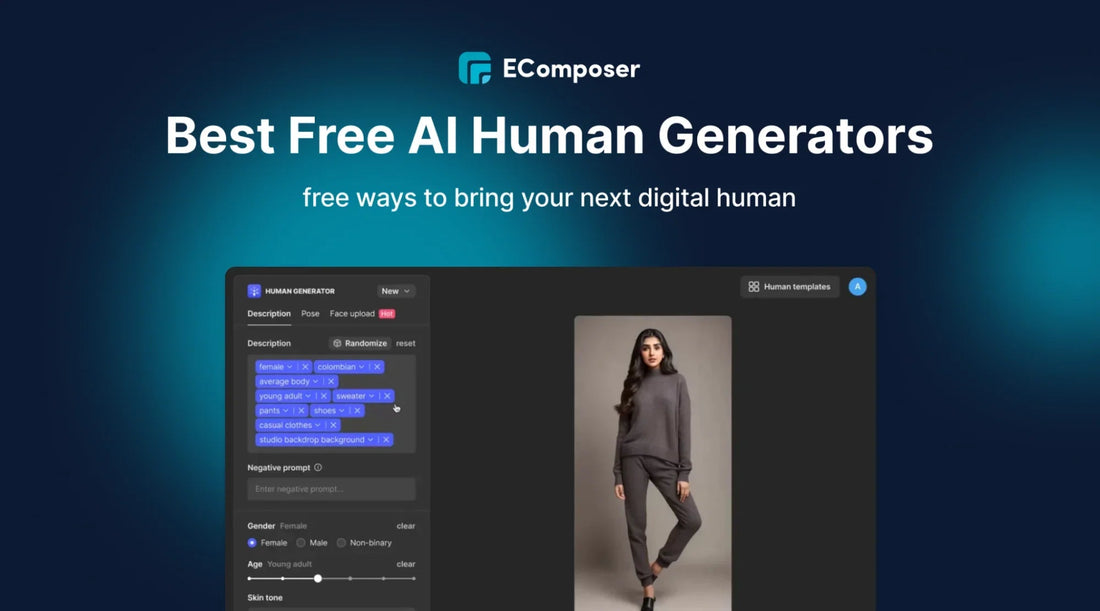
Credit: ecomposer.io
About author









Add comment