

Best AI Data Analytics Tools for Non-Techies: Top Picks 2026
Artificial intelligence is no longer just for tech experts. Today, AI-powered data analytics tools are changing how people in every industry make decisions—even if they have no coding or data science background. These tools help non-techies unlock insights from data, create reports, and spot trends without needing to learn complex software or programming languages.
But with so many choices, it’s hard to know which platform is right for you.
This guide will help you find the best AI data analytics tools for non-techies. You’ll discover which platforms are truly easy to use, what features matter most for beginners, and how these tools can make your daily work simpler. Whether you’re in marketing, sales, HR, healthcare, small business, or just curious about data, you’ll get clear recommendations and tips to choose the right solution—without feeling lost in technical jargon.
What Makes A Data Analytics Tool “non-techie Friendly”?
Before looking at the top tools, it’s important to know what makes an AI analytics platform easy for beginners. Here are the main qualities:
- No coding required: You can analyze data without writing code or formulas.
- Simple interfaces: Drag-and-drop, natural language queries, and clear visuals.
- Guided setup: Step-by-step wizards and built-in tutorials for new users.
- Pre-built templates: Ready-to-use dashboards and reports for common needs.
- Smart automation: Automatic data cleaning, recommendations, and easy sharing.
Many tools claim to be easy, but only a few deliver a truly smooth experience. Non-techies should look for platforms that explain results in plain English, offer live support, and let you connect to familiar apps like Excel, Google Sheets, or your CRM.
Why Ai Analytics Tools Matter For Non-techies
Data-driven decisions lead to better business results, but most people don’t have time to become data scientists. AI-powered tools solve this problem by:
- Saving time: Automate routine tasks and avoid manual spreadsheet work.
- Reducing errors: Use smart algorithms to check for mistakes and outliers.
- Improving insights: Surface hidden patterns and trends you might miss.
- Democratizing data: Let anyone in your team—regardless of skill—explore data and create reports.
A 2026 survey by Gartner found that 67% of business leaders expect their teams to use data for daily decisions, but only 21% of employees feel confident doing so. User-friendly AI analytics tools help bridge this gap, making data accessible to everyone.
Top 10 Best Ai Data Analytics Tools For Non-techies
Let’s look at the leading platforms that combine AI and easy interfaces, perfect for beginners and business users.
1. Microsoft Power Bi
Microsoft Power BI is one of the most popular business analytics tools worldwide. Its drag-and-drop dashboard builder, integration with Excel, and AI-powered insights make it a top choice for non-techies.
- Natural language queries: Type questions like “Show sales growth in California last year” and get instant visuals.
- Pre-built templates: Start with ready dashboards for sales, finance, and marketing.
- Smart recommendations: AI suggests charts and highlights trends automatically.
Power BI’s free version is strong for small teams. The Pro version ($10 per user/month) adds sharing and collaboration features. Because it’s from Microsoft, support and integration with Office apps are excellent.
2. Tableau
Tableau is famous for its beautiful visualizations and flexible data connections. Its “Ask Data” feature uses natural language to turn simple questions into charts.
- Intuitive interface: Drag, drop, and rearrange data without coding.
- AI-powered explanations: Tableau’s “Explain Data” gives plain-language insights.
- Works with many sources: Connects to spreadsheets, databases, and cloud apps.
While Tableau has a learning curve, its guided tutorials and strong community help non-techies get started quickly. Tableau Public is free for sharing, while Tableau Creator ($70/month) suits businesses.
3. Google Looker Studio (formerly Data Studio)
Google Looker Studio offers a free and easy way to visualize data using Google’s cloud. It’s especially friendly for those already using Google Sheets, Analytics, or Ads.
- Simple interface: Build dashboards by dragging widgets.
- AI-powered suggestions: Get recommendations for charts and filters.
- Real-time sharing: Share live dashboards with anyone.
Looker Studio is ideal for marketers and small businesses who want to track performance without complex setup.
4. Zoho Analytics
Zoho Analytics is designed for business users who want powerful analytics without technical skills.
- AI assistant “Zia”: Ask questions in English and get answers or charts.
- Automated insights: Zia highlights unusual trends and outliers.
- Templates: Ready dashboards for sales, HR, finance, and more.
Zoho’s pricing starts at $24/month for two users. Its step-by-step onboarding makes it easy for non-techies to explore data.
5. Qlik Sense
Qlik Sense uses AI to help users discover insights faster. Its associative engine lets you explore data from multiple angles.
- Smart search: Find data points by typing keywords.
- Insight suggestions: AI points out patterns and relationships you might miss.
- Self-service design: Customize dashboards without coding.
Qlik Sense offers a free version for individuals and business plans starting at $30/user/month.
6. Sisense
Sisense is known for its embedded analytics and AI-powered dashboards. Non-techies can use its easy interface to create custom reports with a few clicks.
- AI-driven recommendations: Suggests visualizations based on your data.
- Drag-and-drop builder: Create reports without technical skills.
- Strong integrations: Connects to many apps and databases.
Sisense is used by many mid-sized companies for its balance of power and simplicity.
7. Ibm Cognos Analytics
IBM Cognos Analytics brings enterprise-level AI to a beginner-friendly interface. Its “AI Assistant” helps users explore data in plain English.
- Natural language dialogue: Chat with the AI to generate reports.
- Smart visualization: AI picks the best chart type for your data.
- Automated data prep: Cleans and organizes data automatically.
Cognos offers a 30-day free trial, with business plans starting at $15/user/month.
8. Thoughtspot
ThoughtSpot is built around search-driven analytics. Users can type questions and get instant answers, making it ideal for those who dislike complex menus.
- Search-based interface: Type “Top products by revenue last quarter.”
- AI insights: Spot hidden trends and anomalies automatically.
- Simple sharing: Send reports via email or link.
ThoughtSpot works well for companies that want everyone to ask questions—no training needed.
9. Domo
Domo combines AI analytics with business app integrations. Its platform is designed to be self-service for non-technical users.
- App connectors: Pull in data from spreadsheets, CRMs, social media, and more.
- AI-powered alerts: Get notifications when data changes or trends appear.
- Custom dashboards: Build visual reports with drag-and-drop tools.
Domo is popular with marketing, sales, and operations teams who want fast, automated insights.
10. Monkeylearn
MonkeyLearn is a specialized tool that uses AI for text analytics—great for surveys, reviews, and feedback.
- No-code model builder: Train AI to classify texts or extract keywords.
- Pre-built templates: Analyze sentiment, topics, or intent with one click.
- Integrations: Works with Google Sheets, Zapier, and more.
MonkeyLearn is perfect for non-techies who need to make sense of large volumes of unstructured text data.
Comparison: Ai Analytics Tools For Non-techies
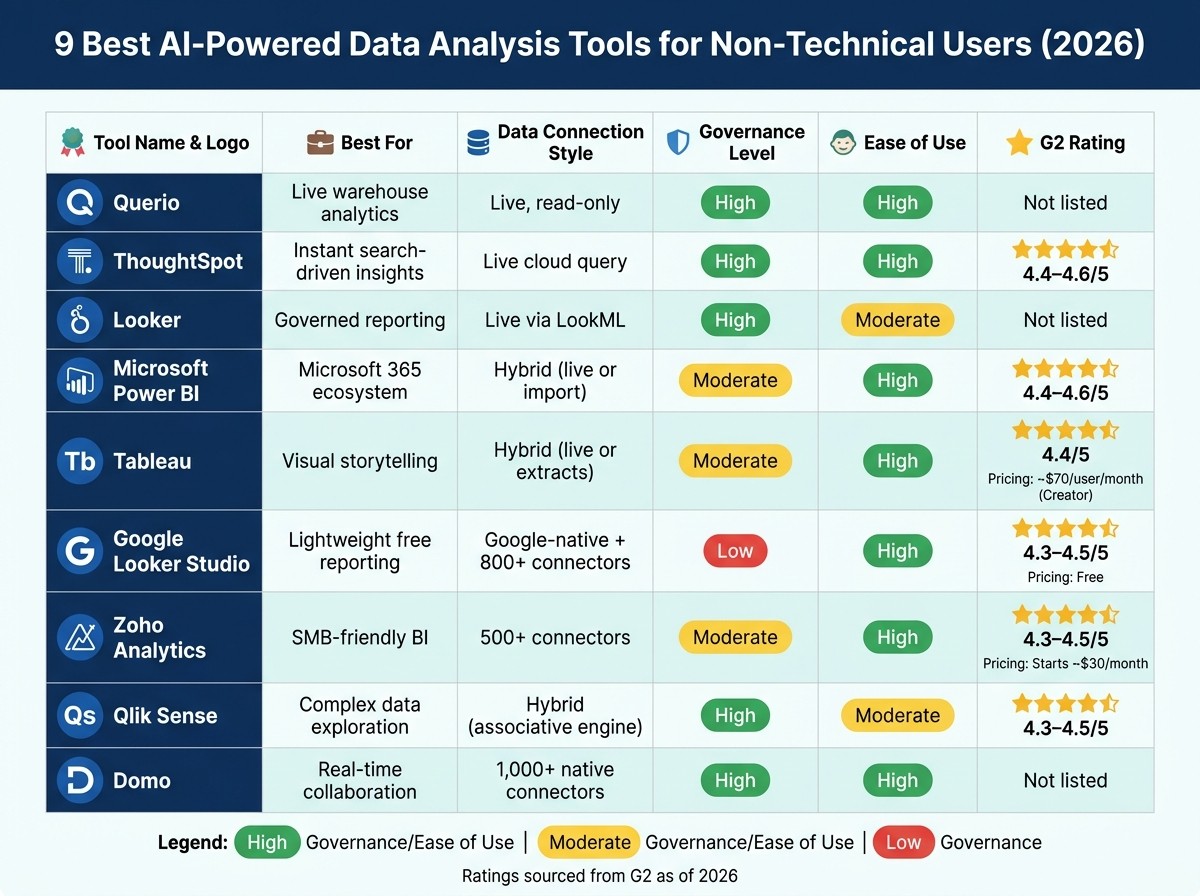
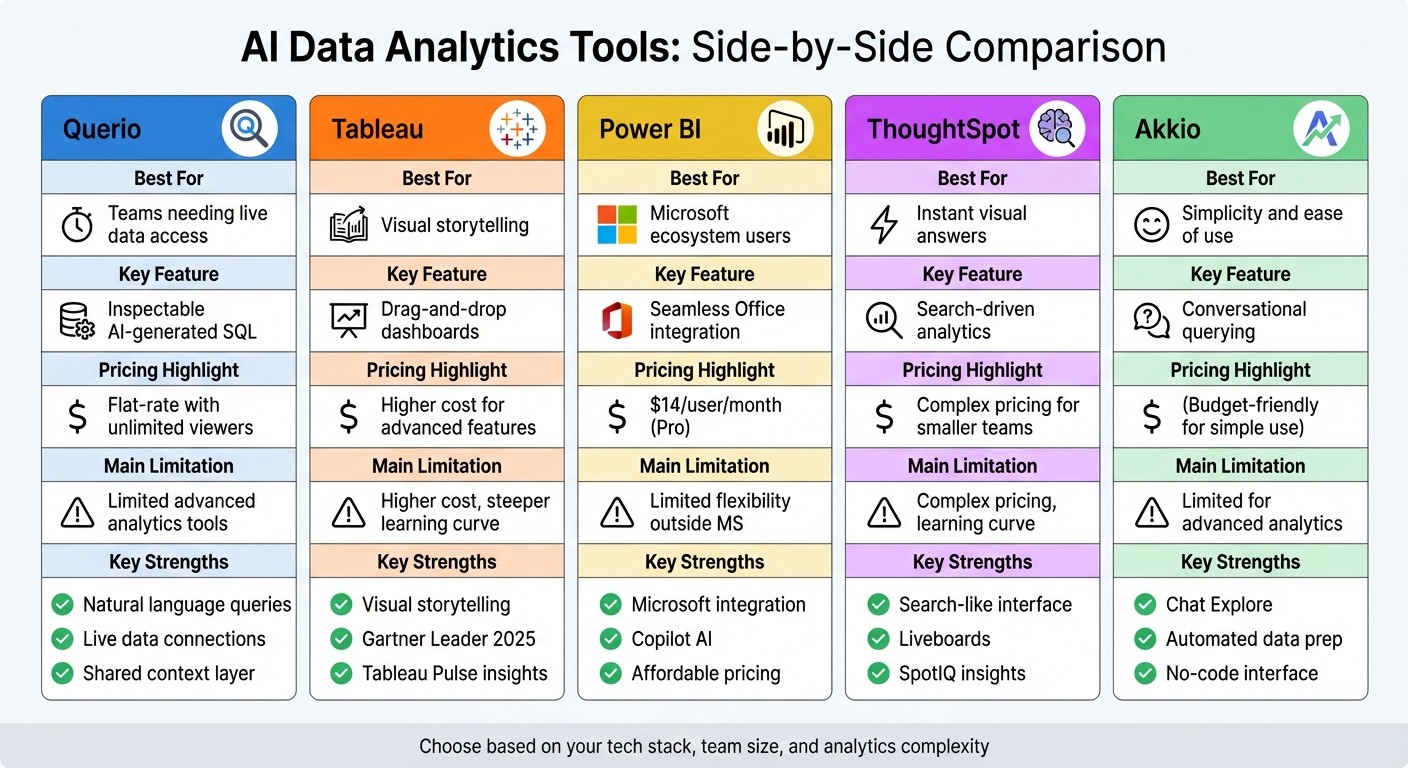
To help you see the main differences, here’s a comparison of the top 10 tools based on key features:
| Tool | No Code Needed | AI-Powered Insights | Natural Language Query | Free Version | Best For |
|---|---|---|---|---|---|
| Microsoft Power BI | Yes | Yes | Yes | Yes | Office Users |
| Tableau | Yes | Yes | Yes | Yes (Public) | Visualization Lovers |
| Looker Studio | Yes | Yes | No | Yes | Google Users |
| Zoho Analytics | Yes | Yes | Yes (Zia) | Yes | SMBs |
| Qlik Sense | Yes | Yes | Yes | Yes | Flexible Analysis |
| Sisense | Yes | Yes | No | Trial | Embedded Analytics |
| IBM Cognos | Yes | Yes | Yes | Trial | Enterprises |
| ThoughtSpot | Yes | Yes | Yes | Trial | Search-Based |
| Domo | Yes | Yes | No | Trial | App Integration |
| MonkeyLearn | Yes | Yes | No | Yes | Text Analytics |
How To Choose The Right Ai Analytics Tool For Beginners
With so many good choices, how do you pick the best tool for your needs? Focus on these factors:
1. Your Data Sources
Do you mostly use Excel, Google Sheets, CRM systems, or cloud apps? Choose a tool that connects easily to your data. For example, Looker Studio is great for Google apps, while Power BI excels with Microsoft data.
2. Type Of Analysis Needed
If you want simple charts, most tools work well. For deeper insights (like AI-driven forecasts or text analysis), look for platforms with built-in machine learning or natural language processing.
3. Ease Of Use
For true non-techies, natural language queries and drag-and-drop dashboards make a big difference. Tools with guided onboarding and strong customer support help you get results quickly.
4. Collaboration
If you need to share dashboards or work as a team, pick a platform with real-time sharing, comments, and permissions. Power BI, Tableau, and Domo excel here.
5. Price
Many tools have generous free versions, but some features (like scheduled reports or advanced AI) may require a paid plan. Always check if the features you need are included in the free tier or if you’ll need to upgrade.
Real-world Examples: Ai Analytics Tools In Action
Let’s see how non-techies use these platforms in daily work.
Marketing Managers
A marketing manager at a small business uses Google Looker Studio to track website traffic, ad performance, and social media metrics. With drag-and-drop widgets and AI-powered suggestions, she builds a dashboard in under an hour—no IT help needed. She shares the dashboard with her boss, who can see real-time updates anytime.
Sales Teams
A sales leader uses Power BI to analyze monthly sales data. By asking natural language questions, he quickly finds which products are underperforming. The AI points out a drop in sales in one region, which the team hadn’t noticed. Based on these insights, they adjust their strategy and improve results the next month.
Hr Departments
An HR manager uses Zoho Analytics to review employee engagement survey results. The AI assistant “Zia” highlights that certain departments have lower scores. With this knowledge, the HR team can focus on targeted improvements.
Small Business Owners
A coffee shop owner uses MonkeyLearn to analyze customer reviews from Yelp and Google. The tool automatically tags reviews as positive, neutral, or negative, and pulls out common themes (like “service” or “ambience”). The owner spots a recurring issue with wait times and decides to hire more staff for busy hours.
Key Features To Look For In Non-techie Ai Analytics Tools
To get the best value, focus on these must-have features:
- Natural language queries: Lets anyone ask questions in plain English.
- AI-powered insights: Highlights trends, outliers, and predictions automatically.
- Drag-and-drop interface: Build reports and dashboards visually.
- Pre-built templates: Start quickly with ready-made solutions.
- Data connectors: Import data from popular sources (Excel, Google Sheets, CRMs).
- Collaboration tools: Share, comment, and work together in real-time.
- Export options: Download reports as PDFs or images for easy sharing.
Some platforms also offer mobile apps, scheduled email alerts, or even voice command support, making data analytics more accessible anywhere.
Ai Analytics Tools: Advantages And Limitations For Non-techies
While AI analytics tools are powerful, it’s wise to know both their strengths and weaknesses.
Advantages
- Accessibility: Opens data analysis to everyone, not just IT or data teams.
- Speed: Get answers in seconds rather than hours.
- Consistency: Standardizes reports, reducing human error.
- Scalability: Handles large data sets without slowing down.
Limitations
- Data quality: AI tools can’t fix bad or missing data. Clean data still matters.
- Customization: Advanced custom reports may require some learning.
- Cost: Some features are only in paid plans.
- Privacy: Sharing sensitive data requires proper permissions and security.
A non-obvious insight is that while AI can suggest trends or correlations, it can’t always explain the “why” behind them. Human judgment is still needed to interpret results and take action.
Credit: skillifysolutions.com
Common Mistakes Non-techies Make (and How To Avoid Them)
- Uploading messy data: Always review your data for errors, duplicates, or missing values. Even the best AI tool needs clean input.
- Ignoring training resources: Most platforms offer tutorials or onboarding tours. Spend 20–30 minutes learning the basics—it saves hours later.
- Overcomplicating dashboards: Start simple. Focus on a few key metrics. Add more as you get comfortable.
- Relying only on AI suggestions: Use AI to guide you, but always double-check important findings.
- Not setting up permissions: If you’re sharing dashboards, make sure only the right people have access.
A pro tip: Take advantage of free trials to test several tools with your actual data. This gives you a feel for each platform’s workflow and support.
Practical Tips For Getting Started With Ai Data Analytics
- Start with your most common questions: Think about the business questions you ask most often. Look for a tool that answers these easily.
- Choose a tool that fits your workflow: If you live in Excel, Power BI might feel most natural. If you use Gmail and Google Sheets, Looker Studio is a strong choice.
- Set up data refresh: Automate updates so your dashboards always show the latest information.
- Use pre-built dashboards: Don’t reinvent the wheel. Templates save time and help you learn.
- Join user communities: Platforms like Tableau and Power BI have large user forums where you can get help and inspiration.
Credit: querio.ai
Data Security And Privacy For Non-techies
AI analytics tools handle sensitive data. Here’s what you should know, even if you’re not a tech expert:
- Choose reputable vendors: Stick with well-known platforms that offer regular security updates.
- Check permissions: Make sure only trusted users can view or edit your dashboards.
- Understand data storage: Know where your data is stored (local vs. cloud) and who can access it.
- Ask about compliance: For regulated industries (like healthcare), ensure the tool meets standards like HIPAA or GDPR.
Many platforms publish their security practices. For example, Microsoft Power BI details its security measures on its official site: Microsoft Power BI Security.
Advanced Ai Features For Curious Beginners
Some platforms offer advanced AI features that are still easy to use:
- Predictive analytics: Forecast sales, demand, or trends with a few clicks.
- Automated anomaly detection: Get alerts when something unusual happens in your data.
- Text analysis: Understand customer feedback or survey comments using sentiment analysis.
For example, ThoughtSpot’s AI can instantly alert you to sudden drops in sales or spikes in website visits—no setup required. Even beginners can spot issues before they grow.
Future Trends: Ai Analytics For Everyone
AI analytics tools are evolving fast. Here’s what non-techies can expect soon:
- Conversational AI: Voice assistants will let you ask questions out loud, like “Show me this month’s top products.”
- Deeper integrations: More tools will connect with popular apps, making setup even easier.
- Personalized insights: AI will not only show data but suggest actions based on your goals.
- More automation: Routine reports, alerts, and emails will run in the background—saving you even more time.
Staying open to learning new features will help you get the most from your chosen tool.
Frequently Asked Questions
What Is The Easiest Ai Data Analytics Tool For Absolute Beginners?
Google Looker Studio is one of the easiest for first-timers. It’s free, works with Google Sheets, and offers a simple drag-and-drop interface. For those in the Microsoft ecosystem, Power BI is also very beginner-friendly.
Do I Need To Know Coding To Use These Tools?
No coding is needed for the tools listed here. They are designed for non-techies, using drag-and-drop, natural language, and pre-built templates. You can analyze data and create dashboards without writing a single line of code.
Can I Use These Tools For Free?
Yes, many platforms like Google Looker Studio, Power BI (basic version), Tableau Public, and MonkeyLearn offer free versions. However, advanced features or sharing options may require a paid plan.
How Secure Is My Data With Ai Analytics Tools?
Major vendors like Microsoft, Google, and IBM use strong security measures, including encryption and access controls. Always check each platform’s security page and ensure you set up permissions properly to protect sensitive information.
What If I Get Stuck Or Need Help?
Most platforms offer built-in tutorials, help centers, and user forums. Companies like Tableau, Power BI, and Zoho Analytics also provide live chat or email support. Joining online communities can also help you find solutions and tips quickly.
Choosing the right AI data analytics tool can transform how you work, even if you have no technical background. With the platforms listed here, you can start making smarter, faster decisions today—no coding required. As AI becomes even more accessible, non-techies will play a bigger role in shaping data-driven organizations.
Start small, stay curious, and you’ll be surprised how far you can go.
Credit: querio.ai

About author









Add comment