
Asana Vs Monday.Com Project Management Comparison: Which Wins?
Project management tools are everywhere today. Teams in every industry need clear ways to plan, track, and finish their work. Among the many options, Asana and Monday.com stand out. Both promise to help you organize tasks, manage projects, and boost productivity. But which is better for your team? Choosing the right tool can save time, reduce stress, and help your business grow faster.
This guide compares Asana and Monday. com in detail. You’ll learn about their features, pricing, user experience, integrations, strengths, and weaknesses. Along the way, you’ll see real examples and data to help make an informed decision. Whether you’re a small startup, a remote team, or a large organization, this article will help you pick the best project management platform for your needs.
Overview: Asana And Monday.com
Asana launched in 2008, founded by former Facebook leaders. Its mission is clear: help teams work together more easily and track tasks without email overload. Asana is known for its flexible task lists, project timelines, and easy-to-use interface.
Monday.com started in 2012. It quickly became popular for its visual boards and customizable workflows. Monday.com lets teams build their own management system, from simple task lists to complex automation. Its colorful, visual approach attracts companies that want to see everything at a glance.
Both platforms are cloud-based and work on computers, tablets, and phones. They support teams of all sizes, from freelancers to huge enterprises.
Core Features Comparison
A good project management tool must handle tasks, deadlines, communication, and reporting. Let’s look at how Asana and Monday. com deliver on these basics.
Task Management
Asana:
Tasks are the heart of Asana. You can create tasks, assign them to team members, set deadlines, and add comments. Asana supports subtasks, so you can break big jobs into smaller pieces. Tasks can appear in lists, boards (like Kanban), calendars, or timelines.
Asana’s “My Tasks” view shows you everything you need to do today, this week, and later.
Monday.com:
Monday. com uses boards made of “items. ” Each item is a task or project, and you can add columns for deadlines, owners, status, files, and more. Boards can be viewed as lists, Kanban, calendars, timelines, Gantt charts, or maps.
Monday. com gives you more flexibility to customize columns, making it easy to track extra details like priority or budget.
Project Views
Both tools offer several ways to visualize your work. Here’s a quick comparison:
| View Type | Asana | Monday.com |
|---|---|---|
| List | Yes | Yes |
| Kanban Board | Yes | Yes |
| Calendar | Yes | Yes |
| Timeline/Gantt | Yes (Timeline) | Yes (Gantt) |
| Map | No | Yes |
Monday.com gives more view options, especially for teams that track locations or want custom dashboards.
Automation And Workflow
Asana:
Automation is available through “Rules. ” You can set triggers (like a task being completed) to start actions (like moving it to another list). Asana supports up to 20 rules per project on premium plans. You can automate reminders, task assignments, and status updates.
Monday.com:
Automation is a big strength for Monday. com. You can build custom workflows using “if this, then that” logic. For example, “When status changes to Done, notify manager. ” There are hundreds of pre-made automations, and you can build your own.
Monday. com also connects to Zapier, so you can automate across other apps.
Collaboration
Both tools focus on team communication. You can comment on tasks, mention people, and attach files. Asana integrates with Slack, Teams, and email, so you can get notifications where you work.
Monday. com offers built-in chats and updates. You can @mention teammates, share files, and keep all conversations linked to the right item. Monday. com also allows you to add guests, making it easy to work with clients or freelancers.
Reporting And Analytics
Asana:
You get project dashboards, workload charts, and progress reports. Asana’s reporting is simple but effective—showing completed tasks, overdue items, and upcoming deadlines. For more advanced analytics, you can connect Asana to tools like Tableau.
Monday.com:
Reporting is more customizable. You can build dashboards with widgets for charts, numbers, timelines, and more. Monday. com lets you track team performance, project budgets, and time spent. The flexibility is a big plus for managers who want deep insights.
Integrations
Both platforms connect to many popular apps, but Monday.com offers more integrations out of the box. Here’s a comparison:
| Integration | Asana | Monday.com |
|---|---|---|
| Slack | Yes | Yes |
| Microsoft Teams | Yes | Yes |
| Google Drive | Yes | Yes |
| Zapier | Yes | Yes |
| Salesforce | Yes | Yes |
| HubSpot | No | Yes |
| Jira | Yes | Yes |
| Zendesk | No | Yes |
| QuickBooks | No | Yes |
Monday. com’s integration library is larger, especially for sales, support, and finance tools.
%20%E2%80%93%20Discover%20the%20Best%20Project%20Management%20Software%20for%20You.png)
Credit: ones.com
User Experience And Interface
How easy is it to start using these platforms? Interface design matters, especially for teams new to project management tools.
Asana Experience
Asana is clean and simple. The left menu shows your projects, and the main area shows tasks. You can switch between list, board, calendar, or timeline views with one click. Tasks are easy to create, assign, and comment on. Asana’s onboarding guides walk you through each feature, so new users can start quickly.
One non-obvious insight: Asana’s keyboard shortcuts save a lot of time. For example, pressing “Tab + Q” creates a new task from anywhere. Many beginners miss these shortcuts, but they can speed up your workflow.
Asana works well for teams who prefer lists and simple layouts. However, it can feel less visual compared to Monday. com. The color coding in Asana is more subtle.
Monday.com Experience
Monday. com is colorful and visual. Boards show tasks as cards, and you can drag and drop items easily. Columns can track anything—deadline, status, priority, cost, location, and more. You can add custom columns to fit your workflow.
Monday. com’s dashboard is customizable. You can build widgets for charts, calendars, workload, and more. This flexibility is powerful, but it can be overwhelming at first. Monday. com offers video tutorials and templates to help you start.
A unique tip: Monday.com lets you set board permissions. You can decide who sees what, and keep sensitive projects private. This is useful for agencies and companies with different teams.
Monday. com is better for teams who want visual tracking and custom workflows. Its interface is lively, but the many options may confuse beginners.
Pricing And Plans
Project management tools can get expensive, especially as your team grows. Let’s compare Asana and Monday. com pricing in detail.
Asana Pricing
Asana offers four main plans:
- Basic (Free):
- Up to 15 users
- List, board, calendar views
- Unlimited tasks, projects
- Simple integrations
- No timeline or advanced reporting
- Premium ($10.99/user/month):
- Timeline view
- Custom fields
- Automation rules
- Advanced search and reporting
- Admin controls
- Business ($24.99/user/month):
- Portfolio management
- Workload tracking
- Advanced integrations (Salesforce, Tableau)
- Custom rules
- Enterprise (Custom pricing):
- Security controls
- Data export
- Custom branding
- Priority support
Asana’s free plan is generous for small teams, but you lose timeline, advanced automation, and reporting. Premium is enough for most growing businesses.
Monday.com Pricing
Monday.com offers five plans:
- Individual (Free):
- Up to 2 users
- Unlimited boards
- 3 views (list, Kanban, calendar)
- No automation or integrations
- Basic ($8/user/month):
- Unlimited items
- 5 GB file storage
- Basic support
- Standard ($10/user/month):
- Timeline, Gantt views
- Automations (250 actions/month)
- Integrations (250 actions/month)
- Guest access
- Dashboard
- Pro ($16/user/month):
- Time tracking
- Advanced automations (25,000 actions/month)
- Advanced integrations
- Private boards
- Chart views
- Enterprise (Custom pricing):
- Security and compliance
- Enterprise integrations
- Analytics
- Premium support
Monday. com’s free plan is limited to 2 users, so teams will need a paid plan early. The Standard plan is similar to Asana’s Premium, but costs less per user.
Key insight: Monday.com charges per user, but also per automation/integration action. If your team uses a lot of automations, costs may rise quickly. Beginners often overlook this, leading to surprise bills.
Use Cases: Which Platform Fits Your Team?
Different teams have different needs. Here are examples of how Asana and Monday. com fit various work styles.
Small Teams And Startups
- Asana:
The free plan is great for small groups. You get enough features to manage simple projects. Asana’s task lists are easy to use, and you don’t need much setup.
- Monday.com:
The free plan is limited, but the Basic plan is affordable. Monday. com’s visual boards help startups plan marketing, sales, and development in one place.
Marketing And Creative Agencies
- Asana:
Agencies use Asana for campaign planning, content calendars, and client approvals. Timelines help track deadlines, and Asana’s integration with Google Drive makes file sharing simple.
- Monday.com:
Monday. com is popular in creative fields. Its customizable boards and dashboards let agencies track projects, invoices, and client feedback. Map view is useful for teams with remote workers.
It And Software Teams
- Asana:
Supports agile workflows, sprint planning, and bug tracking. Jira integration helps developers keep tasks linked to code issues.
- Monday.com:
Offers advanced automations and integrations. Developers can use Monday. com to track releases, monitor bugs, and manage DevOps pipelines.
Sales And Crm Teams
- Asana:
Asana is less focused on sales pipelines. You can build custom fields, but it’s not as flexible for CRM workflows.
- Monday.com:
Monday. com is strong in sales. You can build custom boards for leads, deals, and follow-ups. Integrations with HubSpot, Salesforce, and QuickBooks help manage sales and finances in one place.
Remote And Distributed Teams
Both Asana and Monday. com are cloud-based and mobile-friendly. You can work from anywhere, share files, and track progress.
- Asana:
Useful for teams who prefer email and simple task lists. Mobile app is easy to use.
- Monday.com:
Better for teams who want visual dashboards and real-time updates. Permissions and guest access help include freelancers and clients.
Security And Compliance
Security is important, especially for large companies. Let’s compare their offerings.
Asana:
- Data encrypted in transit and at rest
- GDPR compliant
- SOC 2 Type II certified
- Custom security controls on Enterprise plan
Monday.com:
- Data encrypted in transit and at rest
- ISO 27001, 27018, 27701 certified
- GDPR compliant
- HIPAA compliant (Enterprise plan)
- Audit logs and advanced permissions
Monday. com offers more compliance certifications, which matters for healthcare and finance teams.
Customer Support And Learning Resources
Good support can make a big difference, especially when you’re stuck.
Asana:
- Email and chat support
- Help center with guides and video tutorials
- Community forums
- Priority support on Business and Enterprise plans
Monday.com:
- 24/7 email support
- Phone support (Pro and Enterprise plans)
- Live webinars
- Knowledge base with videos and articles
- Community forums
Monday. com’s phone support is helpful for urgent issues. Both platforms offer learning resources to help new users.
Real-world Adoption: Popularity And Ratings
Let’s look at market data and user reviews.
- Asana:
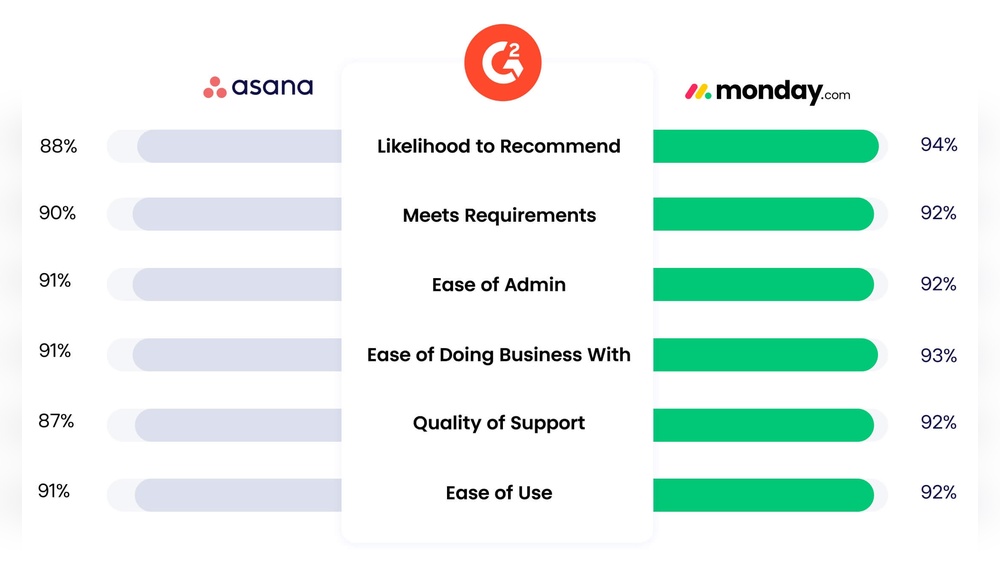
Used by over 120,000 organizations. Trusted by companies like Airbnb, Uber, and NASA. On G2, Asana scores 4.3/5 based on 8,500+ reviews. Users praise its simplicity and flexibility but mention limited reporting.
- Monday.com:
Used by over 150,000 organizations. Customers include Adobe, Universal Music, and Discovery. On G2, Monday.com scores 4.7/5 from 6,000+ reviews. Users love its visual design and automation, but some mention confusion with too many options.
Both platforms are leaders in their field, but Monday. com is growing slightly faster.
Pros And Cons Summary
Here’s a quick summary to help you decide.
Asana Pros
- Simple, clean interface
- Generous free plan for small teams
- Flexible task management
- Good for startups and agencies
- Strong integrations with productivity tools
Asana Cons
- Reporting is less advanced
- Automation is limited compared to Monday.com
- Less visual and customizable
- Free plan lacks timeline and advanced features
Monday.com Pros
- Highly visual, customizable boards
- Powerful automation and integrations
- Advanced reporting and dashboards
- Good for sales, CRM, and complex workflows
- Strong security and compliance
Monday.com Cons
- Free plan limited to 2 users
- Automation actions are capped
- Can feel overwhelming for beginners
- Costs can rise quickly with extra features
Key Differences At A Glance
Here’s a final comparison table for the main differences.
| Feature | Asana | Monday.com |
|---|---|---|
| Free Plan | Up to 15 users | Up to 2 users |
| Customization | Limited | Very flexible |
| Automation | Basic | Advanced |
| Reporting | Simple | Advanced |
| Integrations | Good | Extensive |
| Security | SOC 2 | ISO, HIPAA, GDPR |
| Support | Email, chat | Email, phone |
| Visual Design | Minimal | Colorful |
| Pricing | Higher | Lower (but automation caps) |

Credit: paperform.co
How To Choose: Practical Guidance
Picking the right tool depends on your team’s size, style, and needs. Here’s how to decide:
- If you want simple, list-based task management and a generous free plan, choose Asana.
- If you need advanced automation, custom boards, and visual dashboards, choose Monday.com.
- If security and compliance are important (healthcare, finance), Monday.com is the safer bet.
- If your team is small and cost-sensitive, Asana’s free plan is better.
- If you plan to scale quickly or use complex workflows, Monday.com offers more flexibility.
Don’t forget to try both platforms. Asana and Monday. com offer free trials and templates. Test them with your team to see which feels more natural.
A final tip: Project management tools are only as good as your process. Spend time setting up workflows, training your team, and using features like automation and reporting. Many teams buy expensive tools but don’t use them fully. Start simple, then add complexity as you grow.
Frequently Asked Questions
What Is The Main Difference Between Asana And Monday.com?
The main difference is customization and automation. Monday.com lets you build custom boards and automate workflows easily. Asana focuses on simple task lists with less customization. Monday.com is more visual, while Asana is more minimal and straightforward.
Which Platform Is Better For Small Teams?
Asana is better for small teams because its free plan supports up to 15 users. Monday.com’s free plan only works for 2 users, so small groups may need to pay early.
Can I Use Asana Or Monday.com For Sales And Crm?
Monday.com is stronger for sales and CRM. You can build custom pipelines, track deals, and integrate with sales tools like HubSpot and Salesforce. Asana can be used for sales, but it’s less flexible for CRM workflows.
Which Tool Has Better Automation?
Monday.com has better automation. You can build complex workflows with “if this, then that” logic. Asana offers basic automation rules, but they are limited compared to Monday.com.
Are Asana And Monday.com Secure?
Both platforms are secure. Monday.com offers more compliance certifications, like ISO and HIPAA, which matters for healthcare and finance. Asana is SOC 2 certified and GDPR compliant.

Credit: www.projectmanagertemplate.com
Final Thoughts
Choosing between Asana and Monday. com isn’t easy. Both are powerful, popular project management tools. Asana is simple, clear, and great for small teams. Monday. com is highly visual and customizable, with advanced automation and reporting. Consider your team’s size, workflow, and budget.
Try both platforms, and use the features that fit your work style.
Project management is about more than software. The right tool supports your team, keeps projects on track, and helps you reach your goals. If you want more details, check the official Monday.com documentation at Monday.com Docs.


About author









Add comment