
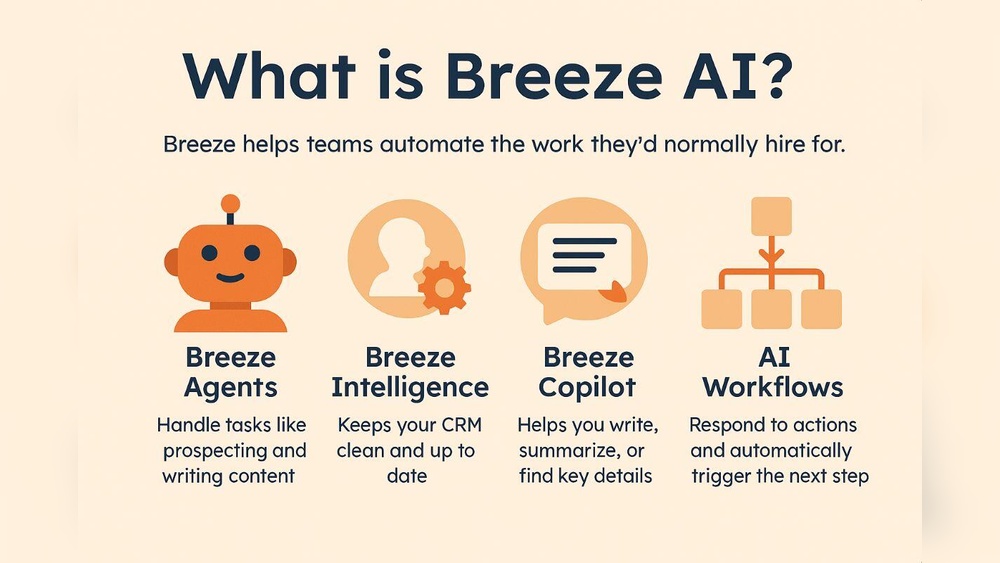
Hubspot Breeze AI Features Explained: Unlocking Smart Automation
Hubspot Breeze Ai Features Explained
HubSpot has always been a leader in marketing and sales technology. With the launch of Breeze AI, HubSpot has taken a bold step into advanced automation and intelligent workflows. Breeze AI is not just another chatbot or automation tool. It’s a deep integration of artificial intelligence into HubSpot’s platform, designed to make marketing, sales, and customer service smarter and faster.
Many businesses struggle to use AI effectively. They find it too complex, expensive, or disconnected from their daily tools. HubSpot Breeze AI changes this by offering easy-to-use features, built right into the familiar HubSpot interface. It helps teams save time, improve content quality, and make better decisions using real data.
This article explains the main features of HubSpot Breeze AI, how they work, and how they can help your business grow. You’ll learn about smart content creation, automated workflows, real-time analytics, and more. Whether you’re new to HubSpot or an experienced user, understanding Breeze AI will help you get ahead in today’s digital market.
What Is Hubspot Breeze Ai?
Breeze AI is HubSpot’s advanced artificial intelligence suite. It combines machine learning, natural language processing, and automation to improve marketing, sales, and service. The goal is simple: help businesses work smarter, not harder.
Unlike standalone AI tools, Breeze AI is fully integrated with HubSpot. This means you don’t have to switch between platforms or deal with complicated setups. Everything happens inside your HubSpot account, making AI accessible to everyone.
Core Technologies
Breeze AI uses several technologies:
- Machine Learning: Learns from your data to suggest actions and improve over time.
- Natural Language Processing (NLP): Understands text and speech, making content creation and customer communication easier.
- Predictive Analytics: Helps forecast outcomes, like which leads are most likely to convert.
These technologies work together to automate tasks, generate content, analyze trends, and personalize user experiences.
Key Breeze Ai Features
Breeze AI offers a wide range of features. Here are the main ones that impact marketing, sales, and customer service.
Smart Content Creation
Creating good content takes time and skill. Breeze AI makes this process easier by generating, editing, and improving content automatically.
Ai-powered Blog Writer
The blog writer uses NLP to create articles based on your topic ideas or keywords. You simply enter a subject, and Breeze AI generates a draft. It can suggest headlines, structure articles, and even add relevant images.
Example: A marketing manager types “Email marketing tips for small businesses.” Breeze AI produces a full blog post with practical advice and statistics. The manager reviews and edits the draft, saving hours.
Automated Email Drafts
Breeze AI also writes email drafts for campaigns, follow-ups, and newsletters. It customizes messages based on your audience and campaign goals.
Non-obvious insight: Breeze AI can analyze previous email performance and adjust tone or style to match what gets the best results.
Content Quality Enhancer
Beyond writing, Breeze AI reviews existing content for grammar, clarity, and engagement. It highlights weak areas and suggests improvements. This is especially useful for non-native English speakers, helping them write more clearly.
Personalized Marketing Automation
Breeze AI takes marketing automation to a new level. It doesn’t just trigger actions—it predicts what will work best and adapts in real-time.
Smart Segmentation
Breeze AI can group contacts based on behavior, interests, and predicted needs. It uses data from website visits, email opens, purchases, and more.
Example: It finds that users who visit your pricing page twice in a week are 30% more likely to buy. You can create a special offer for this segment automatically.
Dynamic Workflow Builder
Workflows are automated sequences of actions, like sending emails or assigning tasks. Breeze AI builds these workflows based on your goals. It suggests the best steps and timing, and adapts if results change.
Non-obvious insight: Breeze AI can pause or redirect workflows if it detects a negative response, like too many unsubscribes. This prevents campaigns from hurting your brand.
Predictive Lead Scoring
Breeze AI scores leads based on their likelihood to convert. It considers past actions, demographics, and engagement. The scores update automatically as new data comes in.
Practical tip: Sales teams can focus on high-scoring leads, increasing efficiency and closing rates.
Real-time Analytics And Reporting
Knowing what works is key to growth. Breeze AI offers real-time analytics, so you can see results as they happen.
Advanced Dashboard
The dashboard shows key metrics, like website visits, email opens, and sales. It uses AI to highlight important trends and suggest actions.
Automated Performance Insights
Breeze AI explains why certain campaigns succeed or fail. It looks for patterns, such as which subject lines get the most opens, or which landing pages convert best.
Example: If your webinar sign-ups drop, Breeze AI might show that the registration page loads slowly for mobile users.
Forecasting Tools
Breeze AI predicts future results based on historical data. This helps you plan budgets, set targets, and adjust strategies.
Non-obvious insight: Forecasts are updated live, so you can respond to changes quickly, like sudden drops in traffic.
Ai-powered Chatbots And Customer Service
Customer service teams can use Breeze AI to answer questions, solve problems, and build relationships.
Smart Chatbots
Breeze AI chatbots understand natural language. They answer common questions, guide users, and collect feedback. If a question is too complex, the bot passes it to a human.
Example: A customer asks about shipping times. The bot checks the order and replies instantly.
Automated Ticket Routing
When customers submit support tickets, Breeze AI analyzes the issue and sends it to the right team member. It considers urgency, topic, and past interactions.
Practical tip: This reduces wait times and helps solve problems faster.
Sentiment Analysis
Breeze AI reads customer messages and detects mood—happy, angry, confused. It flags negative conversations, so managers can step in before problems grow.
Non-obvious insight: Sentiment analysis works in multiple languages, helping global teams.
Ai Recommendations For Sales Teams
Sales teams need to know which prospects are ready to buy, and what to say. Breeze AI helps by offering intelligent recommendations.
Deal Prediction
Breeze AI predicts which deals are most likely to close. It considers communication history, deal size, and engagement.
Email Timing Suggestions
Breeze AI suggests the best time to send sales emails, based on past open rates and customer activity.
Example: It finds that one client opens emails at 9 AM, so it recommends sending messages at that time.
Conversation Coaching
Breeze AI reviews sales calls and emails, suggesting ways to improve. It highlights strong points and areas to fix.
Practical tip: Sales reps can use these insights to adjust their approach and close more deals.
Credit: www.onthefuze.com
Breeze Ai Vs. Other Ai Tools
Many businesses wonder how Breeze AI compares to other AI platforms. Here’s a clear comparison, focusing on usability, integration, and features.
| Feature | HubSpot Breeze AI | Competitor AI Tool | Standalone AI Platform |
|---|---|---|---|
| Integration | Built-in with HubSpot | Usually separate | Needs manual setup |
| Ease of Use | Simple, user-friendly | Moderate | Complex |
| Content Creation | Blog, email, web | Email only | Customizable |
| Analytics | Real-time, explained | Basic | Advanced, but technical |
| Pricing | Included in HubSpot plans | Extra fee | High cost |
Non-obvious insight: Breeze AI’s full integration means you don’t need extra passwords, training, or data transfers. This saves time and lowers risk.
How To Use Breeze Ai In Hubspot
Getting started with Breeze AI is easy. Here’s a step-by-step guide for key features.
Activating Breeze Ai
- Log in to your HubSpot account.
- Go to “Settings” and select “AI Tools.”
- Click “Activate Breeze AI.”
- Choose which features you want to enable (content, automation, analytics, chatbots).
Tip: Start with one feature, like content creation, then expand as you learn.
Creating Ai Content
- Go to “Content” and select “Create with AI.”
- Enter your topic or keywords.
- Choose article, email, or social post.
- Review the draft, edit if needed, and publish.
Practical tip: Use the “Improve Content” tool to check grammar and clarity before publishing.
Building Automated Workflows
- Open “Automation” and select “AI Workflow Builder.”
- Set your goal (e.g., “Nurture leads”).
- Breeze AI suggests steps and timing.
- Customize as needed, and launch.
Example: For lead nurturing, Breeze AI might suggest sending three emails over two weeks, based on your past campaign data.
Analyzing Results
- Go to “Reports” and select “AI Analytics.”
- View real-time metrics and AI insights.
- Adjust campaigns based on suggestions.
Non-obvious insight: You can set alerts for key metrics—Breeze AI will notify you if something changes, like a sudden drop in open rates.
Improving Customer Service
- Open “Service” and select “AI Chatbot.”
- Set up bot scripts for common questions.
- Enable sentiment analysis and ticket routing.
- Monitor conversations and review AI suggestions.
Tip: Train your bot with real customer questions for better results.
Breeze Ai For Different Business Sizes
Breeze AI suits small businesses, startups, and large companies. Here’s how it adapts to each.
Small Businesses
- Simple setup, no IT team needed
- Helps create professional content and automate tasks
- Affordable, included in most HubSpot plans
Example: A bakery uses Breeze AI to write weekly newsletters and answer customer questions online.
Startups
- Fast scaling, adapts as needs grow
- Focuses on lead scoring and automation
- Reduces manual work, freeing time for innovation
Practical tip: Startups can use Breeze AI to test marketing ideas quickly, without hiring extra staff.
Large Companies
- Handles high volumes of data and contacts
- Advanced analytics and forecasting
- Supports global teams with multilingual tools
Non-obvious insight: Large firms can use Breeze AI to analyze thousands of customer messages daily, finding trends and weak points.
Data Privacy And Security
AI tools often raise privacy concerns. HubSpot takes security seriously. Breeze AI follows strict rules to protect data.
Encryption
All data handled by Breeze AI is encrypted. This means information is safe from hackers and leaks.
User Control
Admins decide which features to enable. You can limit AI access to certain teams or data types.
Compliance
Breeze AI meets major standards, like GDPR and CCPA. This is important for businesses working in Europe or California.
Practical tip: Review your privacy settings regularly, especially when adding new AI features.

Credit: resolve247.ai
Real Examples Of Breeze Ai In Action
Seeing Breeze AI in real use helps understand its power.
Marketing Campaigns
A software company used Breeze AI to generate blog posts and emails. Campaign engagement rose by 22%, and content creation time dropped by 70%.
Sales Process
A real estate agency used lead scoring and deal prediction. Agents focused on hot leads, closing deals 30% faster.
Customer Service
An online retailer used chatbots and sentiment analysis. Customer satisfaction improved, and response times fell from hours to minutes.
Non-obvious insight: Breeze AI also helped the retailer spot negative trends early, reducing complaints.
Common Challenges And Solutions
While Breeze AI is easy to use, some issues can arise.
Too Much Automation
If you automate everything, customer interactions may feel cold. Always review AI-generated content and workflows.
Practical tip: Mix AI with human touches, like personal notes or custom offers.
Data Quality
AI depends on good data. If your CRM has outdated or wrong info, Breeze AI’s suggestions may be off.
Tip: Clean your contact lists and update records regularly.
Training And Adoption
Some staff may resist AI, fearing job loss or complexity. Offer training and show how Breeze AI saves time, not replaces jobs.
Non-obvious insight: Start with simple features, then expand as confidence grows.
Breeze Ai Pricing And Plans
Breeze AI is included in most HubSpot plans. Pricing varies by feature and usage.
| Plan | Breeze AI Features | Monthly Price |
|---|---|---|
| Starter | Basic content, simple workflows | $50 |
| Professional | Full content suite, lead scoring, analytics | $200 |
| Enterprise | All features, advanced reporting, global support | $800 |
Tip: Compare plans based on your team size and needs. Upgrading unlocks more AI power.
For official pricing details and updates, see the HubSpot Pricing page.
Breeze Ai Roadmap And Future
HubSpot plans to expand Breeze AI with new features:
- Deeper integration with social media platforms
- Advanced video content creation
- More languages for global teams
- AI-powered competitor analysis
Non-obvious insight: Early users can suggest features and join beta tests, helping shape the future of Breeze AI.

Credit: www.cxtoday.com
Frequently Asked Questions
What Is Hubspot Breeze Ai?
Breeze AI is HubSpot’s built-in artificial intelligence suite. It helps businesses automate tasks, create content, analyze data, and improve customer service using advanced machine learning and natural language processing.
How Is Breeze Ai Different From Other Ai Tools?
Breeze AI is fully integrated with HubSpot. This means it works inside your regular HubSpot account, with no extra setup. It’s easier to use and connects all your marketing, sales, and service data for better results.
Is Breeze Ai Safe For My Data?
Yes. HubSpot uses strong encryption and follows privacy laws like GDPR. You control which features are enabled and who can use them. For more details, check HubSpot’s security policies.
Can I Use Breeze Ai For Multiple Languages?
Breeze AI supports several languages for content creation and sentiment analysis. It’s useful for global businesses who need to reach customers in different countries.
How Much Does Breeze Ai Cost?
Breeze AI is included in most HubSpot plans. Basic features come with the Starter plan, while advanced tools are part of Professional and Enterprise plans. Prices start at $50 per month and go up based on features.
Final Thoughts
HubSpot Breeze AI is a powerful tool for modern businesses. It brings advanced artificial intelligence to marketing, sales, and customer service—without the usual complexity. Features like smart content creation, predictive analytics, and AI chatbots help teams work faster and smarter.
The real value of Breeze AI is its integration and ease of use. You don’t need a technical team or extra software. Everything happens inside HubSpot, making AI accessible to everyone. As HubSpot adds more features and languages, Breeze AI will become even more useful for businesses of all sizes.
If you want to boost productivity, improve customer experiences, and stay ahead in a fast-moving market, learning and using Breeze AI is a smart move. Start with simple tools, grow your skills, and let AI help your business reach its goals.


About author









Add comment