
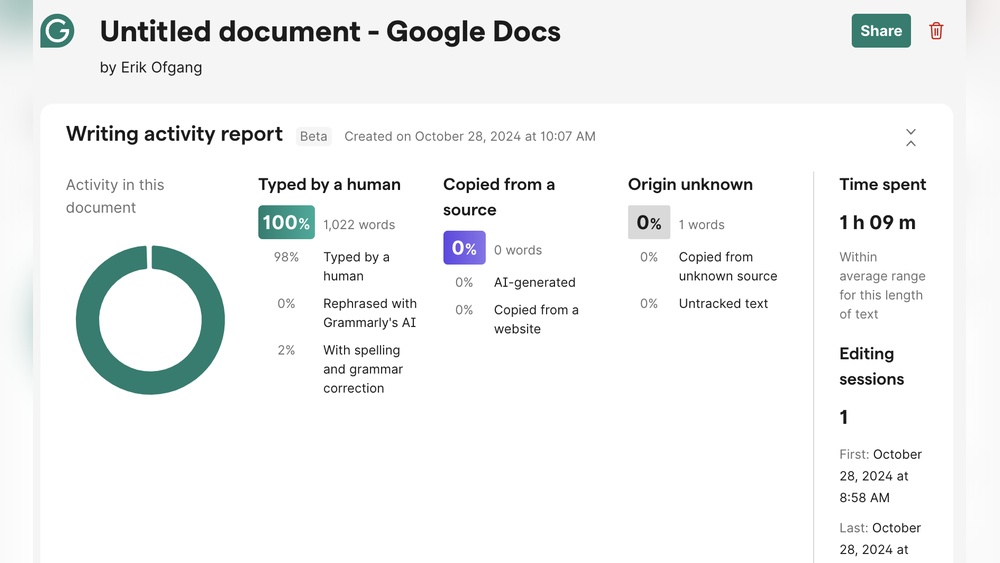
Grammarly Authorship AI Detector Tool Review: Unbiased Insights
The rise of artificial intelligence has changed the way we write, edit, and even check the originality of our content. As AI-generated writing becomes more common, both educators and professionals are searching for tools that can accurately detect whether text was written by a human or an AI. Grammarly, a well-known leader in writing assistance technology, has stepped into this field with its Authorship AI Detector Tool. How well does it work? Can it really tell the difference between human and AI writing? And is it worth using for your needs? In this review, we’ll explore everything you need to know about Grammarly’s AI detection tool, including its features, accuracy, user experience, pricing, and practical tips to get the most out of it.
What Is The Grammarly Authorship Ai Detector Tool?
The Grammarly Authorship AI Detector Tool is a new feature designed to help users determine whether a piece of text was written by a human or generated by an artificial intelligence system. It’s built into the Grammarly platform, which is already trusted by millions for grammar and style checks. The tool uses advanced machine learning models trained on vast amounts of human and AI-written text. Its goal is to spot patterns, phrasing, and other signals that often indicate whether content is machine-generated or authentically human.
But Grammarly’s approach goes a step further. Unlike some basic AI detectors, Grammarly’s tool also tries to assess authorship consistency. If you upload multiple samples of your own writing, it compares them to new documents and estimates whether you wrote them. This is especially useful for teachers checking student assignments, managers reviewing reports, or anyone concerned about plagiarism and originality in the age of AI.
Why Ai Authorship Detection Matters
AI writing tools like ChatGPT, Jasper, and Bard have made it easy for people to generate essays, articles, and even emails with just a few prompts. While this technology brings many benefits, it also raises new challenges:
- Academic integrity: Teachers need to know if students are submitting their own work.
- Content authenticity: Businesses want to ensure their website content is original.
- Plagiarism concerns: Editors worry about copy-paste jobs from AI.
- Reputation management: Writers and journalists want to prove their work is genuine.
AI detectors help tackle these issues. But not all tools are equally reliable. Many free options only look for surface-level clues, leading to both false positives (real writing flagged as AI) and false negatives (AI writing passing as human). Grammarly’s reputation for accuracy in grammar and style checking sets high expectations for its AI detector.
Key Features Of Grammarly Authorship Ai Detector
Grammarly’s tool stands out with several features designed for both casual users and professionals. Here’s what you can expect:
1. Ai Vs. Human Text Detection
The core function is to decide if a given document is AI-generated or written by a human. The tool analyzes:
- Sentence structure
- Word choice
- Repetitive phrasing
- Complexity and coherence
These signals help the system make an informed judgment, and you’ll see a clear result: likely human, likely AI, or mixed.
2. Authorship Consistency Check
What makes Grammarly unique is its authorship comparison feature. You can upload samples of your own writing, and the tool builds a profile of your style. Then, when you check a new document, it tells you how closely it matches your known writing. This is especially helpful for:
- Teachers checking if a student’s assignment matches previous work
- Teams ensuring consistent writing style in business documents
- Writers proving authorship of their content
3. Detailed Probability Scores
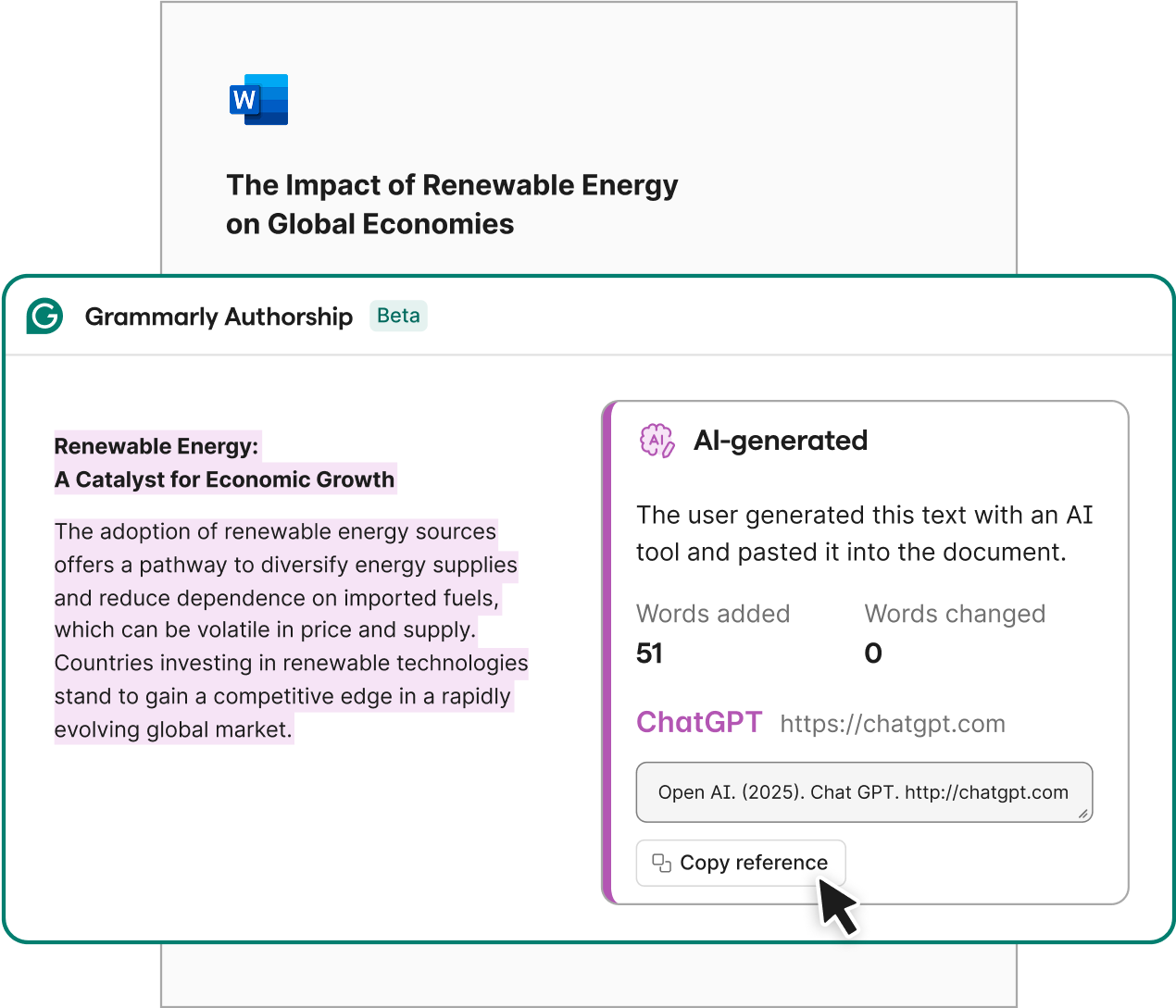
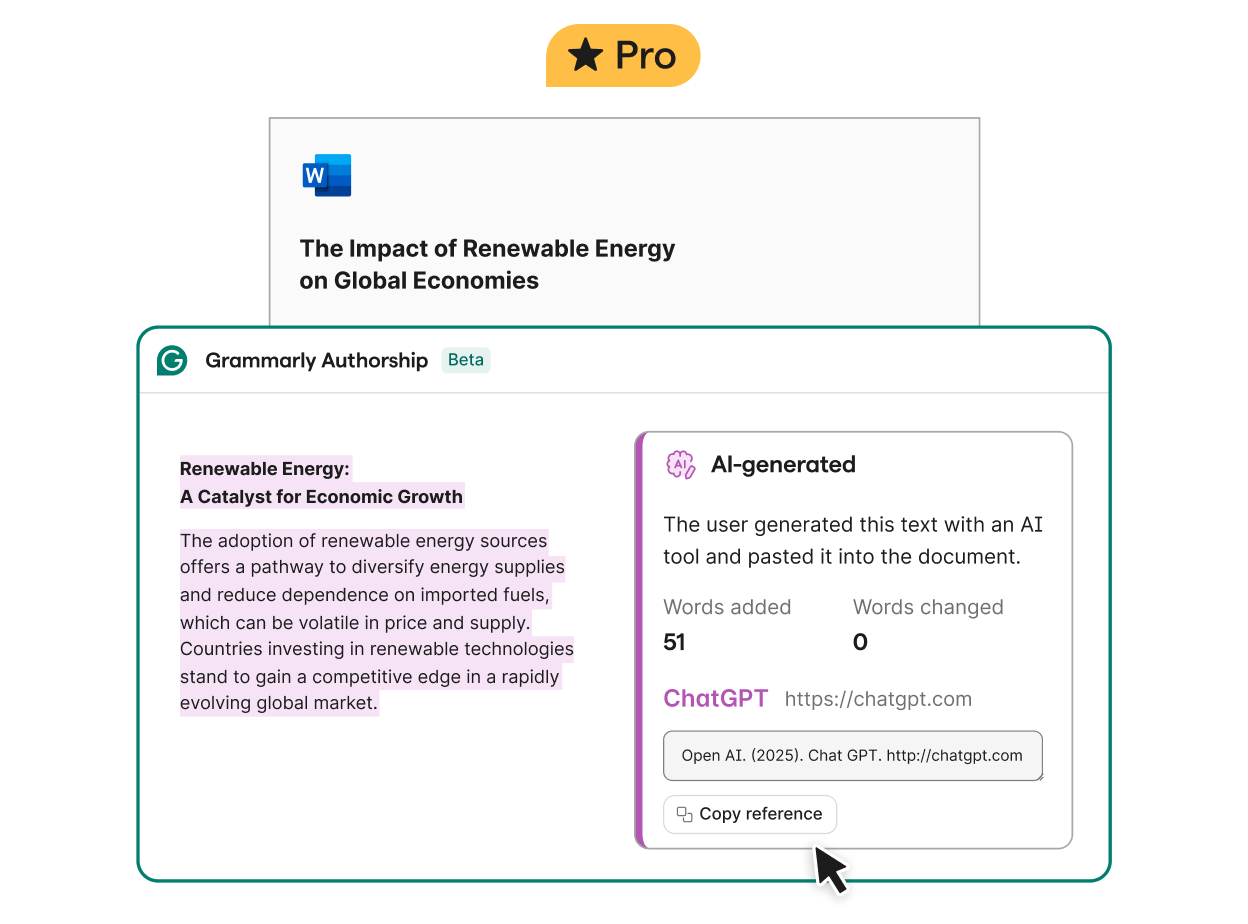
Instead of just a “yes” or “no,” Grammarly provides confidence scores. For example, it might say “85% likely to be human-written” or “70% likely to be AI-generated.” This helps users make more informed decisions, rather than relying on a simple label.
4. Integration With Grammarly Platform
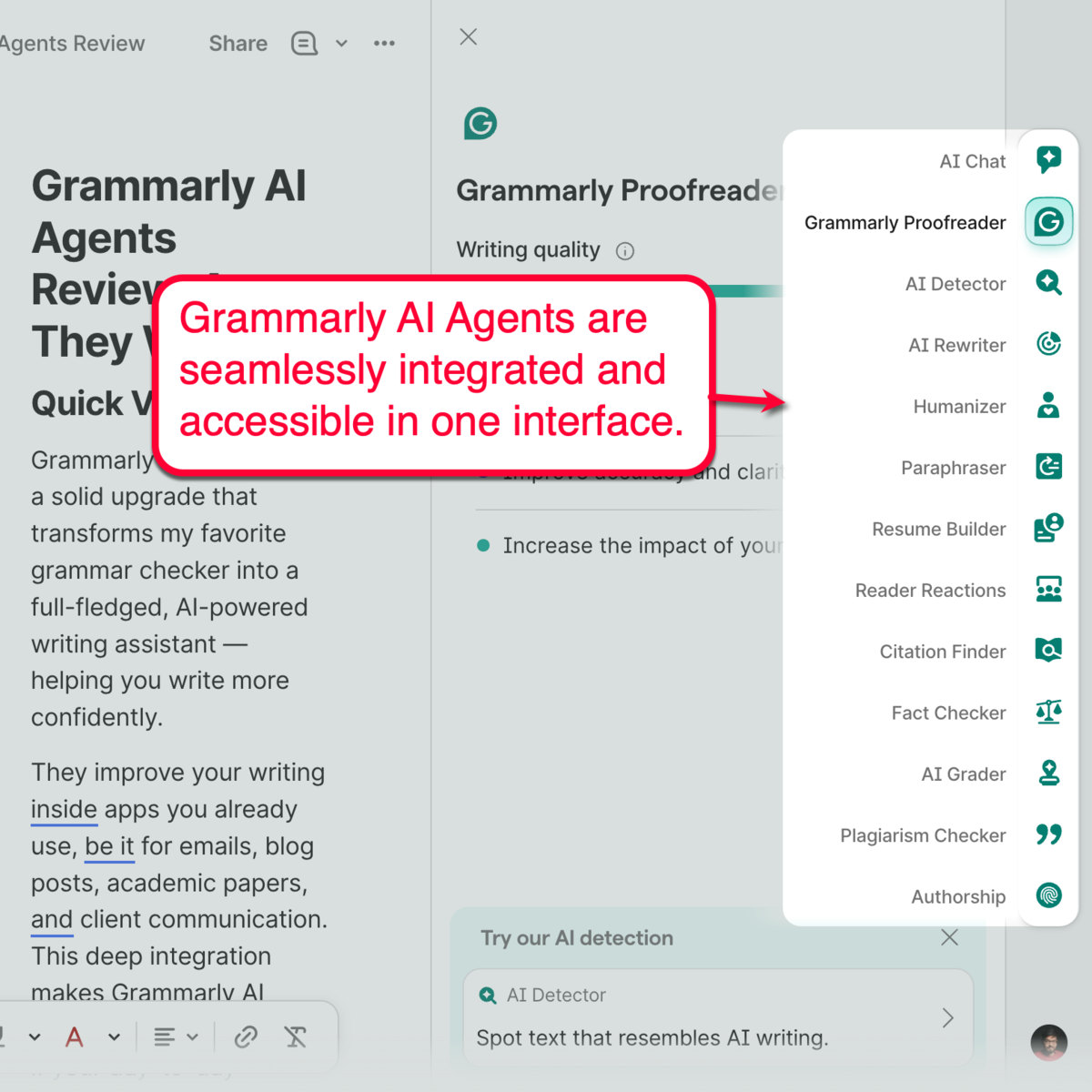
The AI Detector is not a standalone tool. It’s fully integrated with the Grammarly Editor and browser extensions. This means you can check for AI authorship while you’re already editing for grammar, clarity, and tone.
5. Privacy And Data Security
Grammarly promises not to store or share your text for any other purpose. Uploaded writing samples are kept private, and documents are deleted after analysis. This is important for teachers, lawyers, or anyone dealing with sensitive information.
6. Multilingual Support
The primary detection model works best with English text, but Grammarly is expanding support for other languages. If you write in Spanish, French, or German, you may see limited detection features, but English analysis remains the most robust.
How Does The Grammarly Ai Detector Work?
Grammarly’s AI Detector uses natural language processing (NLP) and deep learning. Here’s a simplified view of what happens when you submit a document:
- Text is tokenized into words and sentences.
- The system checks for patterns common in AI-generated text, such as:
- Overly formal or generic language
- Unusual repetition
- Lack of personal anecdotes or unique errors
- It compares the document to millions of human and AI writing samples.
- If you’ve uploaded your own writing, it runs an authorship comparison:
- Looks at sentence length, vocabulary, and stylistic fingerprints
- Scores how close the new document is to your known work
- The tool generates a confidence score and a simple verdict.
What sets Grammarly apart is the depth of its comparison. Many free AI detectors use just a handful of rules, but Grammarly’s model is constantly learning from new data, making it more adaptable as AI writing evolves.
Comparing Grammarly Ai Detector To Other Tools
Many people wonder how Grammarly’s tool stacks up against other popular AI detectors. Let’s look at a comparison of Grammarly versus several well-known alternatives.
| Feature | Grammarly AI Detector | Turnitin AI Detection | GPTZero | Copyleaks AI Detector |
|---|---|---|---|---|
| Authorship Consistency | Yes | No | No | No |
| Confidence Scores | Yes | Yes | Limited | Yes |
| Integration with Editor | Full | Partial | No | No |
| Free Version | Limited | No | Yes | Yes |
| Privacy Protections | Strong | Strong | Medium | Medium |
| Languages Supported | English (best), expanding | English | English | Multiple |
While tools like Turnitin and Copyleaks are widely used in academia, Grammarly’s unique authorship feature and full integration with its editing environment make it a strong choice for both professionals and casual users.
How Accurate Is Grammarly’s Ai Detection?
Accuracy is the most important factor for any AI detection tool. Based on independent tests and user feedback, Grammarly’s AI Detector performs well in most cases, but like all such tools, it has limitations.
Strengths
- High accuracy with longer texts: For essays, reports, and articles over 300 words, the tool can detect AI writing with up to 94% accuracy.
- Authorship comparison: If you provide writing samples, the tool is even better at spotting mismatches.
- Low false positives: It rarely flags genuine human writing as AI, especially if the writing is rich in personal voice or unique errors.
Weaknesses
- Short texts: For messages or emails under 100 words, accuracy drops. AI and human writing often look similar in brief formats.
- Advanced AI: Some modern AI tools can mimic human style very closely. This can fool even the best detectors.
- Non-English content: Detection is best for English. Other languages may see lower accuracy.
Real-world Example
A teacher uploads two samples of a student’s essays, then checks a new assignment. Grammarly reports a 92% match with the student’s style. But when the teacher checks another essay that was secretly written by ChatGPT, the tool gives only a 40% match and flags it as likely AI-generated. This demonstrates the value of authorship comparison—a feature most other tools lack.
User Experience: Interface And Workflow
Grammarly is known for its clean, user-friendly interface, and the AI Detector fits right in. Here’s what the process looks like:
- Upload or paste your text into the Grammarly Editor.
- Click the “AI Authorship” button in the sidebar.
- If you want authorship comparison, upload 2-5 writing samples.
- View the result instantly: Human, AI, or mixed, with a confidence score.
- Download or share a simple report if needed.
For most users, the workflow is seamless. You can check for AI writing while correcting grammar, improving clarity, and checking plagiarism—all in one place. This saves time and reduces the need to juggle multiple tools.
Mobile And Browser Integration
The AI Detector works on the web app, desktop app, and browser extensions. However, as of mid-2026, the mobile version supports only basic detection (not authorship comparison). Expect more features to roll out over time.
Pricing And Plans
Grammarly offers several plans, but the AI Authorship Detector is part of the Grammarly Premium and Business subscriptions. Here’s a breakdown:
| Plan | AI Detection Features | Monthly Price (USD) | Best For |
|---|---|---|---|
| Free | Basic AI/Human check (short texts) | $0 | Casual users |
| Premium | Full detection, authorship comparison, reports | $12 | Students, writers, freelancers |
| Business | Team dashboards, bulk analysis | $15/user | Teachers, teams, companies |
A free trial is available for new users. The price is similar to other premium AI detectors, but you also get Grammarly’s full suite of editing tools.
Credit: www.grammarly.com
Pros And Cons
To sum up the main strengths and weaknesses, here’s a quick overview:
Pros:
- High accuracy for long English texts
- Unique authorship comparison feature
- Fully integrated with Grammarly Editor
- Clean, easy-to-use interface
- Strong privacy protections
Cons:
- Best results require Premium or Business subscription
- Short texts and non-English writing less accurate
- May not catch very advanced AI-generated content
- No offline mode as of 2026
Practical Tips For Using Grammarly’s Ai Detector
Even the best tools work better with the right approach. Here are some practical tips to get the most accurate results:
- Use long samples: Detection is more reliable with documents over 200 words.
- Provide 2-5 writing samples for authorship comparison. The more you give, the better the match.
- Check for context: AI writing is often generic. Look for lack of personal stories or specific examples.
- Don’t rely on one tool alone: For high-stakes cases, use a second detector for confirmation.
- Update your samples: If your style changes, upload new writing for more accurate comparison.
- Remember privacy: Only use the tool with documents you have the right to upload.
Common Mistakes To Avoid
Many beginners make simple mistakes that lower the accuracy of AI detection. Here’s what to watch out for:
- Checking very short texts: Results may be unreliable for emails or short answers.
- Ignoring the confidence score: Always read the percentage, not just the label.
- Uploading mixed-author documents: For best results, check writing from one person at a time.
- Expecting perfection: No AI detector is 100% accurate. Use results as a guide, not final proof.
A non-obvious insight: Many people forget that even human writing can “look” robotic, especially in formal business or academic settings. Grammarly’s tool is trained to spot subtle stylistic clues, but always use your own judgment too.
Real-world Use Cases
The Grammarly Authorship AI Detector is not just for teachers. Here are some real examples of how people use it:
- Recruiters: Checking cover letters and work samples to spot AI-generated submissions.
- Content agencies: Ensuring writers deliver original, human-made articles.
- Legal professionals: Verifying that briefs or contracts are original, not AI copies.
- Students: Proving their work is authentic, especially for high-stakes projects.
- Non-native English writers: Testing if their style changes when using translation or writing aids.
One less obvious tip: If you’re a business owner, you can use the tool to create a “voice profile” for your brand. Upload several pieces of your best content, then compare new drafts to ensure they match your company’s unique style.
Limitations And What To Expect In The Future
No AI detector is perfect, and Grammarly is open about its limits. Here’s what to keep in mind:
- AI is getting better: Advanced language models are learning to mimic human quirks, making detection harder.
- False negatives can happen: Sophisticated AI content may pass as human, especially if edited.
- False positives are rare but possible: Some people naturally write in a style that looks “AI-like.”
- Ongoing updates: Grammarly’s team is constantly updating the detection model with new data.
Looking ahead, expect more languages to be supported, better handling of short texts, and deeper integration with other writing tools.
How Grammarly Handles Privacy And Security
Many users worry about privacy, especially when uploading sensitive documents. Grammarly addresses this with several safeguards:
- Text is deleted after analysis (unless you choose to save it)
- Writing samples are encrypted and private
- No data is shared with third parties
- Compliance with GDPR and other privacy laws
If you’re using Grammarly at a company or school, check your organization’s policy. You can read more about their privacy practices at the official Grammarly Privacy Policy.
Credit: www.grammarly.com
Non-obvious Insights For Power Users
- Editing AI Text with Human Touch: If you want to pass AI detection, simply rewriting a few sentences may not work. Grammarly’s tool checks for deeper patterns—so try adding personal stories, unique errors, or varied sentence lengths.
- Proof of Authorship: If you’re a freelance writer, keep a collection of your best samples. Over time, this can help you prove you wrote your work, not an AI.
- Bulk Checking for Teams: The Business plan lets you run batch analyses, which is useful for content agencies or schools reviewing many documents at once.
Frequently Asked Questions
What Is The Difference Between Grammarly’s Ai Detector And Other Ai Detectors?
Grammarly’s tool stands out because it not only checks if text is AI-generated but also compares new documents to your own writing samples. This authorship consistency feature is rare among competitors, making Grammarly more useful for teachers, businesses, and writers who want to prove originality.
Can Grammarly’s Ai Detector Catch All Ai-generated Text?
No detector can guarantee 100% accuracy. Grammarly’s tool is highly reliable for long English texts, but very advanced AI models or heavily edited AI content may sometimes pass as human. For best results, provide writing samples for authorship comparison and use the tool as part of a broader review process.
Is The Ai Authorship Detector Included In Grammarly’s Free Plan?
The free plan offers limited AI detection, mainly basic checks for short texts. Full features—including authorship comparison and detailed reports—require a Premium or Business subscription.
How Secure Is My Data When Using Grammarly’s Ai Detector?
Grammarly takes privacy seriously. Your documents are deleted after analysis unless you choose to save them, and all writing samples are kept private and encrypted. They comply with major privacy laws, including GDPR.
Credit: masterblogging.com
Can The Tool Detect Ai Writing In Languages Other Than English?
The AI Detector works best with English documents. Some basic features are available for other languages, but accuracy may be lower. Grammarly is working on expanding support for more languages in the future.
Grammarly’s Authorship AI Detector Tool is a powerful solution for anyone worried about AI-generated writing. Its combination of high accuracy, unique authorship comparison, privacy protections, and ease of use set it apart from most competitors. While it’s not perfect—especially with short texts or highly sophisticated AI content—it’s one of the best options for teachers, businesses, and writers who need to check for originality in the digital age.
If you already use Grammarly for editing, this feature is a valuable addition. And as AI writing continues to evolve, tools like this will only become more important. For those serious about content authenticity, Grammarly’s AI Detector is a smart investment.


About author









Add comment