
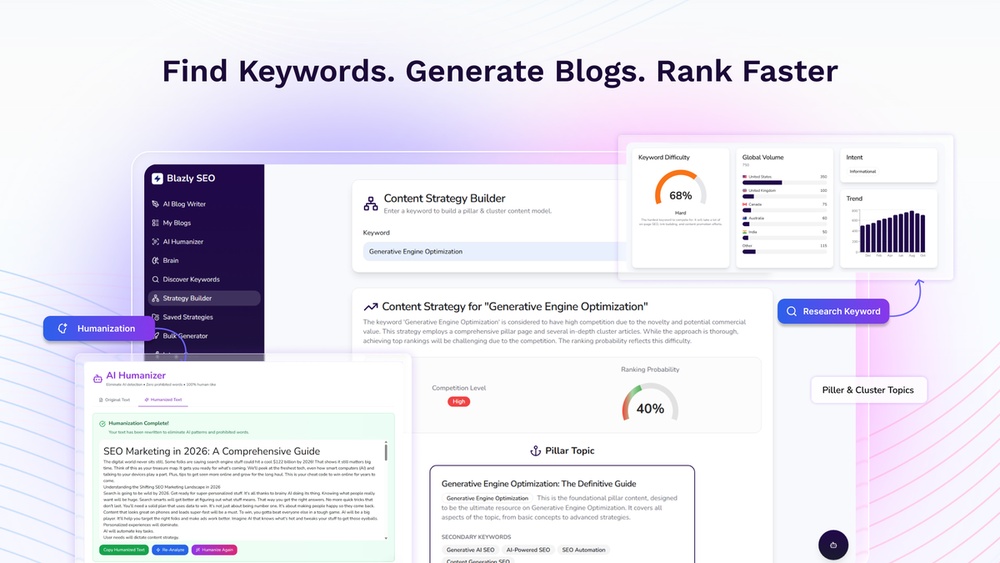
How to Rank on Google Using Blazly Geo Seo: Proven Strategies
If you run a local business or manage clients who depend on local customers, ranking high on Google is essential. But local SEO often feels confusing, especially if you try to manage multiple locations or compete with bigger brands. That’s where Blazly Geo SEO comes in. This platform promises to make local SEO smarter, faster, and more effective—even for people without technical skills.
In this article, you’ll learn exactly how to rank on Google using Blazly Geo SEO. We’ll break down what Geo SEO is, how Blazly works, and step-by-step strategies that actually move your business up in search results. You’ll see real examples, data, and practical tips that most beginners miss.
Whether you’re a business owner, marketer, or SEO specialist, you’ll gain a clear roadmap to local search success.
What Is Blazly Geo Seo?
Before jumping into tactics, it’s important to understand what Blazly Geo SEO is and why it matters for Google rankings. Blazly is an advanced local SEO platform that helps businesses improve their visibility in local search results. Unlike traditional SEO tools, Blazly focuses specifically on geo-targeted optimization—meaning it helps your business appear in search results for people in your local area.
Blazly uses a combination of automated location pages, geo-tagged content, and structured data. Instead of manually creating dozens of pages or trying to stuff city names into your website, Blazly automates much of this process. It generates optimized landing pages, injects local business schema, and adds geo-coordinates to your content. The end result: Google understands exactly where you are and what you offer, making it more likely to show your business to local searchers.
How Is Geo Seo Different From Regular Seo?
Regular SEO focuses on ranking for keywords globally or nationally, but Geo SEO is all about local intent. If someone searches for “pizza near me,” Google uses their location to show relevant results. To win these searches, your business must send clear signals about your location, service area, and relevance. Geo SEO includes:
- Local landing pages
- Google Business Profile optimization
- Location-specific keywords
- Map embeds and driving directions
- Consistent NAP (Name, Address, Phone) data
- Location schema markup
Blazly automates or simplifies all these steps, saving you time and avoiding common mistakes.
Why Google Local Rankings Matter
If you’re not convinced that local SEO deserves attention, consider this:
- Over 46% of all Google searches have local intent.
- 78% of mobile local searches result in an offline purchase within 24 hours.
- Businesses in the Google Local Pack (top three map results) get over 70% of clicks.
For most small businesses, local SEO brings in more customers than social media or paid ads. And because local search results are less competitive than national ones, the right strategies can help even new businesses rank quickly.
But here’s a key insight: Google’s local algorithm is very different from its standard one. Local results depend heavily on proximity, relevance, and prominence. Tools like Blazly Geo SEO target these factors directly.
Getting Started With Blazly Geo Seo
Blazly’s onboarding is simple, but to get the most from the platform, you need to set things up properly. Here’s how to start:
1. Create Your Blazly Account
Go to the Blazly website and sign up. You’ll need to enter your business name, address, and main website URL. The platform will prompt you to verify your business details—accuracy here is critical.
2. Connect Your Website
Blazly works best when integrated directly with your site. For WordPress, there’s a plugin. For other platforms, you can copy-paste a code snippet. This allows Blazly to generate and update location pages and inject schema markup automatically.
3. Add Locations
If you have more than one location, enter each one separately. Blazly will create unique landing pages for every address. Make sure you use the exact address format found on your Google Business Profile and other listings.
4. Choose Your Target Service Areas
You can target by city, zip code, or even neighborhood. Blazly helps you select the best areas based on search volume and competition. For example, a plumber in Dallas might target “Dallas,” “Plano,” and “Richardson. ”
5. Set Up Google Business Profile Sync
Blazly can connect to your Google Business Profile (GBP) to ensure your website and GBP stay consistent. This syncs your business hours, phone number, and categories automatically.
Building Optimized Location Pages
One of Blazly’s main features is automated location landing pages. These pages are critical for local SEO because Google wants to show users the most relevant business nearby. Here’s what makes a location page rank well:
Essential Elements Of A High-ranking Location Page
- Unique content: Each page must describe services and details specific to that location.
- NAP consistency: Full business name, address, and phone number, matching your GBP exactly.
- Local keywords: Use city and neighborhood names naturally in headings and text.
- Map embed: Show a Google Map with your exact location.
- Driving directions: Make it easy for customers to find you.
- Reviews and testimonials: Display Google reviews for trust.
- Structured data/schema: Add LocalBusiness schema for search engines.
Blazly auto-generates much of this, but it’s smart to customize and add human touch where possible.
Example: Local Landing Page Structure
Here’s how Blazly’s Dallas plumber page might look:
- H1: Plumbing Services in Dallas, TX
- Description of services unique to Dallas
- Google Map embed with office location
- Service area list: “We serve Dallas, Plano, Richardson, and nearby areas”
- Latest customer reviews from Dallas clients
- Office hours and contact info, matching Google
This approach makes it clear to Google that you’re a real, local business.
Using Geo-targeted Content For Better Rankings
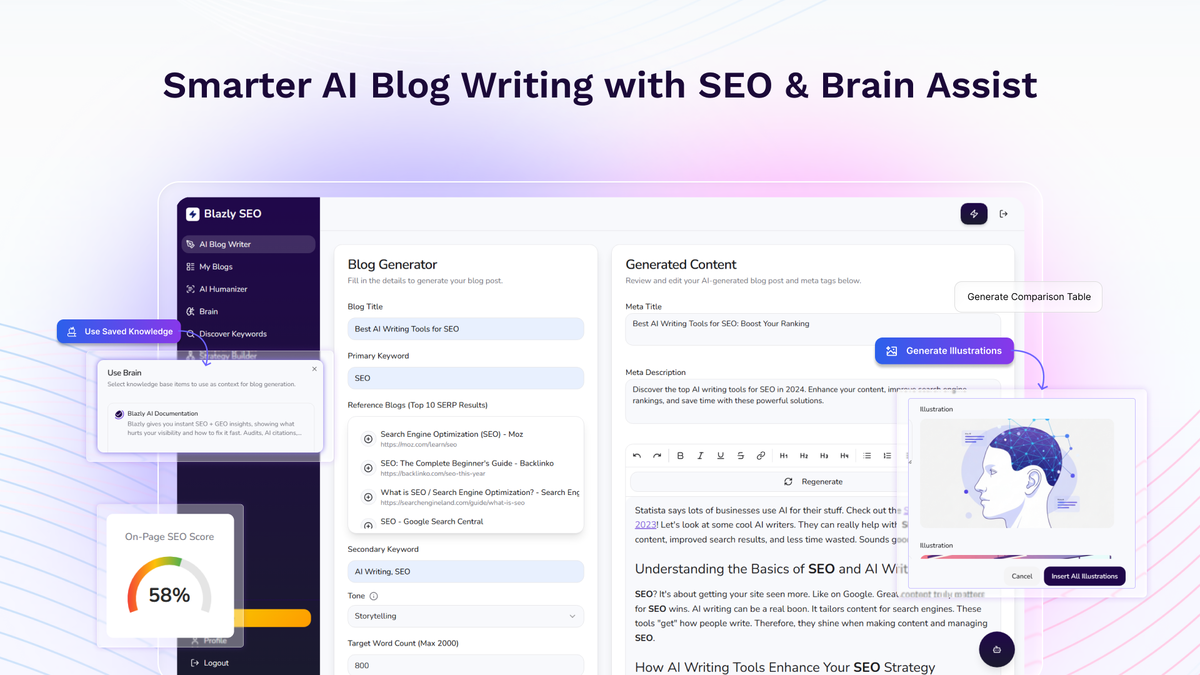
Many business owners skip this step, but geo-targeted blog posts and articles can boost your local authority. Blazly offers a content creation tool that lets you write or generate posts targeting specific neighborhoods, events, or local topics.
For example, a law firm might publish:
- “How to Choose a Divorce Lawyer in Arlington, TX”
- “Understanding Property Laws in Plano”
This content signals to Google that your business is active in these areas, not just passively listing them. Remember, Google values fresh, relevant content that answers local questions.
How Blazly Automates Geo Content
Blazly’s AI can suggest topics, generate outlines, and even write drafts. But the best results come when you add your own insights or stories. For example, mention local events you attended, charities you support, or unique challenges in your city.
Non-obvious tip: Use photos taken in your city (street views, your team at local events) and geotag them before uploading. Google can read photo metadata and use it as a local relevance signal.
Implementing Local Business Schema Markup
Schema markup is code that helps search engines understand your content. For local SEO, LocalBusiness schema is the most important type. It tells Google your business name, address, phone, opening hours, and more.
Blazly automatically adds this schema to your location pages, but it helps to know what’s included:
- @type: LocalBusiness (or a more specific subtype, like Restaurant)
- Name
- Address (street, city, state, zip)
- Telephone
- Geo (latitude and longitude)
- OpeningHours
- SameAs (links to social profiles)
This markup can earn you rich results in search (like stars, hours, or a map snippet), making your listing stand out.
Sample Localbusiness Schema (json-ld Format)
{
"@context": "https://schema.org",
"@type": "LocalBusiness",
"name": "Dallas Plumbers",
"address": {
"@type": "PostalAddress",
"streetAddress": "123 Main St",
"addressLocality": "Dallas",
"addressRegion": "TX",
"postalCode": "75201"
},
"telephone": "+1-214-555-1234",
"geo": {
"@type": "GeoCoordinates",
"latitude": "32.7767",
"longitude": "-96.7970"
},
"openingHours": "Mo-Fr 09:00-17:00"
}
Blazly handles this behind the scenes, so you don’t need to write code yourself.

Credit: www.youtube.com
Optimizing Google Business Profile With Blazly
Your Google Business Profile (formerly Google My Business) is the foundation of local SEO. Blazly helps ensure your website and GBP are in sync, but you should still optimize your profile directly:
- Use the exact same NAP details everywhere (website, GBP, directories).
- Choose the most accurate primary category (e.g., “Plumber” instead of “Home Services”).
- Add multiple photos, including exterior, interior, staff, and products.
- Respond to reviews promptly and professionally.
- Post updates or offers regularly.
A well-optimized GBP makes your business eligible for the Local Pack and map rankings.
Managing Citations And Directory Listings
Citations are mentions of your business’s name, address, and phone on other websites—think directories like Yelp, Yellow Pages, and Facebook. Google uses these to verify your business info and trustworthiness.
Blazly can audit your citations and help you correct any that are inconsistent. Here’s why this matters:
- Consistent NAP data boosts trust with Google.
- Inconsistent listings can hurt your rankings.
- More citations (from quality sites) = higher local authority.
Blazly recommends the most important directories for your industry and region, but you should also look for local business associations or chamber of commerce listings.
Popular Citation Sites For Us Businesses
| Directory | Domain Authority | Type |
|---|---|---|
| Yelp | 94 | General |
| 96 | Social | |
| Yellow Pages | 88 | General |
| Bing Places | 92 | General |
| Better Business Bureau | 91 | Trust |
Aim for at least 20–30 quality citations. Avoid spammy directories—they can do more harm than good.
Leveraging Reviews For Geo Seo
Reviews are a key local ranking factor. Google trusts what your customers say about you, especially if reviews mention your services and location. Blazly can help collect and display reviews on your site, but you should also ask customers directly.
How Reviews Affect Local Rankings
- Businesses with more reviews and higher ratings rank higher.
- Reviews with location keywords (“Best pizza in Austin!”) send strong signals.
- Recent reviews are more valuable than old ones.
Practical tip: Ask happy customers to mention the city or neighborhood in their review, but don’t script it. Google can detect fake or forced reviews.
Tracking Your Geo Seo Performance
It’s not enough to set up local SEO and hope for the best. You need to measure progress and adjust your strategy. Blazly includes a dashboard that tracks:
- Local search rankings for each location and keyword
- Google Maps visibility
- Website traffic from local searches
- Call and lead tracking from location pages
By checking these metrics weekly, you can see what’s working and spot problems early.
Example: Interpreting Ranking Data
Suppose your “Austin Plumber” page is stuck at #8 in local results. Blazly’s dashboard shows:
- Only 2 reviews in past 3 months
- Some citations missing in Austin
- Low click-through rate from maps
You know to focus on getting more local reviews and filling in those citation gaps.
Advanced Geo Seo Strategies With Blazly
Once you’ve mastered the basics, Blazly has advanced features to take your rankings even higher.
1. Multi-location Content Personalization
Blazly can tailor content for each location—not just changing the city name, but adjusting services, staff bios, photos, and offers. This makes each page truly unique and more useful for local visitors.
2. Geo-fencing And Service Area Optimization
If your business serves people at their location (like cleaning or delivery), use Blazly’s service area targeting. You can set a radius or draw polygons on a map, so only customers in your delivery zone see those pages.
3. Dynamic Map Embeds
Blazly allows you to embed interactive maps that show all your locations or service areas. Customers can find the nearest store, and Google sees even more location signals.
4. Local Event And Sponsorship Pages
If you sponsor local events, run charity drives, or host workshops, create pages for these activities. Blazly makes it easy to add event schema, which can earn you rich results in local searches.
5. Geo-tagged Image Galleries
Upload photos that include GPS coordinates (taken with a smartphone at your business). Blazly can add these to your location pages, giving Google more evidence you’re truly local.
Common Geo Seo Mistakes (and How Blazly Prevents Them)
Most local businesses make the same mistakes—often without realizing it. Here’s how Blazly helps you avoid costly errors:
Mistake 1: Using Duplicate Content For Locations
Copying the same content across pages with only the city name changed can hurt your rankings. Blazly uses unique content generation and encourages you to add location-specific details.
Mistake 2: Inconsistent Nap Data
Even a small typo in your address can confuse Google. Blazly checks all your listings and highlights inconsistencies.
Mistake 3: Ignoring Schema Markup
Many business owners skip schema because it’s technical. Blazly adds and updates LocalBusiness schema automatically.
Mistake 4: Forgetting To Update Opening Hours Or Services
Outdated info frustrates customers and lowers your trust score. Blazly syncs hours and services from your GBP, ensuring accuracy.
Mistake 5: Not Tracking Performance By Location
Without tracking, you can’t improve. Blazly’s dashboard breaks down results for each location, so you see what’s working.
Comparing Blazly Geo Seo To Other Local Seo Tools
Is Blazly the right choice for you? Here’s a quick look at how it stacks up against other popular local SEO platforms:
| Feature | Blazly Geo SEO | BrightLocal | Yext |
|---|---|---|---|
| Automated Location Pages | Yes | No | No |
| Geo-Tagged Content Creation | Yes | Partial | No |
| Schema Markup Automation | Yes | No | Yes |
| GBP Sync | Yes | Yes | Yes |
| Citation Management | Yes | Yes | Yes |
| Advanced Service Area Targeting | Yes | No | No |
| Pricing (per month) | $49+ | $29+ | $199+ |
Blazly stands out for its automation, unique content tools, and geo-targeting features. It’s ideal for businesses with multiple locations or those who want to scale local SEO quickly.
Real-world Results: Case Studies
Numbers speak louder than promises. Here are examples of businesses that improved their Google rankings with Blazly Geo SEO.
Example 1: Multi-location Dental Clinic
A dental group with five locations in Texas used Blazly to create optimized pages for each office. Within three months:
- Local Pack rankings for “dentist + city” keywords increased from #7 to #2.
- Monthly website visits rose by 48%.
- Appointment bookings doubled in two locations.
The biggest gains came from unique content and consistent NAP.
Example 2: Home Services Franchise
A cleaning franchise struggled with duplicate content and low map visibility. After switching to Blazly:
- All location pages had unique service descriptions and geo-tagged images.
- Google Maps rankings went from #12 to #3 in most markets.
- Lead volume increased by 64% over six months.
Insight: The Hidden Power Of Geo-targeted Faqs
Blazly users found that adding location-specific FAQs (like “How fast can you reach Plano?”) to each landing page improved rankings. These sections answer common customer questions and help Google match your page to voice search and long-tail queries.
Credit: appsumo.com
Step-by-step Checklist For Blazly Geo Seo Success
To help you stay on track, here’s a quick action plan for getting the most from Blazly:
- Set up your Blazly account and connect your website.
- Add all business locations, double-checking address accuracy.
- Customize each location page with unique content, photos, and FAQs.
- Sync your Google Business Profile and update categories, hours, and services.
- Build local citations and fix any inconsistencies.
- Request reviews from happy customers, focusing on each location.
- Create geo-targeted blog posts and news updates.
- Monitor your rankings and traffic for each location in Blazly’s dashboard.
- Adjust your strategy based on data (e.g., more reviews, better content).
- Repeat for every new service area or location you add.
Non-obvious tip: Don’t just focus on big cities. Suburbs and smaller towns often have less competition but high conversion rates. Blazly makes it easy to target these areas, giving you a head start.
Frequently Asked Questions
What Is Blazly Geo Seo And How Does It Help Local Businesses Rank On Google?
Blazly Geo SEO is a platform designed to boost local search visibility by automating the creation of optimized location pages, geo-targeted content, and local business schema. It helps businesses rank higher in Google’s local results by sending clear location signals, improving NAP consistency, and making it easier for customers and Google to understand where you operate.
How Long Does It Take To See Results With Blazly Geo Seo?
Most businesses see noticeable ranking improvements within 2–3 months, especially if they follow Blazly’s best practices for content, reviews, and citations. Some competitive markets may take longer, but automated updates help you stay ahead without manual work.
Can Blazly Geo Seo Work For Businesses With Only One Location?
Yes. Even single-location businesses benefit from Blazly’s automation, especially if they serve a wide area or want to target nearby neighborhoods. The platform helps create hyper-local content and ensures your site matches your Google Business Profile perfectly.
Is Blazly Geo Seo Compatible With WordPress And Other Website Platforms?
Blazly offers a WordPress plugin for easy integration. For other platforms (like Squarespace, Wix, or custom sites), you can add a code snippet or connect via API. This lets Blazly manage location pages and schema without needing a developer.
Where Can I Learn More About Best Practices In Local Seo?
For a deeper dive into local SEO strategies, visit Moz’s Local SEO Guide. You’ll find detailed tutorials, case studies, and research to build on what you’ve learned here.
Bringing It All Together
Ranking on Google locally isn’t just about luck—it’s about using the right tools and strategies. Blazly Geo SEO takes the guesswork out of local search by automating what matters most: unique location pages, consistent business info, geo-tagged content, and review management. When you combine these features with smart execution—customizing your pages, collecting real reviews, and tracking your results—you give your business a real edge.
Remember, local SEO is ongoing. Google updates its algorithms, competitors change tactics, and customer behavior shifts. But by using Blazly Geo SEO and following the steps shared here, you’ll stay visible, trusted, and ready to win more local customers.

Credit: www.youtube.com

About author









Add comment